
介绍
Legacy OrthoCamera
A port of DimasKama’s OrthoCamera to 1.8.9.
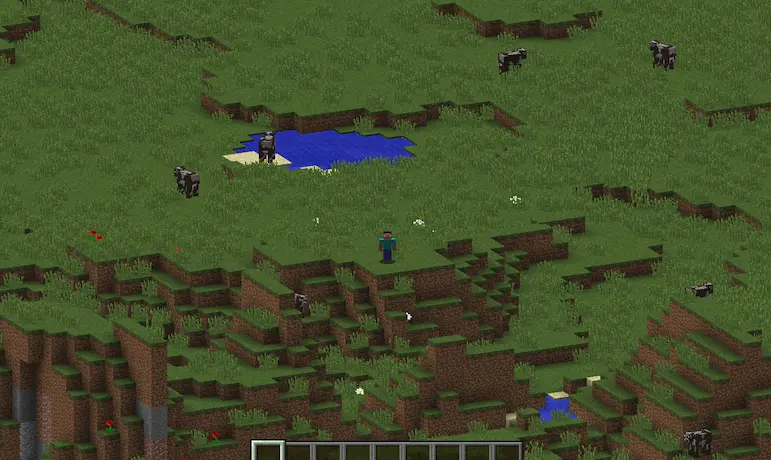
Provides an alternative camera view to visualize large areas.
Original Mod
For more details, review the original mod’s page. Many of the features presented there are also present in this port:
https://modrinth.com/mod/orthocamera
Core features of (Legacy) OrthoCamera
- A client-side Minecraft Fabric mod that adds a toggleable & configurable orthographic camera mode.
- The orthographic camera keeps everything the same scale regardless of distance.
- Highly configurable: includes a config screen (via ModMenu or hotkey) to customize various features such as scale, hotkeys, etc.
Changes
Legacy OrthoCamera implements a few notable changes:
- Through the config screen, you can now show/hide the cursor while in orthocam. This only hides the cursor in ortho, not first or third person.
- Since the clouds obfuscate a lot in earlier versions, there is a setting to disable clouds in ortho. This only hides the clouds in ortho, not first or third person.
How to build
gradlew build
Permissions
Feel free to use Legacy OrthoCamera in any mods or modpacks.
常见问题
Legacy OrthoCamera 支持哪些 Minecraft 版本?
Legacy OrthoCamera 支持 Minecraft Java 版 1.8.9。下载时注意选择和你游戏版本一致的文件。
Legacy OrthoCamera 怎么安装?
先用 PCL2 或 HMCL 启动器安装对应版本的 模组加载器,再把下载的 .jar 文件放进游戏目录的 mods 文件夹,重新启动游戏即可。开启了版本隔离的,mods 文件夹在 versions/版本名 下面。运行环境:仅客户端。
infloat 的其他作品
查看全部 →
Legacy Mouse Tweaks
A port of YaLTeR's Mouse Tweaks mod for Minecraft 1.8.9

Legacy Block Highlight
A highly customizable mod that allows the player to modify the block selection outline.

Modern Chat
Reworks the chat with various modern features and quality-of-life improvements.

Legacy Hitbox
A customizable client-side Minecraft 1.8.9 mod that renders player hitboxes, built on Legacy Fabric.
评论
登录后评论和评分