Left Click Assist
Block-breaking assist that lets players arm safe automatic mining for a held item, toggle it with left click, and track its state on the HUD.
介绍
Left Click Assist
AI usage disclaimer: This mod was developed with AI-agent assistance using this agent workflow. The project owner reviewed the work during development.
This mod lets you break blocks without holding the left mouse button the whole time.
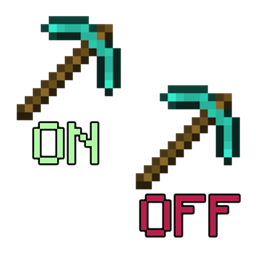
Bind the mod key in the Controls menu, hold the tool or item you want to use, and press the key once to arm the mod for that item. A small HUD component appears in the bottom-right corner with the armed item icon and an ON or OFF label. While that item is selected, left-click once to turn automatic block breaking on, and left-click again to turn it off.
The mod is focused on block breaking, not general autoclicking. Aiming at entities, air, fluids, or unbreakable blocks does not trigger automated block breaking, and manual attacks still work normally when you intentionally left-click an entity.
If you switch away from the armed item, auto click turns off. The HUD stays visible while the mod is still armed, so you can switch back to the original item and left-click again when you want to continue. Pressing the mod key again disarms it completely and hides the HUD component.
Notes
- It requires a non-empty main-hand item when you arm it.
- Automatic block breaking does not work in Creative mode.
Configuration
- The toggle key (unbound by default).
- The HUD component position and scale.
Multiplayer
This mod is client-side and does not need to be installed on the server.
Some servers may consider automatic block breaking to be cheating or otherwise against their rules. Check the rules of the server you play on.
Links
常见问题
Left Click Assist 支持哪些 Minecraft 版本?
Left Click Assist 支持 Minecraft Java 版 1.12.2,可用的加载器:Forge。下载时注意选择和你游戏版本一致的文件。
Left Click Assist 怎么安装?
先用 PCL2 或 HMCL 启动器安装对应版本的 Forge,再把下载的 .jar 文件放进游戏目录的 mods 文件夹,重新启动游戏即可。开启了版本隔离的,mods 文件夹在 versions/版本名 下面。
Mahghuuuls 的其他作品
查看全部 →
Inventory Tweaks Remove Settings Button Config
Fork of the mod Inventory Tweaks that adds a single config option to remove the "..." buttons from GUIs

TreeChopper Durability Config
Fork of MrDuchy's TreeChopper mod, it adds a single config option to reduce (or increase) the durability loss of the axe when a tree is chopped whole.

Just Another Wizardry Mana System
Replaces Electroblob’s Wizardry wand mana with a deeply configurable player mana system

CTSetBonus
CraftTweaker integration with Set Bonus mod.
评论
登录后评论和评分