
Leave This, GoBack!
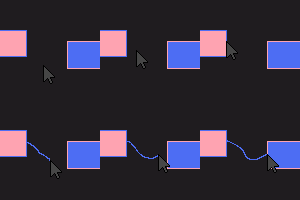
Pressing on a slot twice returns you back to the previous slot. Useful for attribute swapping / quick tool swapping / mace pvp
介绍
Leave This, GoBack!
A simple mod that lets you go back to the previous slot after clicking on the same slot twice. No more messy keyboard smashes!
FOR THE LATEST VERSION USE TUTLA CLIENT
Basic Usage
- Press 1: Switches to Hotbar Slot 1
- Press 2: Switches to Hotbar Slot 2
- Press 2 (again): Switches BACK to Hotbar Slot 1
As you see Leave This (slot), GoBack (to the previous slot)!
Chaining
- Press 1: Switches to Hotbar Slot 1
- Press 2: Switches to Hotbar Slot 2
- Press 2 (again): Switches BACK to Hotbar Slot 1
- Press 2 (again): Switches BACK to Hotbar Slot 2
- Press 2 (again): Switches BACK to Hotbar Slot 1
(repeats on and on)
What makes it so special?
-> “Chaining” can help beginners learn to attribute swap, instead of searching your keyboard for a different slot or getting used to the movement you can just- 1 -> 2 -> LEFT CLICK -> 1 -> 1 -> LEFT CLICK -> 1 -> 1 -> LEFT CLICK-> 1 -> 1 -> LEFT CLICK
(assuming you have a sword in slot 1 and mace in slot 2)
DISCLAIMER: THIS IS __NOT__ A CHEAT. IT INSTEAD MAKES SWAPPING SIMPLE. THE USER STILL HAS TO PERFORM THE ACTION
Similar Mods & Other Projects by Tutla
常见问题
Leave This, GoBack! 支持哪些 Minecraft 版本?
Leave This, GoBack! 支持 Minecraft Java 版 1.21.11–26.3,共 4 个版本,可用的加载器:Fabric。下载时注意选择和你游戏版本一致的文件。
Leave This, GoBack! 怎么安装?
先用 PCL2 或 HMCL 启动器安装对应版本的 Fabric,再把下载的 .jar 文件放进游戏目录的 mods 文件夹,重新启动游戏即可。开启了版本隔离的,mods 文件夹在 versions/版本名 下面。运行环境:仅客户端。
Tutla 的其他作品
查看全部 →
Leave Bind
LeaveBind! Lets you leave a server with a keybind

Spoofer+
🎭 Mod to hide mods & spoof your F3 menu
Tutla’s ClickCrystals Script Editor
Make, Edit and Create workflows using CCS Node Editor. Comes with an AI if your too lazy to make scripts!

HardPlayers
Custom Player Mod. Discontinued
评论
登录后评论和评分