
LanguageFixer
This mod fixed minecraft language change logic: Cilck "Done" is the start to reload
截图
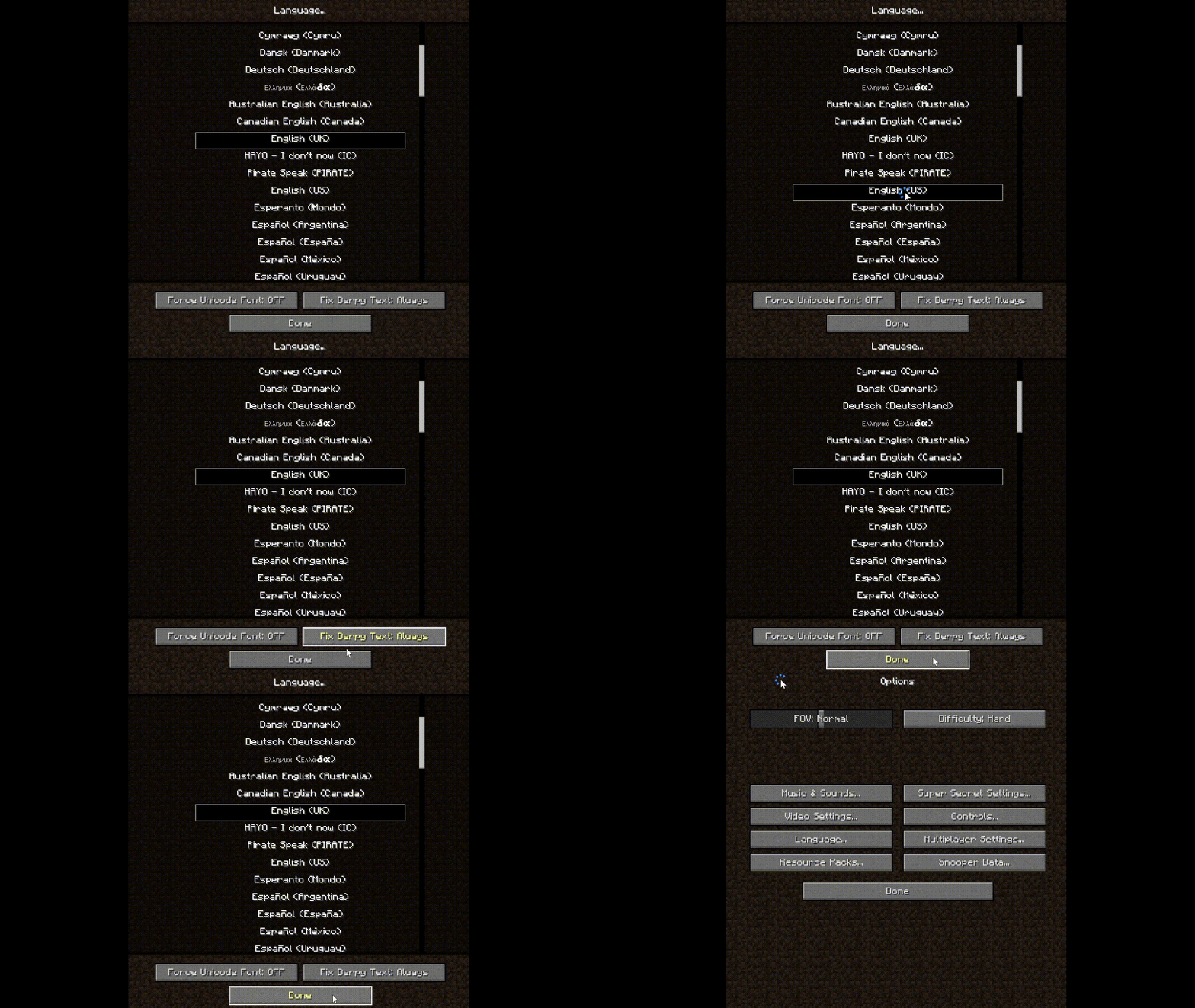
介绍
LanguageFixer
A small mod focused on fixing the language selection UX in Minecraft.
What problem does this solve?
In vanilla Minecraft, the language menu behaves in an extremely inconvenient way:
- You click a language by accident.
- Minecraft immediately starts reloading the language resources.
- In a heavily modded environment, language loading can take a very long time.
- If you misclick multiple times, you are forced to wait through multiple full reloads.
This becomes especially painful in large modpacks where resource and language initialization is slow.
What does LanguageFixer change?
LanguageFixer changes the language menu logic:
- Clicking a language no longer instantly reloads the game language.
- The selected language is only applied after pressing the Done button.
- You can freely browse or correct accidental clicks without triggering repeated reloads.
Result
- No more accidental multi-second or multi-minute reloads.
- Much better experience in large modpacks.
- Language selection finally behaves like a normal settings menu.
Before
- Click wrong language.
- Game immediately reloads.
- Wait.
- Click again.
- Reload again.
- Repeat suffering.
After
- Click languages freely.
- Nothing reloads immediately.
- Press Done when finished.
- Only one reload happens.
Demonstrate
The animated picture is cut out the unnecessary portions of long waiting periods.
Spoiler
Compatibility
Designed primarily for heavily modded Minecraft environments where language reload times are significant.
常见问题
LanguageFixer 支持哪些 Minecraft 版本?
LanguageFixer 支持 Minecraft Java 版 1.7.10,可用的加载器:Forge。下载时注意选择和你游戏版本一致的文件。
LanguageFixer 怎么安装?
先用 PCL2 或 HMCL 启动器安装对应版本的 Forge,再把下载的 .jar 文件放进游戏目录的 mods 文件夹,重新启动游戏即可。开启了版本隔离的,mods 文件夹在 versions/版本名 下面。运行环境:仅客户端。
Seniye 的其他作品
查看全部 →
MC New Textures
让你的 MC 1.0-1.4.7、1.6-1.13.2 支持 1.14 及更高版本的材质。/更新 1.14 之后未更新的材质。

MC New Textures: Aquatic
Archive the blue water for MC New Textures
CreateWorldUI
Modern Minecraft world creation, backported to 1.7.10 / 1.12.2

MC New Textures: Seamless Glass & Color
Seamless Glass and Modern color for MC New Textures Optifine (1.0-1.13) MCpatcher for Forge (1.7.10) Required
评论
登录后评论和评分