
LagProfiler
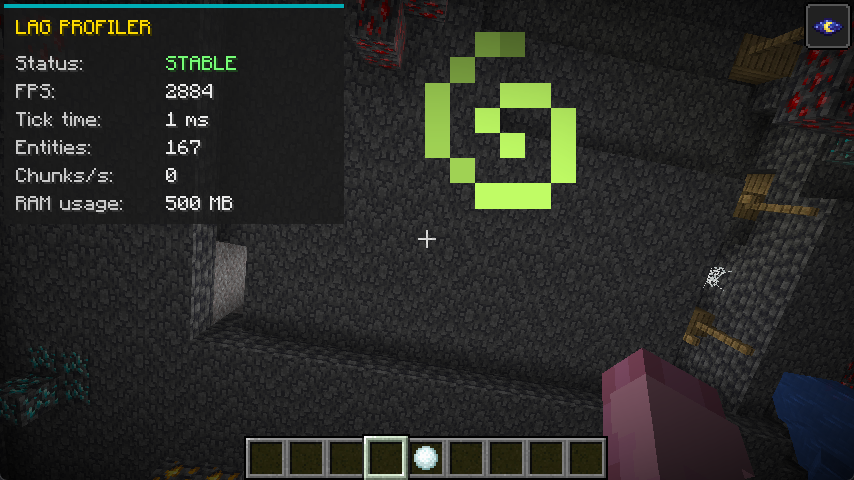
This mod introduces a sleek, lightweight HUD overlay designed specifically to help players monitor their local game performance and diagnose client-side lag or stuttering in real-time.
截图
介绍
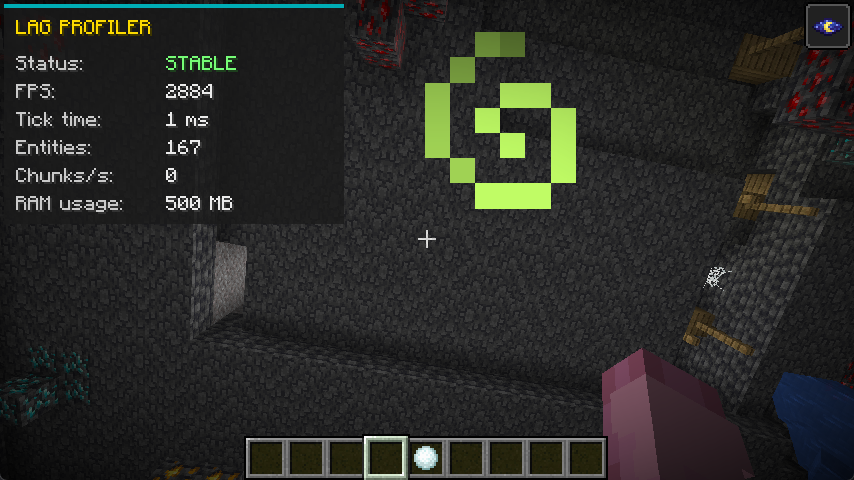
This mod introduces a sleek, lightweight HUD overlay designed specifically to help players monitor their local game performance and diagnose client-side lag or stuttering in real-time.
Instead of relying on the cluttered F3 debug screen, this mod provides a clean UI that tracks exactly what is impacting your PC’s performance and causing your game to drop frames.
Key Features:
Dynamic Stutter Detection (Status): Automatically monitors the client’s processing time. If the local tick/frame time spikes above 50ms (which causes noticeable stuttering or freezing), the status instantly turns red and alerts you with “LAG DETECTED”. Otherwise, it displays a green “STABLE” status.
Live Client Metrics: The HUD continuously tracks five crucial data points to help you pinpoint the source of your lag:
FPS: Your current Frames Per Second. Drops here indicate rendering struggles.
Tick Time: The exact duration of the client’s processing cycle in milliseconds. High numbers mean your game is freezing or struggling to process data.
Entities: The total number of entities currently rendered around you. Useful for spotting lag caused by mob farms or dropped items.
Chunks/s: The rate at which your client is loading new map chunks. Fast flying or high render distances can cause this to spike and create lag.
RAM Usage: The current amount of memory (in MB) actively being consumed by the game. Perfect for identifying memory leaks or stuttering caused by Java Garbage Collection.
Quick Toggle & Customization: You can easily hide or show the entire UI at any time by pressing F7. If this conflicts with your other controls, the shortcut can be fully rebound to any key of your choice in the game’s standard controls/keybinds menu.
常见问题
LagProfiler 支持哪些 Minecraft 版本?
LagProfiler 支持 Minecraft Java 版 1.21.4–1.21.11,共 8 个版本,可用的加载器:Fabric。下载时注意选择和你游戏版本一致的文件。
LagProfiler 怎么安装?
先用 PCL2 或 HMCL 启动器安装对应版本的 Fabric,再把下载的 .jar 文件放进游戏目录的 mods 文件夹,重新启动游戏即可。开启了版本隔离的,mods 文件夹在 versions/版本名 下面。运行环境:仅客户端。
xEnif 的其他作品
查看全部 →
NyxaVora
Colorful shaderpack made to make Minecraft feel brighter, softer, and more atmospheric without destroying performance. It keeps the vanilla style recognizable while adding pleasant colors, gentle lighting, and a clean fantasy-like look.

Aetheris Lite
An ultra-lightweight, performance-friendly post-processing shader pack that enhances Minecraft's colors and atmosphere without affecting FPS.

Aetheris Medium
Warm Lite colors, sun shadows, swaying plants, and water and lava with a real surface. Heavier than Lite, still fine on a normal PC.

NoHead
A simple mod that removes the player’s head. No reason. No questions. Just... no head.
评论
登录后评论和评分