kiss
作者:jiazengp
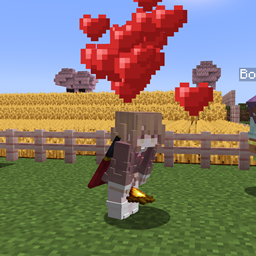
A lightweight mod that spawns heart particles above the player who rapidly crouches near others — a simple gesture of friendliness.
介绍
中文介绍正在准备中,下面暂时显示原文。
Description
A lightweight server-side mod that spawns heart particles above the player who rapidly crouches near others — a simple gesture of friendliness.

Command
/kiss <player>: Allowing you to kiss other players with this command (The command can be used once every 10 seconds per player by default. The kissed player will receive a notification and heart particle effects will appear above their head.
)
Default Config
kissmod.json
{
  // Maximum number of heart particles that can appear when sneaking (1–20)
  "maxSneakParticles": 6,

  // Vertical position offset for particles (in blocks)
  // 1.6 = Eye level for standing players
  "sneakParticleHeight": 1.6,

  // Message shown when receiving a kiss
  // %s = Automatically replaced by the kisser's username
  "kissMessage": "%s kissed you!",

  // Message shown to the sender after kissing someone
  // %s = Automatically replaced by the receiver's username
  "kissPromptMessage": "you kissed %s",

  // Cooldown between /kiss commands (in seconds)
  // Prevents command spamming (0 = no cooldown)
  "commandCooldown": 10,

  // Enable or disable the /kiss command entirely
  "enableKissCommand": true,

  // Error message shown when trying to kiss yourself
  "selfKissErrorMessage": "You can't kiss yourself!",

  // Error message shown when using /kiss before cooldown ends
  // %d = Automatically replaced by the number of seconds remaining
  "cooldownErrorMessage": "You must wait %d seconds before kissing again!",

  // Maximum view angle (in degrees) to detect nearby players for kiss or sneak particle effects
  // A smaller angle means only players in front are considered visible
  "maxViewAngleDegree": 90.0
}
License
常见问题
kiss 支持哪些 Minecraft 版本?
kiss 支持 Minecraft Java 版 1.20.1–26.3,共 20 个版本,可用的加载器:Fabric / NeoForge。下载时注意选择和你游戏版本一致的文件。
kiss 怎么安装?
先用 PCL2 或 HMCL 启动器安装对应版本的 Fabric / NeoForge,再把下载的 .jar 文件放进游戏目录的 mods 文件夹,重新启动游戏即可。开启了版本隔离的,mods 文件夹在 versions/版本名 下面。
评论
登录后评论和评分