
KillMessage Plus
A lightweight PvP enhancement mod that adds a stylish "Defeated" overlay on player kills and appends the kill distance to chat death messages.
截图

介绍
KillMessagePlus
A lightweight, visual enhancement mod that makes PvP in Minecraft more exciting.
It adds a visual overlay when you defeat another player, as well as kill distance display in the chat.
Features
Kill Overlay HUD
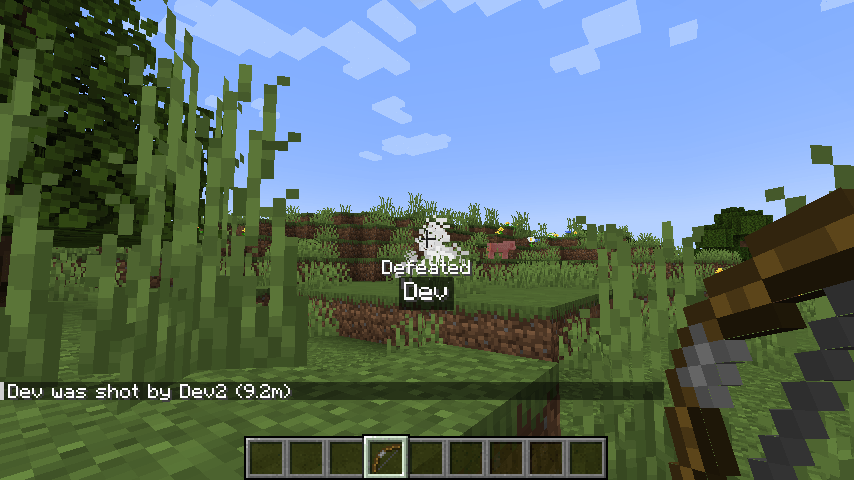
When you kill another player, a kill overlay pop-up appears at the bottom-center of the screen.
- Defeat Text: Displays "Defeated" at the bottom-center of the screen, followed by the defeated player’s name underneath.
- High Visibility Design: The defeated player’s name is rendered with a semi-transparent black background, ensuring high visibility in any environment.
- Team Color Support: If the defeated player belongs to a scoreboard team with a team color, their name will be dynamically rendered in that team’s color.
- Smooth Animation: The overlay is displayed for 3 seconds (60 ticks) and smoothly fades out during the final 1 second (20 ticks).
Kill Distance in Chat
When a player is killed in PvP, the straight-line distance between the killer and the victim is automatically appended to the vanilla chat death message.
- Example (English):
Steve was slain by Alex (15.5m) - It makes long-distance snipes with bows or spacing-intensive melee encounters immediately obvious to everyone in chat.
常见问题
KillMessage Plus 支持哪些 Minecraft 版本?
KillMessage Plus 支持 Minecraft Java 版 1.20.1,可用的加载器:Forge。下载时注意选择和你游戏版本一致的文件。
KillMessage Plus 怎么安装?
先用 PCL2 或 HMCL 启动器安装对应版本的 Forge,再把下载的 .jar 文件放进游戏目录的 mods 文件夹,重新启动游戏即可。开启了版本隔离的,mods 文件夹在 versions/版本名 下面。
dousiyo 的其他作品
查看全部 →
Only Zombies Spawn
阻止其他所有敌对生物生成(包括刷怪笼),让世界里只生成僵尸。
Vanilla Plus Enchantments
Vanilla Plus Enchantments 为 Minecraft 添加了大量新附魔和诅咒,扩展了战斗、实用、机动性和装备自定义,同时保持原版风格。

Size by Health
一个根据当前生命值动态改变玩家大小的模组,低于 20 生命值时缩小,高于时变大。
Happy Ghast: Speed Upgrades
一个简单的模组,让你使用可合成的天界水晶永久升级快乐恶魂的飞行速度。
评论
登录后评论和评分