Kid Buttons
Turn complex commands into simple, colorful buttons! Change game modes, time, weather, and more with just a click. Perfect for kids who want to explore Minecraft's creative possibilities without typing commands.
截图
介绍
Kid-Friendly Buttons
📝 Description
Transform complex Minecraft commands into simple, colorful buttons!
Kid-Friendly Buttons is the perfect solution for young Minecraft players who want to explore the game’s creative possibilities without learning complex commands. No more typing /gamemode creative or /time set 6000 – just click beautiful, intuitive buttons!
🎯 Perfect for Young Players (Ages 6-12)
- No command memorization required – Everything is visual!
- No typing needed – Just click and play
- Safe exploration of Minecraft features
- Confidence building through easy success
🎮 What You Can Do
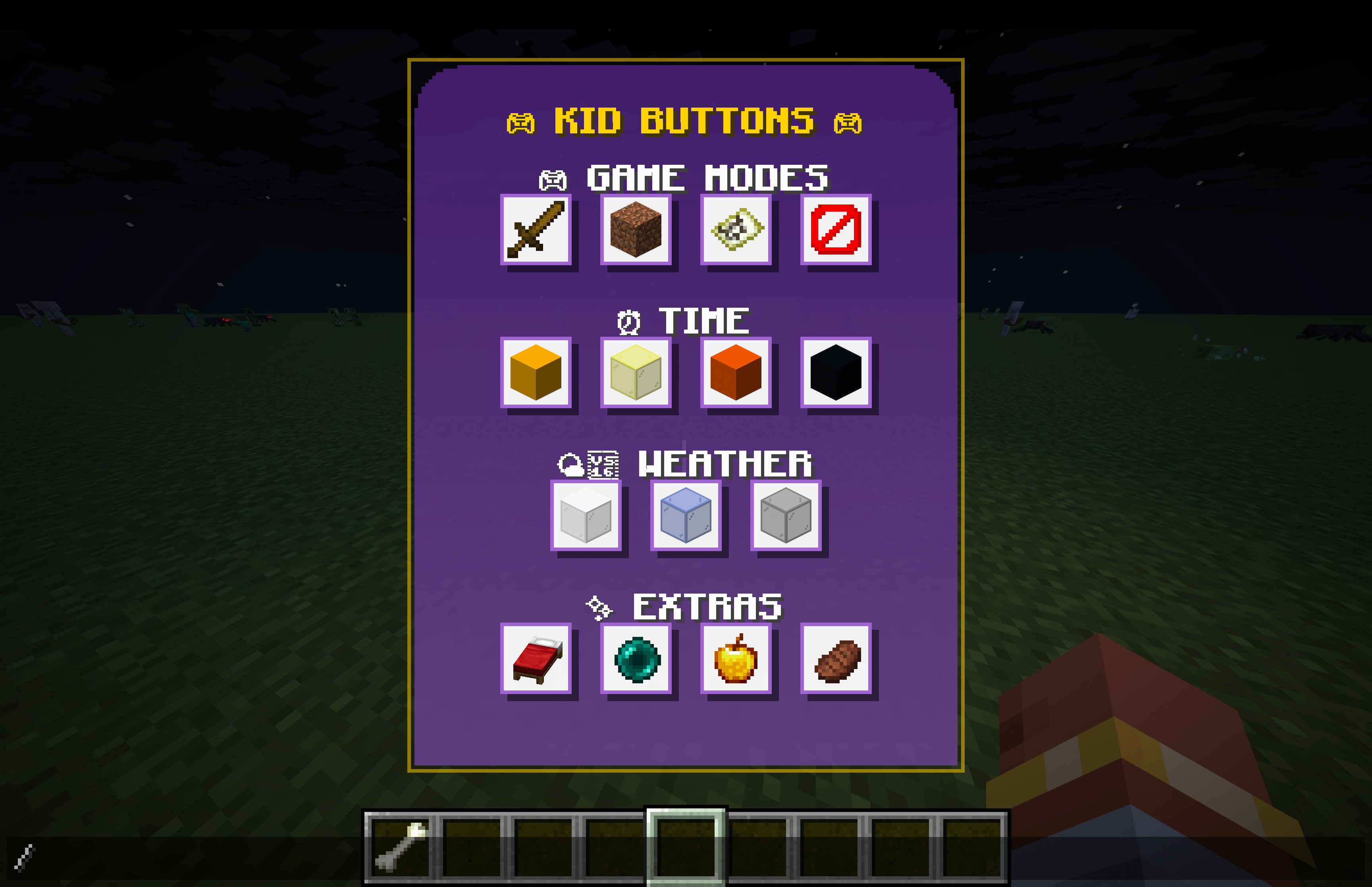
Game Modes: Switch between Survival, Creative, Adventure, and Spectator modes instantly
Time Control: Set the time to Sunrise, Noon, Sunset, or Midnight with one click
Weather Control: Change weather to Clear, Rain, or Thunder Storm
Extra Features: Set home points, teleport home, heal instantly, and satisfy hunger
🛡️ Safety First
- Smart home teleportation – Never get stuck at dangerous world spawn
- Safe fallback locations – Always teleport to secure areas
- Cooldown protection – Prevents accidental spam clicking
- Parent-approved commands – Only basic, safe game functions
🎨 Beautiful Interface
- Purple gradient design with gold accents
- Organized categories for easy navigation
- Hover tooltips explain what each button does
- Responsive sizing that adapts to any screen
- High contrast for easy visibility
🚀 How to Use
- Install the mod (see installation section below)
- Launch Minecraft with the Fabric profile
- Press T to open chat
- The Kid Buttons overlay appears automatically
- Click any button to execute the command
- Hover over buttons to see helpful tooltips
🏠 Setting Up Home
- Find a safe location where you want your home to be
- Click the red bed button (Set Home)
- Your location is now saved as your home point
- Click the green ender pearl (Go Home) to return anytime
📦 Installation
Requirements
- Minecraft 1.21.8
- Fabric Loader
- Fabric API
Step-by-Step
- Install Fabric Loader for Minecraft 1.21.8
- Download and install Fabric API
- Download Kid-Friendly Buttons from this page
- Place the JAR file in your
.minecraft/modsfolder - Launch Minecraft with the Fabric profile
- Open chat (T key) to access the interface
🎯 Who This Mod Is For
👶 Young Players
- Ages 4-12 who are learning Minecraft
- Non-readers who can’t type commands
- Creative builders who want easy mode switching
- Explorers who want to control time and weather
👨👩👧👦 Parents & Families
- Family servers with mixed-age players
- Supervised play with controlled commands
- Educational tool for learning game mechanics
- Safe environment for creative expression
🎓 Educators
- Classroom Minecraft with young students
- Educational servers with controlled features
- Learning tool for game mechanics
- Easy setup and management
🖥️ Server Administrators
- Kid-friendly servers with controlled commands
- Reduced command spam in chat
- Better user experience for young players
- Easy moderation of available features
🔧 Technical Information
Mod Details
- Mod ID: kid-buttons
- Version: 1.0.0
- Minecraft Version: 1.21.8
- Fabric API Required: Yes
- Client-Side Only: Yes
- Performance: Lightweight, minimal impact
Commands Used
The mod uses these vanilla Minecraft commands:
gamemode [mode] @p– Change game modestime set [value]– Control time of dayweather [type]– Control weathereffect give @p [effect] [duration] [amplifier]– Apply effectstp @p [x] [y] [z]– Teleportationspawnpoint @p [x] [y] [z]– Set spawn points
Features
- ✅ Complete UI overlay system
- ✅ All game mode buttons
- ✅ Time control features
- ✅ Weather control options
- ✅ Home teleportation system
- ✅ Health and hunger management
- ✅ Beautiful purple gradient design
- ✅ Safe teleportation logic
- ✅ Responsive button sizing
- ✅ Hover tooltips
- ✅ Click cooldown protection
🐛 Troubleshooting
Common Issues
Q: The overlay doesn’t appear when I press T
A: Make sure you’re using the Fabric profile, not vanilla Minecraft
Q: Buttons don’t work when I click them
A: Check that you have operator permissions or are in single-player mode
Q: I get stuck when using the home button
A: The mod uses safe teleportation – it will never teleport you to dangerous locations
Q: The interface looks too big/small
A: The interface automatically scales to your screen size
Getting Help
- Check the logs for any error messages
- Verify Fabric API is installed correctly
- Ensure Minecraft version matches (1.21.8)
- Try in single-player first to test functionality
🌟 What Players Are Saying
“My 8-year-old loves this mod! No more asking me to type commands for him.” – Minecraft Parent
“Perfect for our family server. The kids can explore creative mode safely.” – Server Admin
“Simple, effective, and exactly what we needed for young players.” – Educator
“The interface is so intuitive, my 6-year-old figured it out immediately!” – Family Gamer
📈 Version History
v1.0.0 – Initial Release
- ✨ Complete UI overlay system
- 🎮 All game mode buttons (Survival, Creative, Adventure, Spectator)
- ⏰ Time control features (Sunrise, Noon, Sunset, Midnight)
- 🌤️ Weather control options (Clear, Rain, Thunder)
- 🏠 Home teleportation system with safety features
- 💊 Health and hunger management (Heal, Feed)
- 🎨 Beautiful purple gradient design with gold accents
- 🔒 Safe teleportation logic (never stuck at spawn)
- 📱 Responsive button sizing for all screen sizes
- 💡 Hover tooltips for all buttons
- ⏱️ Click cooldown protection
🤝 Support & Community
Need Help?
- Leave a comment on this CurseForge page
- Check the troubleshooting section above
- Verify your installation follows the step-by-step guide
Want to Contribute?
This mod is open source! Contributions are welcome:
- Bug reports and feature requests
- Code improvements and optimizations
- UI/UX enhancements
- Documentation updates
📜 License
This project is licensed under the MIT License with Commercial Restriction – see the LICENSE file for details.
This means you can:
- ✅ Use the mod freely for personal and educational purposes
- ✅ Modify it for personal use
- ✅ Share it with others
- ✅ Include it in open source projects
- ✅ Use it in community servers and modpacks
- ❌ Cannot sell or monetize the mod commercially
🙏 Credits
Development
- fletchertyler914 – Original developer and maintainer
- Fabric Team – Amazing modding framework
- Minecraft Community – Inspiration and feedback
Special Thanks
- Young Minecraft players – For inspiring this project
- Parents and educators – For valuable feedback
- Beta testers – For helping improve the mod
Made with ❤️ for young Minecraft players everywhere!
Transform the way kids experience Minecraft – one button at a time.
🎮 Screenshots
[Note: Add screenshots of the interface in action, showing the purple overlay with buttons organized by category]
🔗 Links
- GitHub Repository: https://github.com/fletchertyler914/kid-buttons
- Fabric API: Required dependency
- Fabric Loader: Required for installation
- Minecraft 1.21.8: Required game version
Download now and give your young Minecraft players the power to control their world with simple, beautiful buttons! 🎮✨
常见问题
Kid Buttons 支持哪些 Minecraft 版本?
Kid Buttons 支持 Minecraft Java 版 1.20–1.21.8,共 16 个版本,可用的加载器:Fabric。下载时注意选择和你游戏版本一致的文件。
Kid Buttons 怎么安装?
先用 PCL2 或 HMCL 启动器安装对应版本的 Fabric,再把下载的 .jar 文件放进游戏目录的 mods 文件夹,重新启动游戏即可。开启了版本隔离的,mods 文件夹在 versions/版本名 下面。
评论
登录后评论和评分