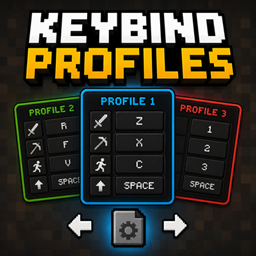
Keybind Profiles
Switch between multiple keybind profiles instantly with customizable hotkeys. Easily manage different controls for PvP, building, modpacks, or any playstyle.
介绍
Keybind Profiles
Keybind Profiles is a lightweight NeoForge mod that allows you to instantly switch between multiple Minecraft keybind setups using customizable hotkeys.
Perfect for players who use different controls for PvP, building, modpacks, minigames, or different playstyles.
Features
- Instantly switch between multiple keybind profiles
- Automatically saves and loads controls
- Fully customizable profile-switch hotkeys
- Lightweight and easy to use
- Profiles are stored locally as JSON files
- Client-side only
Default Keys
- Right Arrow → Next Profile
- Left Arrow → Previous Profile
The hotkeys can be changed in the Minecraft Controls menu.
How It Works
-
Change your controls in Minecraft settings
-
Switch to another profile
-
Set different controls
-
Switch back anytime instantly
Each profile stores your complete Minecraft keybind configuration automatically.
Compatibility
- Minecraft 26.1.2
- NeoForge 26.1.2.64
Profile Storage
Profiles are automatically stored inside:
config/keybind_profiles/
Notes
This mod is completely client-side and does not need to be installed on servers.
常见问题
Keybind Profiles 支持哪些 Minecraft 版本?
Keybind Profiles 支持 Minecraft Java 版 1.20.1–26.3,共 5 个版本,可用的加载器:Forge / NeoForge。下载时注意选择和你游戏版本一致的文件。
Keybind Profiles 怎么安装?
先用 PCL2 或 HMCL 启动器安装对应版本的 Forge / NeoForge,再把下载的 .jar 文件放进游戏目录的 mods 文件夹,重新启动游戏即可。开启了版本隔离的,mods 文件夹在 versions/版本名 下面。
leiv436 的其他作品
查看全部 →
ItemCuller
通过不渲染玩家视野外的掉落物来提升性能。轻量级的客户端优化,让游戏更流畅。

Leiv’s Lib
Leiv's Lib is the lightweight core framework required to power all mods in the Leiv Ecosystem Suite, optimizing performance and streamlining core mechanics under the hood.

Leiv’s API
Leiv's API is the mandatory, highly reliable core library that manages configurations, validation, and system rules for all mods created by Leiv.

Mystic Arts & Spellbooks
A custom modpack built around Iron's Spells 'n Spellbooks and my favorite add-ons! Enhance your magical adventure with new spells, dungeons, weapons, world features and more!
评论
登录后评论和评分