
截图
介绍
中文介绍正在准备中,下面暂时显示原文。
Just SYBAU
Just SYBAU is a client-side Fabric mod that gives you full control over which chat messages you see in Minecraft.
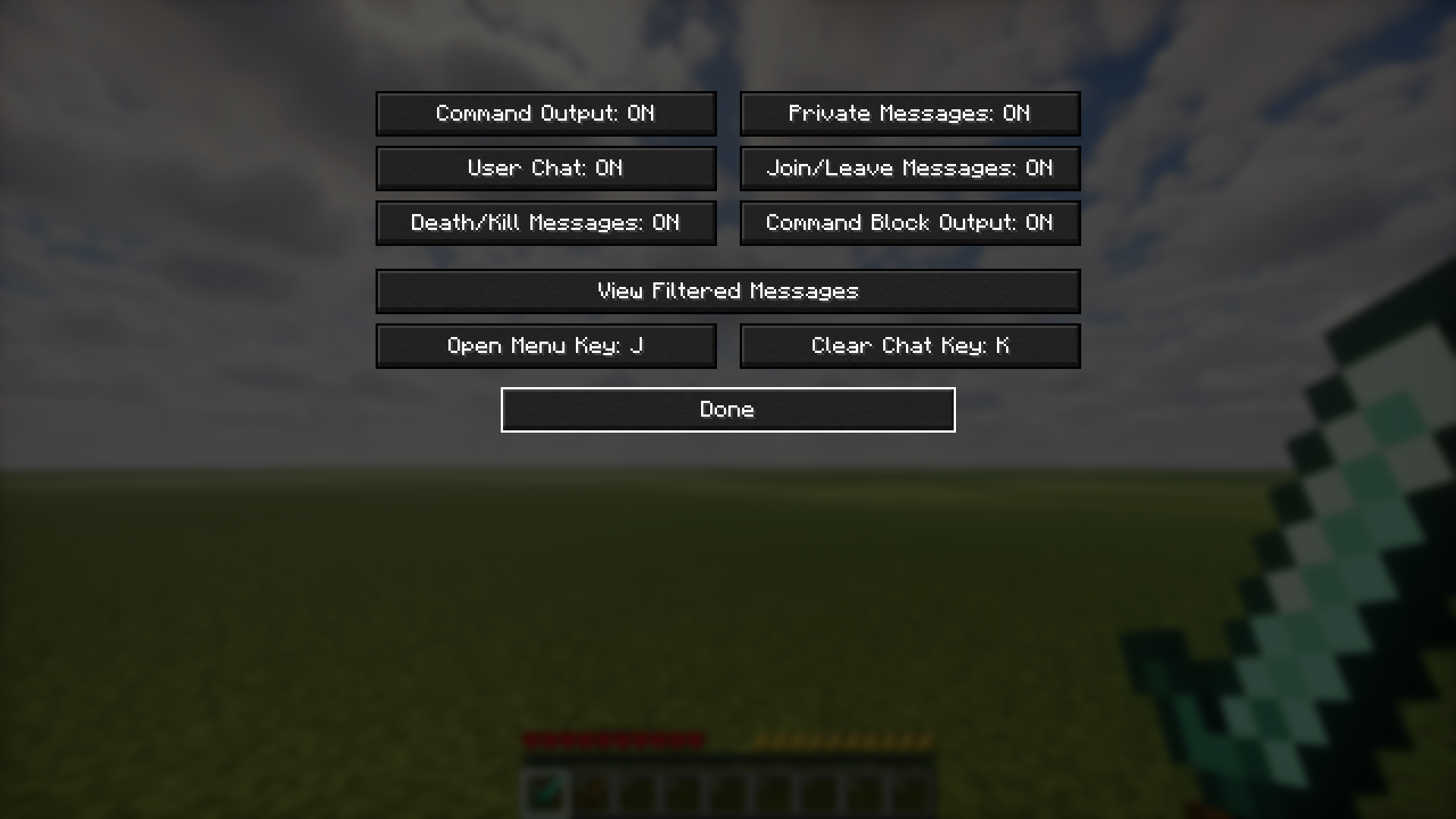
You can hide specific categories of chat instantly, open a clean vanilla-style menu, assign your own shortcuts, clear chat with a custom key, and review hidden messages in a built-in archive.
No server install is required.
Features
- 100% client-side (works on vanilla servers and modded servers)
- Live toggles (no restart needed)
- Filter categories:
- Command output (
/say,/tellraw, command feedback, etc.) - Private messages (
/msg,/tell,/w) - User chat (normal player messages)
- Join/leave messages
- Death/kill messages
- Command block output
- Open menu with command:
/justsybau - Customizable shortcuts inside the GUI:
- Open menu key (default:
None) - Clear chat key (default:
None) - Filtered message archive:
- Read past messages that were hidden by filters
- Scrollable history view
- Clear archive button
- Clean vanilla-style UI
Requirements
- Minecraft:
1.21.11 - Fabric Loader:
0.18.6+ - Fabric API:
0.141.3+1.21.11(or compatible) - Java:
21+
Installation
- Install Fabric Loader for Minecraft
1.21.11. - Put Fabric API into your
modsfolder. - Put
just-sybau-1.0.0.jarinto yourmodsfolder. - Start Minecraft.
Quick Tutorial
1) Open the menu
Use:
/justsybau2) Toggle chat categories
- In the menu, each button controls one message type.
ONmeans visible.OFFmeans hidden.- Changes apply instantly.
3) Set custom shortcuts
- In the same menu, click
Open Menu KeyorClear Chat Key. - Press any keyboard key or mouse button.
- Press
ESCwhile assigning to reset it toNone.
4) Read hidden messages
- Click
View Filtered Messages. - Scroll with mouse wheel or arrow keys.
- Use
Clear Stored Messagesif you want to wipe history.
Notes
- This mod only changes what you see.
- It does not block, edit, or modify server messages.
- It does not require the server to have the mod.
Troubleshooting
The menu does not open
- Confirm you are using
/justsybau(with slash). - Make sure the correct jar is in the
modsfolder. - Confirm game version and Fabric API match the requirements.
Filters seem not to work
- Check each category button state (
OFF= filtered). - Some custom server/plugin formats may not match perfectly.
- If needed, open an issue with logs and an example message format.
Game crashes or UI conflicts
- Update Fabric Loader and Fabric API.
- Test with only Fabric API + Just SYBAU to confirm conflict source.
License
This project is licensed under CC0 1.0 Universal.
常见问题
Just SYBAU 支持哪些 Minecraft 版本?
Just SYBAU 支持 Minecraft Java 版 1.21.11–26.1.2,共 4 个版本,可用的加载器:Fabric。下载时注意选择和你游戏版本一致的文件。
Just SYBAU 怎么安装?
先用 PCL2 或 HMCL 启动器安装对应版本的 Fabric,再把下载的 .jar 文件放进游戏目录的 mods 文件夹,重新启动游戏即可。开启了版本隔离的,mods 文件夹在 versions/版本名 下面。运行环境:仅客户端。

评论
登录后评论和评分