
截图


介绍
Just Enough Craft
JEC is an item and recipe viewing mod for Minecraft, built from the ground up for stability and performance.
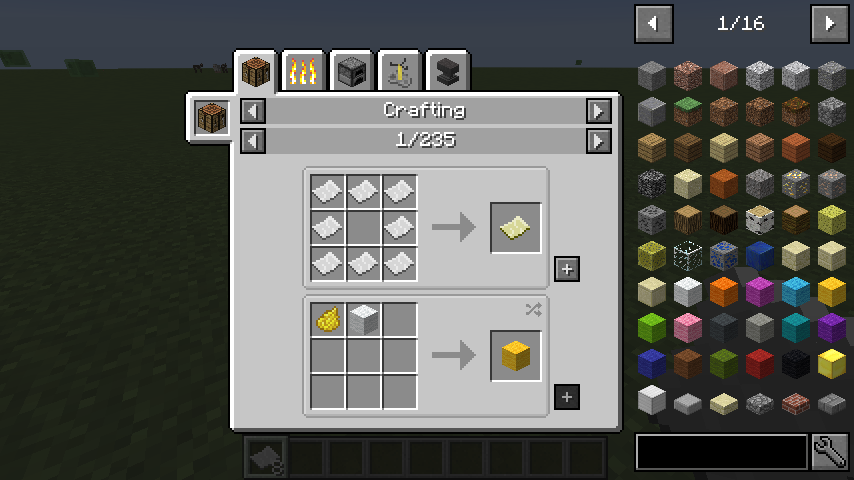
Controls
Inventory:
(Minecraft Options -> Controls)
Show Recipes: Hover over item + R
Show Uses: Hover over item + U
Toggle Item List Overlay: Control + O
Item List:
Show Recipes: Click Item or type R
Show Uses: Right-Click Item or type U
Next/Previous page: Scroll Wheel
Search:
Select Search Bar: Click or Control + F
Clear Search: Right Click
Previous Search: *Up Arrow * Search by Mod Name: Type @ in front of a word (@thaum)
Multiple terms work together (wand @thaum)
Exclude search terms: Type – in front of a word (@thaum -wand)
Search terms that have spaces in them: Type “” around the words (“two words”)
Recipe View:
Next/Previous page: Scroll Wheel
Show all Recipes: Click the recipe category’s name
Move items into crafting area: Click the [+] button. Shift-Click to move multiple sets of items.
常见问题
Just Enough Craft (JEC) 支持哪些 Minecraft 版本?
Just Enough Craft (JEC) 支持 Minecraft Java 版 1.16.5,可用的加载器:Forge。下载时注意选择和你游戏版本一致的文件。
Just Enough Craft (JEC) 怎么安装?
先用 PCL2 或 HMCL 启动器安装对应版本的 Forge,再把下载的 .jar 文件放进游戏目录的 mods 文件夹,重新启动游戏即可。开启了版本隔离的,mods 文件夹在 versions/版本名 下面。
Advait8370 的其他作品
查看全部 →
Survival-OneBlock Forge
Survival-OneBlock 是一个冒险类空岛生存 Forge 整合包。

Survival : Create OneBlock
Start on one regenerating block spawning resources & mobs through phases. Use Create's gears, belts & contraptions to automate survival in the void. Perfect for builders craving mechanical twists. Forge/Fabric compatible.

Survival OneBlock
Survival-OneBlock is an Adventure OneBlock Forge modpack.

Golden Backpacks
It's a portable storage mod for minecraft
评论
登录后评论和评分