Just Dire Areas: Better Machine Area Selection
In-world interactive area selection, rather than in-gui-button-fighting.
介绍
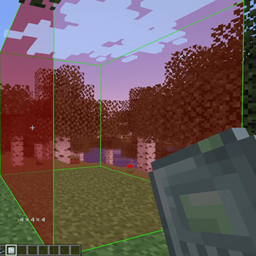
Set the working area of Just Dire Things machines by drawing a box in the world.
Just Dire Things machines (Block Breakers, Block Placers, Clickers, Sensors, Droppers and others) take their area as a radius plus an offset, typed into the GUI one number at a time. Just Dire Areas adds the Area Selector. You draw the box you want in the world, then right-click the machine and the mod works out the radius and offset for you.
Features
- Craft the new Area Selector item (Celestigem Tier).
- Two clicks for a box. Right-click one block for the first corner and another block for the second.
- Corners in mid-air. Hold Left Ctrl and right-click to place a corner in empty space, and Ctrl + Scroll to move that point closer or further away.
- Resize by face. Once the box is finished, look at one of its sides and Ctrl + Scroll to push that side out or pull it in.
- Apply to a machine. Right-click a machine to give it the box as its area. If the box is too big or too far from the machine, you get a message that says why.
- Copy an existing area. Sneak + right-click a machine to load its current area into the selector, ready to edit or apply to other machines.
- Live preview. The box is drawn in the world while you hold the selector, and a HUD line shows its size.
- Works on servers. All changes are checked on the server, including reach, the machine’s size limits and claim or spawn protection.
Controls
| Action | Input |
|---|---|
| Set corner 1, then corner 2 | Right-click a block |
| Set a corner in mid-air | Ctrl + Right-click |
| Change mid-air distance | Ctrl + Scroll |
| Move the hovered face of a finished box | Ctrl + Scroll |
| Apply the box to a machine | Right-click the machine |
| Load a machine’s area | Sneak + Right-click the machine |
| Clear the selection | Sneak + Right-click elsewhere |
Hold Shift over the item to see these controls in game. The Ctrl key can be changed in the controls menu under Just Dire Areas.
Requirements
- Minecraft 1.21.1
- NeoForge 21.1.209 or newer
- Just Dire Things 1.5.7 or newer
Install it on both the client and the server.
Credits
This is an unofficial addon for Just Dire Things by Direwolf20. It is not affiliated with or endorsed by Direwolf20.
Please report Area Selector bugs here and not to Just Dire Things.
Modpacks
I play with this mod added to ATM10-Aeronautics modpack.
Feel free to use my mods in your modpack, just don’t forget to give proper credit.
Other Mods by me
I run these mods together:
- Applied Glyphs – AE2 Glyphs for Ars Nouveau
- Create: Take a seat, Piglin! – Automated Bartering – Addon for Create
- Create Safe Seating — addon for Create
- Empty Hand Keybind – Hold Onto THIS
- PAPA: Portable Aeronautics Physics Assembler — addon for Create Aeronautics
常见问题
Just Dire Areas: Better Machine Area Selection 支持哪些 Minecraft 版本?
Just Dire Areas: Better Machine Area Selection 支持 Minecraft Java 版 1.21.1–26.1.2,共 2 个版本,可用的加载器:NeoForge。下载时注意选择和你游戏版本一致的文件。
Just Dire Areas: Better Machine Area Selection 怎么安装?
先用 PCL2 或 HMCL 启动器安装对应版本的 NeoForge,再把下载的 .jar 文件放进游戏目录的 mods 文件夹,重新启动游戏即可。开启了版本隔离的,mods 文件夹在 versions/版本名 下面。
takl 的其他作品
查看全部 →
Create Safe Seating
坐在机械动力座椅上即可安全挂机:生物会无视你,你会缓慢恢复生命值和饥饿值,幻翼和闪电也不会来打扰你。

Create: Take a seat, Piglin! – Automated Bartering
机械动力附属模组:用传送带和卸货站自动化猪灵以物易物。

PAPA: Portable Aeronautics Physics Assembler
使用手持工具组装和拆卸机械动力:航空物理结构,而无需一直放置/破坏物理装配器。
Applied Glyphs – Inscribe and Bud Glyphs
新生魔艺的 AE2 符文:用法术铭刻 AE2 组件,并强制芽生水晶按命令生长。
评论
登录后评论和评分