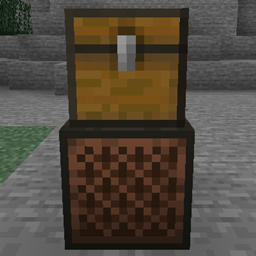
Jukebox Playlists [Backport]
Backport of the 26.4 "Winter Drop" Jukebox Playlist feature to Minecraft 1.21.1 (NeoForge). Put a chest full of music discs on top of your jukebox and it plays them one after another automatically — loops forever. No more changing discs!
介绍
Jukebox Playlists brings the beloved Jukebox Playlist feature from Minecraft 26.4 "Winter Drop" back to Minecraft 1.21.1 (NeoForge) — fully client-compatible, server-side, zero recipes to learn.
What it does
Place any chest directly on top of a jukebox — the chest becomes that jukebox’s playlist.
- Right-click the jukebox (even with an empty hand) — the first disc from the chest is pulled in and starts playing instantly.
- When a song ends, the mod automatically:
- returns the finished disc into the chest slot it was taken from,
- pulls the next disc in slot order and starts it.
- Loops forever by default — your playlist never stops. Set
loop = falseinconfig/jukeboxplaylists-common.tomlfor one-shot playlists. - Slots without a music disc (dirt, tools, whatever) are safely skipped.
- A trapped chest and even a double chest work as the playlist — store your whole vinyl collection in one box.
- The current playlist position is saved per jukebox and survives relogs and server restarts.
- No container on the jukebox? Vanilla behavior — nothing changes.
Why
Music gives your base a soul. Before 26.4, every three minutes someone had to walk to the jukebox and swap the disc like a medieval DJ. Build once, listen forever.
Supported versions
| Minecraft | Loader | Version |
|---|---|---|
| 1.21.1 | NeoForge | 1.0.0 |
Client-only? No — install it on both sides or just server-side: it is a small server-side QoL mod; vanilla clients can join a server running it.
How to install
- Install NeoForge for Minecraft 1.21.1.
- Drop the
.jarinto yourmodsfolder. - Chest on jukebox. Done.
FAQs
Does it need a client/server?
Just server side (or singleplayer). It adds no items or blocks.
Which counts as "a playlist container"?
Any block from the tag #jukeboxplaylists:playlist_containers (vanilla: chest, trapped chest). Pack makers can extend the tag for modded containers — e.g. shelves, barrels, or modded cabinets.
What if there are no more discs?
The jukebox falls back to vanilla behavior; the playlist restarts from the top the next time a disc ends (or immediately on the next right-click).
Is the disc order guaranteed?
Yes — chest slot order, top-left to bottom-right like you see it in the chest GUI, skipping empty and non-disc slots.
Config?
config/jukeboxplaylists-common.toml → loop = true/false.
Tested quality
The playlist logic is covered by 6 automated NeoForge GameTests (headless CI-style runs): disc advancement, slot-order skipping, loop wrap-around, empty-chest vanilla behavior, right-click start with empty hand, and cursor persistence across sessions.
Comments & ideas
Found a bug or want your favorite container supported? Drop a comment — new versions are cheap to ship. If this saves you disc-swapping, hit the like button — it helps the mod author a lot.
常见问题
Jukebox Playlists [Backport] 支持哪些 Minecraft 版本?
Jukebox Playlists [Backport] 支持 Minecraft Java 版 1.21.1,可用的加载器:NeoForge。下载时注意选择和你游戏版本一致的文件。
Jukebox Playlists [Backport] 怎么安装?
先用 PCL2 或 HMCL 启动器安装对应版本的 NeoForge,再把下载的 .jar 文件放进游戏目录的 mods 文件夹,重新启动游戏即可。开启了版本隔离的,mods 文件夹在 versions/版本名 下面。
BioBauerHartmut 的其他作品
查看全部 →
Monster Energy and Caffeine
White Monster 模组加入了魔爪能量饮料和瓜拉纳植物。饮用能量饮料可获得咖啡因加成,提高移动速度和伤害。你可以种植瓜拉纳并制作能量饮料。所有物品都位于“Monster Energy”创造模式物品栏分类中。

Herbcraft
向游戏中添加一种新的魔法草药种子。种子可以通过破坏草来找到。在耕地上经历不同阶段种植该植物。收获它以收集特殊草药。将草药制作成魔法物品。与村民交易换取绿宝石。

Throwable poop
一个有趣的 Minecraft Fabric 和 Forge 模组,允许玩家在游戏中生成和投掷便便物品。
Spartan Weaponry Port
D:\daswu\Minecraft Commissions\spartanweaponry-26.2-neoforge\build\libs\spartan_weaponry_unofficial-2.0.0-26.2.jar
评论
登录后评论和评分