介绍
中文介绍正在准备中,下面暂时显示原文。
> AI Disclosure: This mod was created entirely by ChatGPT 5.6 Sol using High thinking mode.
Jm2Bm
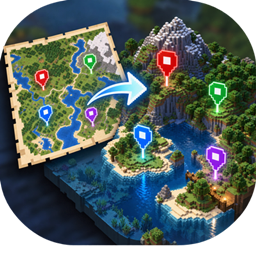
Sync JourneyMap waypoints to BlueMap markers automatically on your Minecraft server.
Description
Jm2Bm is a server-side Minecraft mod that connects JourneyMap and BlueMap, allowing you to display JourneyMap waypoints as markers on your BlueMap web map.
The mod automatically synchronizes selected waypoint groups, keeping your BlueMap markers up to date without manual updates.
Features
- Automatically syncs JourneyMap waypoints to BlueMap.
- Supports both Fabric and NeoForge.
- Updates markers when waypoints are added, changed, or removed.
- Supports multiple waypoint groups and custom marker icons.
- Includes simple server commands for managing synchronization.
- Runs entirely on the server, with no client installation required.
Requirements
- Minecraft Java Edition 26.3
- Fabric or NeoForge
- JourneyMap
- BlueMap
Installation
- Install Fabric or NeoForge on your server.
- Install JourneyMap and BlueMap.
- Download Jm2Bm and place the
.jarfile in your server’smodsfolder. - Restart your server.
- Configure waypoint group mappings using the configuration file or server commands.
Source Code
Jm2Bm is open-source and available on GitHub under the MIT License.
常见问题
Jm2Bm 支持哪些 Minecraft 版本?
Jm2Bm 支持 Minecraft Java 版 26.3,可用的加载器:Fabric / NeoForge。下载时注意选择和你游戏版本一致的文件。
Jm2Bm 怎么安装?
先用 PCL2 或 HMCL 启动器安装对应版本的 Fabric / NeoForge,再把下载的 .jar 文件放进游戏目录的 mods 文件夹,重新启动游戏即可。开启了版本隔离的,mods 文件夹在 versions/版本名 下面。


评论
登录后评论和评分