
JEI_Commands
Adds commands to open JEI recipe, usage, and effect views directly.这个模组为 JEI 添加命令,可直接打开配方、用途和 Jeed 药水效果界面。
截图
介绍
JEI Command Integration
Adds convenient commands to open JEI recipe, usage, and effect views directly in-game.
Commands
| Command | Description |
|———|————-|
| /jeiitemr <item> | Open recipe/source view (R key) |
| /jeiitemu <item> | Open usage/work view (U key) |
| /jeiiteme <effect> | Open JEED effect description page |
Example
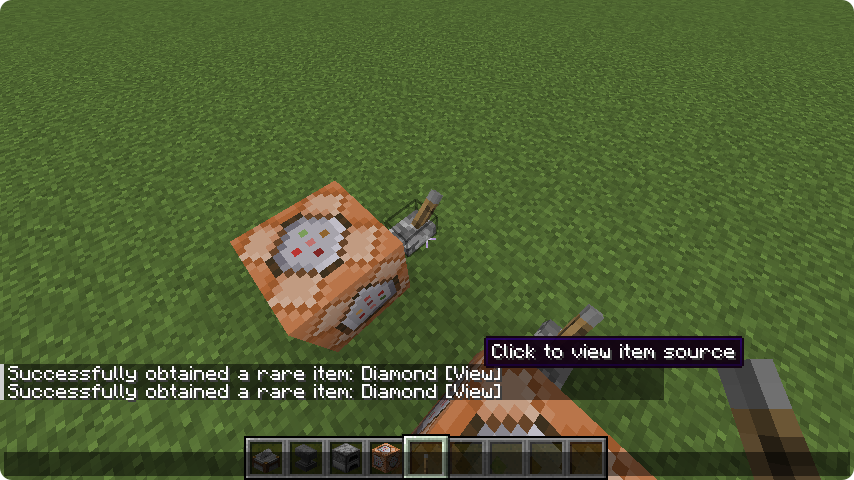
Click the /tellraw message to execute the command:
tellraw @a [{"text":"Successfully obtained rare item: Diamond","hoverEvent":{"action":"show_text","contents":"Click to view item source"}},{"text":" [Click to view]","clickEvent":{"action":"run_command","value":"/jeiitemr minecraft:diamond"}}]– Click to view sourcetellraw @a [{"text":"Successfully obtained rare item: Diamond","hoverEvent":{"action":"show_text","contents":"Click to view item usage"}},{"text":" [Click to view]","clickEvent":{"action":"run_command","value":"/jeiitemu minecraft:diamond"}}]– Click to view usage
JEI 快捷命令
为 JEI 添加快捷命令,可直接打开配方、用途和 Jeed 药水效果界面。
命令列表
| 命令 | 功能说明 |
|——|———|
| /jeiitemr <物品> | 打开 配方/来源界面(R 键) |
| /jeiitemu <物品> | 打开 用途/加工界面(U 键) |
| /jeiiteme <效果> | 打开 JEED 效果描述页面 |
示例
点击 /tellraw 消息即可执行命令:
tellraw @a [{"text":"触发效果:瞬移","hoverEvent":{"action":"show_text","contents":"点击查看效果描述"}},{"text":" [点击查看]","clickEvent":{"action":"run_command","value":"/jeiiteme minecraft:teleport"}}]– 点击查看 来源tellraw @a [{"text":"成功获得稀有物品:钻石","hoverEvent":{"action":"show_text","contents":"点击查看物品用途"}},{"text":" [点击查看]","clickEvent":{"action":"run_command","value":"/jeiitemu minecraft:diamond"}}]– 点击查看 用途
常见问题
JEI_Commands 支持哪些 Minecraft 版本?
JEI_Commands 支持 Minecraft Java 版 1.20.1,可用的加载器:Forge。下载时注意选择和你游戏版本一致的文件。
JEI_Commands 怎么安装?
先用 PCL2 或 HMCL 启动器安装对应版本的 Forge,再把下载的 .jar 文件放进游戏目录的 mods 文件夹,重新启动游戏即可。开启了版本隔离的,mods 文件夹在 versions/版本名 下面。运行环境:客户端和服务端都要装。

评论
登录后评论和评分