
截图
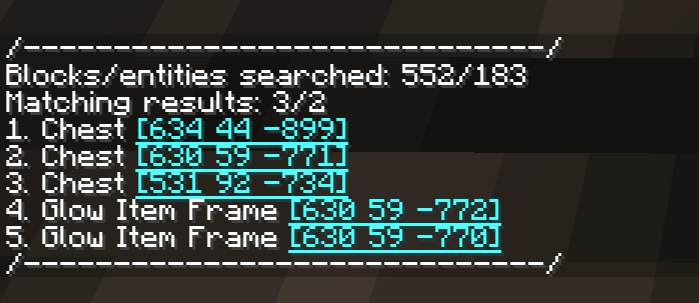
介绍
About
Allows performing a large-scale filtered search for items in all loaded/generated chunks.
Checks for items in (probably) all “storage” block entities and entities.
Runs on server side. Install on client for some useful keybinds.
YetAnotherConfigLib for config.
Incompatible with c2me (Concurrent Chunk Management Engine).
Usage
Full information – README.
/finditem id <id> – search for items with exact ID.
/finditem name <name> – search for items that contain string in default (custom, if present) name.
/finditem data <data> – search for items that contain string in their NBT/data components.
/finditem loot_table <loot_table> – search for lootable block entities with this loot table.
Special arguments: any, none, none_empty.
/finditem empty – search for empty chests or lootable containers (changed in config).
/finditem summary – collects and prints out information about all existing unique items and loot tables, including counts. Only uses global mode.
Search modes
Normal mode only checks currently loaded chunks & entities, runs instantly.
Global mode can be activated by adding global to the command: /finditem <search_type> <argument> global
Searches all generated chunks in the current dimension, may take a few seconds.
Additional
- You can teleport to search results in order by pressing a keybind (
Nby default). - Mod has keybinds to perform a normal/global item search using the currently held item (unset by default).
- Hovering mouse over the BE/entity names in search results will show the item stacks/loot tables that matched the search parameters.
- Mod will do nested search for shulker boxes and bundles found inside containers.
- Check the config! Useful stuff there.
常见问题
Item Finder 支持哪些 Minecraft 版本?
Item Finder 支持 Minecraft Java 版 1.20.1–26.3,共 7 个版本,可用的加载器:Fabric。下载时注意选择和你游戏版本一致的文件。
Item Finder 怎么安装?
先用 PCL2 或 HMCL 启动器安装对应版本的 Fabric,再把下载的 .jar 文件放进游戏目录的 mods 文件夹,重新启动游戏即可。开启了版本隔离的,mods 文件夹在 versions/版本名 下面。运行环境:仅服务端。
Vladomeme 的其他作品
查看全部 →
Monumenta Item Dictionary
A QOL mod for Monumenta, adding an in-game item dictionary.
Monumenta Item Dictionary
A QOL mod for Monumenta, adding an in-game item dictionary.

HPH
A configurable teammate-health display with widget/glowing options
评论
登录后评论和评分