
[v1.2.0] Item Scribe: Give Every Item its Own Story
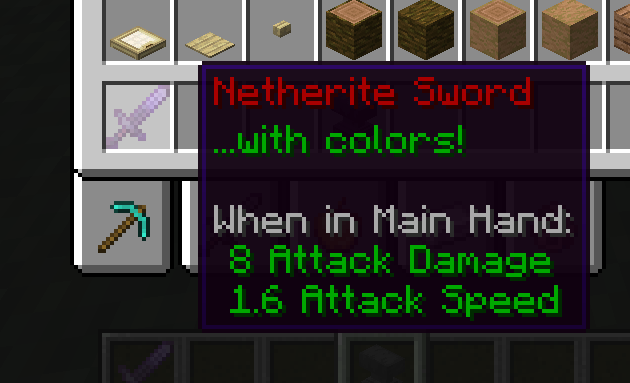
A mod that enables users to add custom lore, change names, colors, and clear enchants from their items.
截图



介绍
Give Every Item Its Own Story.
Current Version: 1.2.1
Item Scribe is a survival-friendly item customization mod that lets you customize nearly every aspect of your favorite items; all in survival.
Whether you’re building an RPG, decorating trophies, rewarding players, or making your favorite sword feel special, Item Scribe helps every item tell a story.
Perfect for:
- RPG Modpacks
- Adventure Maps
- Multiplayer Servers
- Content Creators
- Builders & Collectors
- FTB Quest Rewards
Features
Text Customization
- Custom Item Names
- Custom Lore & Tooltips
- Name & Tooltip Colors
- Bold, Italic, Underline, Strikethrough & Obfuscated Text
- Extensive Cosmetic Customization
Visual Effects
- Glowing Item Names
- Rainbow (
jeb_) Names - Upside-Down (
Dinnerbone/Grumm) Names - Stylized Text
- Wax Items to Prevent Further Editing
Item History
- Record the Day an Item Was Created
- Record Creation Coordinates
- Add Flavor Text
Vanilla-Friendly Recipes
Every customization is applied using intuitive Anvil recipes.
Examples include:
- Book & Quill – Edit lore
- Glass – Hide enchantments/tooltips
- Glowstone Dust – Glowing name
jeb_Name Tag – Rainbow names-
Dinnerbone/GrummName Tag – Upside-down names - Honeycomb – Wax items
- Axe – Unwax Items
- Compass – Record creation location
- Clock – Record creation date
- Amethyst Shard – Mystical styling
- Echo Shard – Ancient styling
- Nether Star – Fiery Styling
NEW! Enchantment Collapsing
Got a sword with 20 enchantments, taking up your whole screen?
Features:
- Configurable Max Displayed Enchants
- Shift to Show all Enchantments
- Dynamic Scaling per your Settings
- Enchantment Descriptions!
…and more.
Formatting Codes
Use & followed by a formatting code.
Colors
0-9 a-f
Formatting
&k Obfuscated&l Bold&m Strikethrough&n Underline&o Italic&r Reset
* As of 1.2.0, formatting codes can be combined.
Compatibility
✔ Vanilla Items
✔ Most Modded Items
✔ NeoForge 1.21.1
May conflict with mods that completely replace tooltip rendering.
Enchantment Descriptions might be an incompatibility – working on a toggle when the mod is installed to use their descriptions instead.
Some modded axes not tagged correctly might not be usable for dewaxing.
Tooltip overhaul is currently incompatible with colored/adjusted item names.
FAQ
Can I use this in my modpack?
Absolutely.
Please link back to this CurseForge page if your modpack is hosted on CurseForge.
Redistribution behind a paywall is not permitted.
Are other versions planned?
Possibly. Support for additional Minecraft versions or loaders depends on community demand.
What’s next?
Planned features include:
- Rich text editing directly from Book & Quills
- Additional cosmetic recipes
- More text effects
- Creative-only advanced editing
- Optional NBT/stat editing for creators
- World-generated, crafted, and dropped loot containing implicit format codes
Known Bugs:
Anvil render potentially still brokenRender order of tooltips (causes “jumping”)You can currently “apply” wrong enchantments with no effect.- Unable to combine enchantments (cr. personificational)
- Colored + glowing = permanent italics (cr. personificational)
Credits
Inspired by Scribe: Write your Item’s Lore by bushtaill.
Item Scribe is an independent project and is not affiliated with the original mod.
常见问题
[v1.2.0] Item Scribe: Give Every Item its Own Story 支持哪些 Minecraft 版本?
[v1.2.0] Item Scribe: Give Every Item its Own Story 支持 Minecraft Java 版 1.21.1,可用的加载器:NeoForge。下载时注意选择和你游戏版本一致的文件。
[v1.2.0] Item Scribe: Give Every Item its Own Story 怎么安装?
先用 PCL2 或 HMCL 启动器安装对应版本的 NeoForge,再把下载的 .jar 文件放进游戏目录的 mods 文件夹,重新启动游戏即可。开启了版本隔离的,mods 文件夹在 versions/版本名 下面。
评论
登录后评论和评分