
介绍
[LEGACY] InvMove (Forge)


New version: https://github.com/PieKing1215/InvMove
Minecraft Forge mod that adds the ability to walk around while in inventories
| Forge | GitHub | CurseForge | Modrinth |
| Fabric | GitHub | CurseForge | Modrinth |

Allows for moving, jumping, sprinting, etc. from within inventories.
Also disables the darkened background in inventories that don’t pause the game.
Both features can be toggled on or off per-inventory in the config menu.
This mod is client-side, but it may raise alarms if used on servers with anticheat.
I take no responsibility if you get banned or something because you used this on public servers.
Made after I couldn’t find an existing mod for this.
Releases
Requires Cloth Config (1.14+ only) so the config screen works.
Config (In-game)
Click to expand.
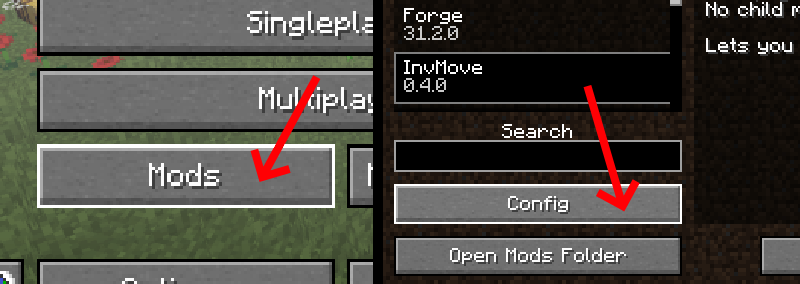

InvMove has an in-game config menu which can be accessed from the Forge mod list.
(for 1.14+ also highly recommend GameMenuModOption which adds the mod list button to the pause screen)
(note the config for 1.12 looks different but has generally the same layout)
In the config menu, you can find several options:
General:
- Enable: Enable the entire mod
- Debug Display: Enables a debug overlay that can help debug compatibility problems.
UI Movement:
- Move In Inventories: Enable movement in inventories
- Allow Sneaking: Allow sneaking in inventories (disabled by default because it’s distracting when shift-clicking)
- Allow Jumping: Allow jumping in inventories
- Text Field Disables Movement: Disable movement when a text field is focused (like search bars or in an anvil)
- (Expandable categories that let you enable/disable movement for certain inventories)
UI Background:
- Hide Inventory Backgrounds: Hides the background tint while in inventories.
- (Expandable categories that let you enable/disable the background for certain inventories)
Compatibility / Mod Support
Click to expand.

(Note: Corail Woodcutter is no longer supported)
As of version 0.4.0+, InvMove has actual mod support.
InvMove has specific support for certain mods, but any GUIs from unrecognized mods are added into the config dynamically and can be manually enabled.
Unrecognized GUIs will only appear in the config once they have been opened/seen in-game.
Explicitly supported mods have their own sections in the config, and come with tested default settings.
If you find problems with any of the explicitly supported mods, please start a ticket in the issue tracker.
If there’s a mod you want to be added, also please start a ticket in the issue tracker, especially if it doesn’t work enabling it from the “unrecognized” section of the config.
(The initial list of supported mods was arbitrarily chosen from a mod pack I’m playing.)
(More are being added mostly by going through curseforge sorted by popularity)
InvMove explicitly supports the following mods (as of version 0.4.6):
- Botania (1.12-1.16.1)
- CC: Tweaked
- Charm (1.12-1.15)
- Cooking for Blockheads
- Create (1.14-1.15)
- Curios API (1.14+)
- EmbellishCraft (1.14-1.16.1)
- Ender Storage 1.8.+ (1.12-1.15)
- Engineer’s Decor
- FreeCamera (1.12)
- Immersive Engineering (1.12-1.16.1)
- Industrial Foregoing (1.12-1.16.1)
- Iron Chests
- ItemPhysic Full
- Just Enough Items (JEI)
- Locks (1.14+)
- Mekanism (1.12-1.16.1)
- Mekanism Generators (1.14-1.16.1)
- MrCrayfish’s Furniture Mod (1.14-1.16.1)
- Music Maker Mod (1.14-1.15)
- Optifine
- Patchouli
- Quark (1.12-1.16.1)
- Refined Storage
- Waystones (1.12-1.16.1)
Usage
Feel free to use in packs if you wish.
Do not download this mod from anywhere other than the InvMove GitHub, CurseForge, or Modrinth page.
This mod may not be reposted to any other third-party websites.
The mod is licensed under the GNU Lesser General Public License v3.0
Upcoming
More mod compatibilities, bug fixes, and code cleanup will come as v0.4.X.
Once it’s stable and has a good amount of compatibilities, it’ll become v1.0.0.
常见问题
[LEGACY] InvMove (Forge) 支持哪些 Minecraft 版本?
[LEGACY] InvMove (Forge) 支持 Minecraft Java 版 1.12.2–1.16.5,共 8 个版本,可用的加载器:Forge。下载时注意选择和你游戏版本一致的文件。
[LEGACY] InvMove (Forge) 怎么安装?
先用 PCL2 或 HMCL 启动器安装对应版本的 Forge,再把下载的 .jar 文件放进游戏目录的 mods 文件夹,重新启动游戏即可。开启了版本隔离的,mods 文件夹在 versions/版本名 下面。运行环境:仅客户端。
PieKing1215 的其他作品
查看全部 →
InvMove
添加了在物品栏界面中四处走动的能力

[LEGACY] Drip Sounds (Forge)
为 Forge 添加滴落粒子落地音效的模组

Drip Sounds
为滴落粒子落地添加音效,并加入方块粒子设置

InvMoveCompats
InvMove的附属模组,添加了更多模组的兼容支持
评论
登录后评论和评分