Inventory Customisation
Give your inventory a new look with custom colors, adjustable transparency, themed creative tabs, and a live-preview settings screen customisation
截图
介绍
Make your inventory match your style. Customize the appearance of your inventory and hotbar with your own colors, transparency settings, and preset themes—all from an in-game settings screen.
Features
-
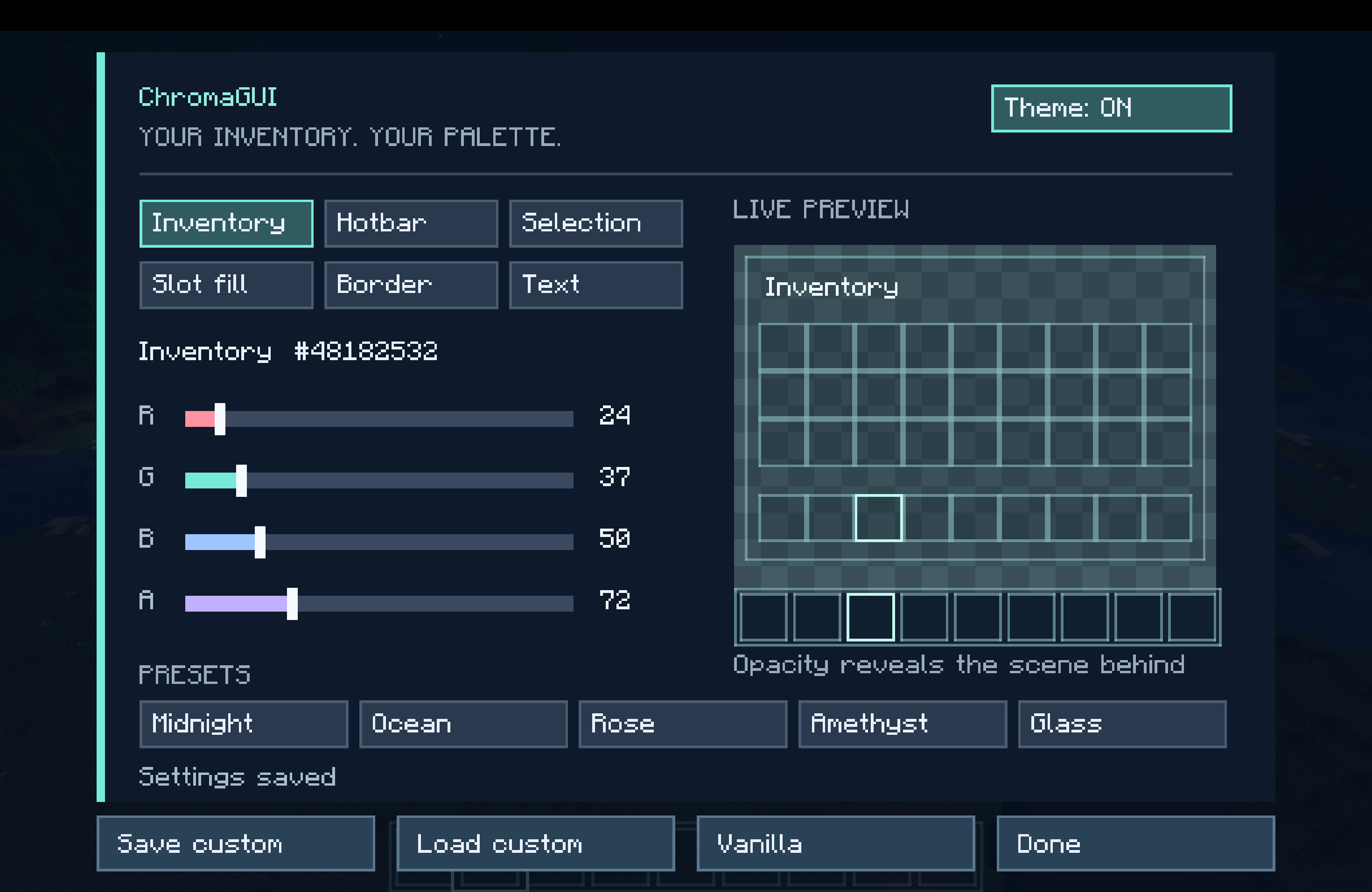
Inventory styling: Change background, slot, border, and inventory-label colors.
-
Hotbar customization: Set its color, transparency, and selected-slot highlight.
-
Creative inventory support: Matching tab backgrounds and scrollbar styling, including mod-added tabs that use Minecraft’s standard creative inventory.
-
Live preview: See your changes while adjusting your settings.
-
Built-in themes: Choose Midnight, Ocean, Rose, Amethyst, or Glass.
-
Save your style: Settings persist between sessions, with a separate custom preset you can save and reload.
-
Restore vanilla: Switch back to Minecraft’s original appearance whenever you like.
How to use
Press K while playing, or click the settings button in Options or your inventory. Choose a component, adjust its color and opacity, then select Done to save.
Client-side only
No server installation or resource pack is required. The mod changes how your inventory looks while preserving normal item handling.
Supported versions
-
Minecraft 1.21.1: NeoForge and Forge
-
Minecraft 1.20.1: Forge
-
Minecraft 1.12.2: Forge
-
Minecraft 1.7.10: Forge
Install only the JAR matching your Minecraft version and loader.
Compatibility
Styles the standard survival and creative inventories. Chests, machines, and other custom container screens keep their existing appearance. Mods that replace the entire inventory screen or tab renderer may need separate compatibility support.
Play this pack with friends
-
Choose your server: Visit Apex Hosting, select Minecraft hosting, and choose a plan suitable for this modpack.
-
Complete checkout: Create your account and follow the payment steps.
-
Install the modpack: Open your server panel and select this pack if it’s available in the installer. If it isn’t listed, follow Apex’s custom modpack instructions or contact support.
-
Start playing: Start the server, copy its address, and share it with your friends. Everyone needs the same modpack version installed.
Unsure which plan to choose? Ask Apex support before buying and tell them the pack name and how many people will play.
常见问题
Inventory Customisation 支持哪些 Minecraft 版本?
Inventory Customisation 支持 Minecraft Java 版 1.7.10–1.21.1,共 4 个版本,可用的加载器:Forge / NeoForge。下载时注意选择和你游戏版本一致的文件。
Inventory Customisation 怎么安装?
先用 PCL2 或 HMCL 启动器安装对应版本的 Forge / NeoForge,再把下载的 .jar 文件放进游戏目录的 mods 文件夹,重新启动游戏即可。开启了版本隔离的,mods 文件夹在 versions/版本名 下面。
CursedFoundry 的其他作品
查看全部 →
Naruto The Shinobi World [Ultimate Naruto Map]
火影忍者:忍者世界【终极火影地图】——《火影忍者疾风传》动漫地图,木叶隐村、砂隐村、雾隐村、云隐村、岩隐村,五大国,博人传,火影忍者世界地图!

Naruto Legacy of the Shinobi (Ninshu Origins)
在这款火影忍者主题的 Minecraft 冒险中铸就你的传奇。掌握忍术,选择你的道路,探索鲜活的世界,建立你的村庄,成为你注定要成为的忍者。
Tensura Rise of Tempest (Tensura Reincarnated)
体验《关于我转生变成史莱姆这档事》主题的 Minecraft 整合包 Tensura: Rise of Tempest,灵感来自利姆鲁·坦派斯特!探索充满魔法、强大能力、怪物、Boss 战、RPG 成长和探索的奇幻世界。
Mob Health Hud (Damage Indicator)
生物生命值HUD(伤害显示)敌人血量显示、Boss血条、血量悬浮层、生物生命值、血量追踪、战斗HUD、血量指示模组、Forge、伤害显示。用于CursedFoundry的动漫主题Minecraft整合包《火影忍者》《关于我转生变成史莱姆这档事》《死神》
评论
登录后评论和评分