
截图


介绍
Inventory Color Changer

Hotkeys
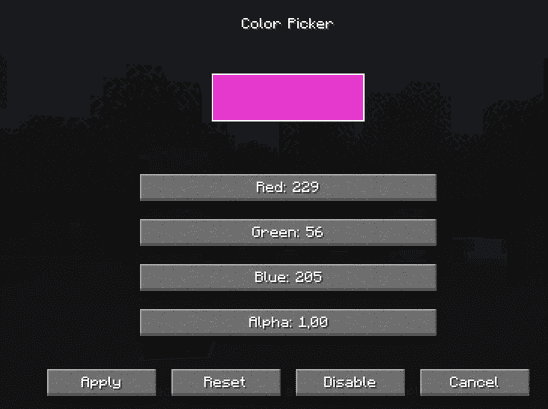
- Press V for opening the Screen to customize the Color (NEW rewritten 2.0 Version)
- Press K for opening the Screen to customize the Color (OLD Alpha Version)
- Press O (the Letter) to toggle/disable the Color
NEW REWRITTEN 2.0 VERSION
This Mod got completely rewritten. It has none of the old bugs, works better and multiple UIs can have the color overlay now. ALL of them can be toggled if not wanted.
Why will the Alpha Version stay
If you want to see the old version or want to modify this version, feel free to do it.
I tried to mark them clearly so you can easily see which is the new and which the old buggy Version. Feel free to use it.
The old Alpha Version creates a Bug with the Item Durability Bar. They are behind the Color layer, so they disappear when they are in your Inventory. This bug is already fixed in the newer versions, that arent marked as Alpha.
Help
When you know how to fix this or have any Idea for this Mod or just want to help me improve the User Experience, then feel free to help me via Github for example.
https://github.com/BaGaJa004/Inventory-Color-Changer
Screen
常见问题
Inventory Color Changer 支持哪些 Minecraft 版本?
Inventory Color Changer 支持 Minecraft Java 版 1.20.4–1.21.11,共 8 个版本,可用的加载器:Forge。下载时注意选择和你游戏版本一致的文件。
Inventory Color Changer 怎么安装?
先用 PCL2 或 HMCL 启动器安装对应版本的 Forge,再把下载的 .jar 文件放进游戏目录的 mods 文件夹,重新启动游戏即可。开启了版本隔离的,mods 文件夹在 versions/版本名 下面。运行环境:客户端和服务端都要装。
BaGaJa 的其他作品
查看全部 →
Random Drops Mod
When you break a block, the block will drop a random Item. Always

Random Chunks
Chunk(s) get randomized, thats basically it

Random Mob Drops
Killed Mobs will now drop random items

Random Chest Loot
When you open a new chest, that spawns, its Loot is randomized
评论
登录后评论和评分