
Interactive Block Prompt
A Simple but Customizable QoL Mod which Overhaul the Crosshair - Adding Interactive Indicators to Minecraft.
截图
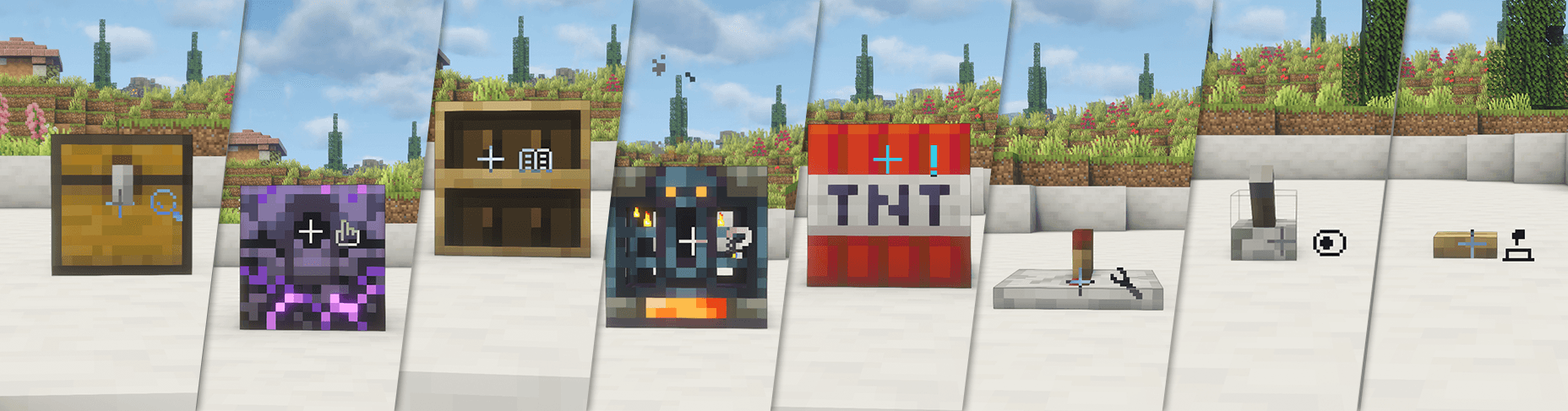
介绍

Interactive Block Prompt is a QoL mod designed for map and modpack creators. It adds more functionality to the crosshair, introducing several icon indicators on its right side. These icons appear when the player looks at specific blocks, offering a more intuitive way to guide player interaction.
The mod itself does not add new content, only including a few block prompts as examples. **Creators can customize it freely by editing the config (Default location: config/ibp/indicators folder), or modifying tags via Datapacks or mods like KubeJS. This allows you to choose which icon is displayed for each block or item as you wish. You can also adjust the position of the indicators via the config file.
Current Icons and Corresponding Tags:
- 🔍 Search –
ibp:search - 👆 Click –
ibp:click - 📖 Book –
ibp:book - ❓ Point of Interest –
ibp:interest - ❗ Notice –
ibp:notice - 🔧 Wrench –
ibp:wrench - ⏺️ Button –
ibp:button - 🕹️ Toggle –
ibp:toggle
Example Config
{
  "rules": [
    {
      "block": "minecraft:barrel"
    },
    {
      "block_tag": "minecraft:signs"
    }
  ]
}
Special thanks to TimyaSifer for drawing the adorable icons!
The mod is continuously being updated, with plans to support more Minecraft versions and add more features in the future.
*You can be free to use this mod in your modpacks, and you can even distribute it directly without needing to redirect back to this link.
常见问题
Interactive Block Prompt 支持哪些 Minecraft 版本?
Interactive Block Prompt 支持 Minecraft Java 版 1.20.1–26.1.2,共 3 个版本,可用的加载器:Forge / NeoForge。下载时注意选择和你游戏版本一致的文件。
Interactive Block Prompt 怎么安装?
先用 PCL2 或 HMCL 启动器安装对应版本的 Forge / NeoForge,再把下载的 .jar 文件放进游戏目录的 mods 文件夹,重新启动游戏即可。开启了版本隔离的,mods 文件夹在 versions/版本名 下面。
HaooooZhang 的其他作品
查看全部 →
Think before Drop
丢弃物品前按两次 Q

Harvista
「Harvista」is a leisure, development-oriented sweet modpack.

Harvista
Harvista is a leisure, development-oriented sweet modpack.

Eirin Yagokoro‘s Pharmacy
A Touhou Project re-creation which adds some potions from House of Eternity
评论
登录后评论和评分