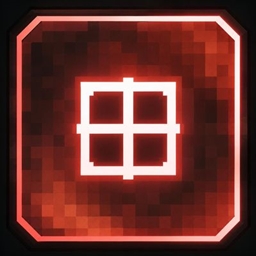
InteractBox
TargetBox adds a clean interactive crosshair box that appears when you're looking at entities, Block Entities, and interactive blocks. Simple, lightweight, and easy to use.
介绍
🎯 Interact Box
Interact Box is a lightweight client-side utility mod that adds a clean box around your crosshair whenever you are looking at an entity or an interactable block.
The box makes it easier to see when you’re targeting something you can interact with, while keeping the vanilla Minecraft crosshair visible.
✨ Features
-
🎯 Clean interaction box around the crosshair
-
👤 Works with entities
-
🧱 Works with interactive blocks
-
🎨 16 Minecraft bed colors
-
📍 Move the box pixel by pixel
-
⌨️ Press R to toggle the box
-
⚡ Lightweight and simple
-
💻 Client-side
🎮 Commands
Toggle
Turn the box on:
/interactcrosshair turn on
Turn the box off:
/interactcrosshair turn off
You can also press R to toggle it.
🎨 Change Color
Change the box color:
/interactcrosshair color <color>
Available colors:
white • orange • magenta • light_blue • yellow • lime • pink • gray • light_gray • cyan • purple • blue • brown • green • red • black
Example:
/interactcrosshair color red
📍 Change Position
Move the box horizontally:
/interactcrosshair position x 1
Moves the box 1 pixel to the right.
/interactcrosshair position x -1
Moves the box 1 pixel to the left.
Move the box vertically:
/interactcrosshair position y 1
Moves the box 1 pixel up.
/interactcrosshair position y -1
Moves the box 1 pixel down.
You can also use larger values:
/interactcrosshair position x 5
Moves the box 5 pixels to the right.
🔄 Reset Position
Reset the box to its default position:
/interactcrosshair position reset
⚙️ Default Position
By default, the Interact Box is positioned 1 pixel to the right and 1 pixel above the center of the vanilla crosshair.
🪶 Lightweight
Interact Box is designed to be simple, lightweight, and easy to configure. It adds a useful visual indicator without changing the normal Minecraft gameplay.
常见问题
InteractBox 支持哪些 Minecraft 版本?
InteractBox 支持 Minecraft Java 版 26.2,可用的加载器:Forge。下载时注意选择和你游戏版本一致的文件。
InteractBox 怎么安装?
先用 PCL2 或 HMCL 启动器安装对应版本的 Forge,再把下载的 .jar 文件放进游戏目录的 mods 文件夹,重新启动游戏即可。开启了版本隔离的,mods 文件夹在 versions/版本名 下面。
SemsLife 的其他作品
查看全部 →
Mr duck totem
This mod is for people that loves ducks because you now have an totem duck
BananaMob
this is an banana mod

CrystalOres
This is a mod that bring extra ores,tools and gear
BlockBingo
this mod gives minecraft players Bingo
评论
登录后评论和评分