
Instrucciones
It's an instruction system in the style of Eufonia Studio, like what was shown in Dedsafio, Squid Game, etc. This mod adds an instruction screen that looks like you're playing a game, or whatever you like.
截图
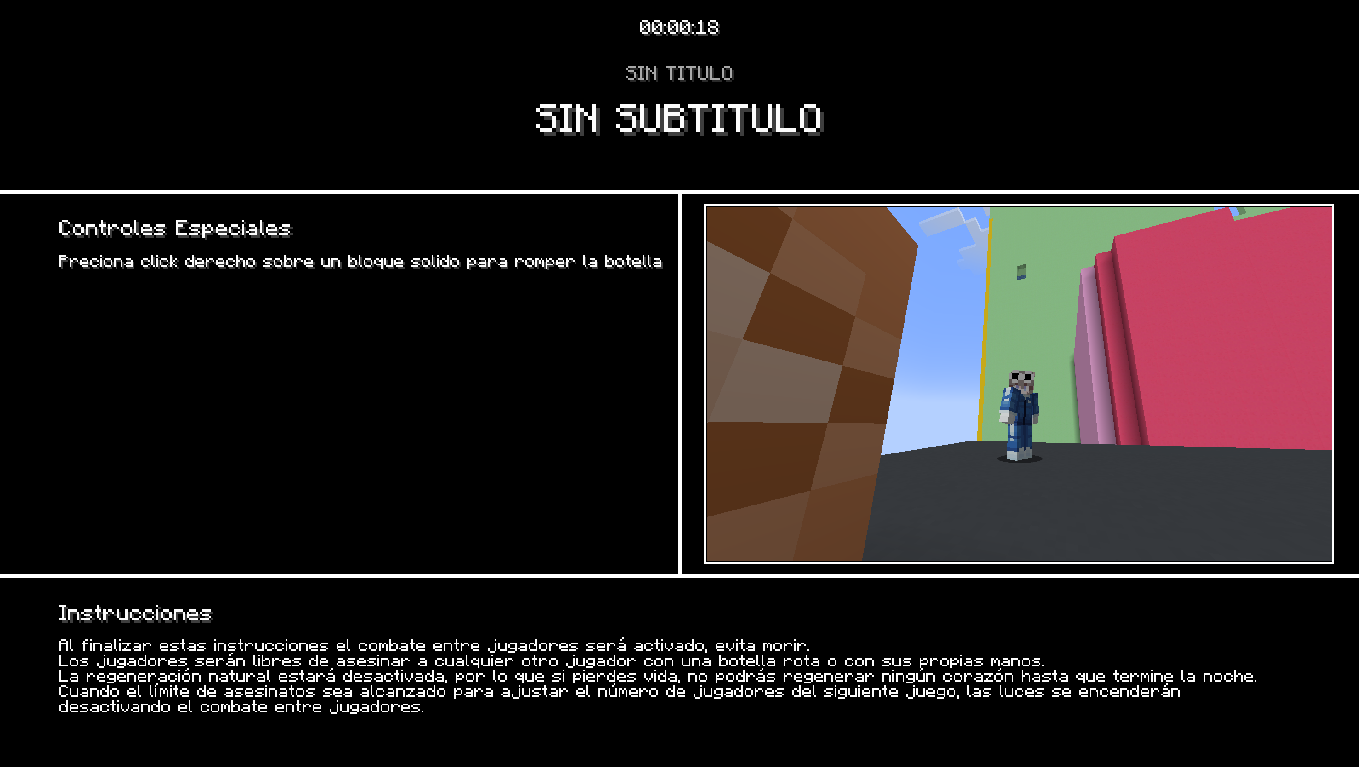
介绍
📺 Eufonia Instructions (fan)
The Cinematic Event Framework for Minecraft Servers
Eufonia Instructions is a high-performance administrative tool designed to deliver professional, synchronized visual overlays to all players. Whether you are hosting a massive tournament, a roleplay event, or a community challenge, this mod allows you to broadcast rules, phase transitions, and real-time instructions with a premium cinematic feel.
✨ Core Features
- 🌐 Global Synchronization: Every update, timer change, or text edit is instantly synced across the entire server to all connected clients.
- 🎭 Cinematic Immersion: Features a smooth 2.5-second fade-in/out system and built-in camera shader support to transform the atmosphere of your event.
- ⏱️ Integrated Event Timer: A centralized, high-visibility countdown clock to keep every player informed of event phases or objective deadlines.
- 🎨 Dynamic Styling & Branding: Real-time control over colors (Hex & 80+ presets), text scales, and element positioning. Supports custom logos in screen corners.
- 📁 Config Presets: Save and load different HUD layouts as
.jsonfiles to swap between complex event phases instantly.
⌨️ Command Reference (/luxep)
Master your event with the complete command suite. (Requires OP Level 4)
📂 1. Scene & Display Control
| Command | Description |
| :— | :— |
| /luxep escena mostrar [hh:mm:ss] | Opens the HUD globally (use 0 for permanent display) |
| /luxep escena mostrar_a <players> | Shows the HUD only to specific users or groups |
| /luxep escena ocultar | Closes the HUD for everyone instantly |
| /luxep escena bloquear_hud <true\|false> | Toggles the F1 key blocking for maximum focus |
🎨 2. Visual Customization
| Command | Description |
| :— | :— |
| /luxep ui texto <principal\|secundario> <text> | Updates main titles (use ; for line breaks) |
| /luxep ui color fondo <color1> [color2] | Sets solid or gradient backgrounds (Hex or Names) |
| /luxep ui color <element> <color> | Changes color for titles, clock, lines, or instructions |
| /luxep ui escala <element> <value> | Adjusts sizes for text and logos (e.g., 1.5) |
| /luxep ui offset <element> <x> <y> | Precise X/Y positioning for logos and titles |
⚙️ 3. Content & File Management
| Command | Description |
| :— | :— |
| /luxep controles <add\|mod\|del\|clear> | Manage the specific action/keybind list on screen |
| /luxep logos <primary\|secondary> <path> | Load custom corner images from the mod folder |
| /luxep archivo <save\|load\|list> | Manage your professional .json configurations |
Developed by Sofyx
常见问题
Instrucciones 支持哪些 Minecraft 版本?
Instrucciones 支持 Minecraft Java 版 1.20.1–1.21.1,共 7 个版本,可用的加载器:Fabric / Forge。下载时注意选择和你游戏版本一致的文件。
Instrucciones 怎么安装?
先用 PCL2 或 HMCL 启动器安装对应版本的 Fabric / Forge,再把下载的 .jar 文件放进游戏目录的 mods 文件夹,重新启动游戏即可。开启了版本隔离的,mods 文件夹在 versions/版本名 下面。运行环境:客户端和服务端都要装。
luxfirostudios 的其他作品
查看全部 →
Subtitle+
Adds customizable on-screen subtitles for events, story maps, and immersive gameplay.

Leaderboard+
Leaderboard is the ultimate solution for rankings on Minecraft servers.

WhiteScreen
🌐 WhiteScreen: The Ultimate Hardcore Loading System WhiteScreen is a powerful server-side and client-side utility designed for hardcore communities and event organizers. It creates a synchronized waiting experience, ensuring all players are ready before t

LuxSopport
💠 The ultimate administrative toolkit for cinematic servers. Manage 3D waypoints, custom tablists, cuboid regions, and enforce player restrictions with ease. Perfect for Roleplay and advanced server management.
评论
登录后评论和评分