
Instant XP Gain
Instantly gain XP without the need to manually collect experience orbs while improving performance!
截图

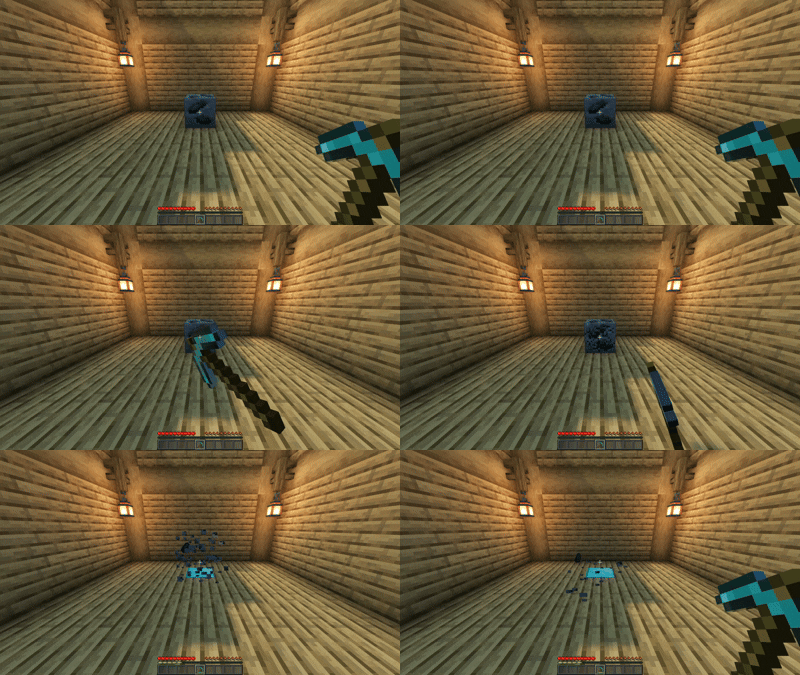
介绍
_Instant XP Gain_ is a mod designed for both performance and convenience. It removes the spawning of XP orbs during gameplay and directly grants XP to players, eliminating the need to collect orbs manually. By bypassing XP orb creation, this mod not only optimizes game performance by reducing entity load but also simplifies gameplay by removing the hassle of retrieving scattered XP.
_Why is this mod larger in size than similar ones?_
This mod is larger because it considers every single game mechanic responsible for XP generation, making it significantly more optimized than similar alternatives that often rely on tick-based updates or a single centralized system that requires constant recalculation, ultimately reducing efficiency.
_Key features:_
- Instantly grants XP to the player from every source of the game.
- Helps optimize server and client performance.
- It prevents the abuse of XP-based lag machines.
- Fully compatible with vanilla mechanics that depend on XP.
- Does not remove the XP drop from defeating the Ender Dragon since distributing it equally ensures fairness in multiplayer environments.
Whether you’re playing in a singleplayer world or managing your server, Instant XP Gain helps streamline gameplay while maintaining balance, fairness, and improving performance.
This mod has full compatibility with most mods that introduce new mechanics regarding XP or alter existing ones.
I will soon release this mod for additional Minecraft versions. To stay up to date for future updates and releases, _consider following this mod!_
If you found any unintended behaviour, please report it via the provided issue tracker.
Feel free to include this mod in your modpack!
常见问题
Instant XP Gain 支持哪些 Minecraft 版本?
Instant XP Gain 支持 Minecraft Java 版 1.20–26.2,共 23 个版本,可用的加载器:Fabric。下载时注意选择和你游戏版本一致的文件。
Instant XP Gain 怎么安装?
先用 PCL2 或 HMCL 启动器安装对应版本的 Fabric,再把下载的 .jar 文件放进游戏目录的 mods 文件夹,重新启动游戏即可。开启了版本隔离的,mods 文件夹在 versions/版本名 下面。运行环境:客户端 / 服务端。


评论
登录后评论和评分