
Info+ 📑
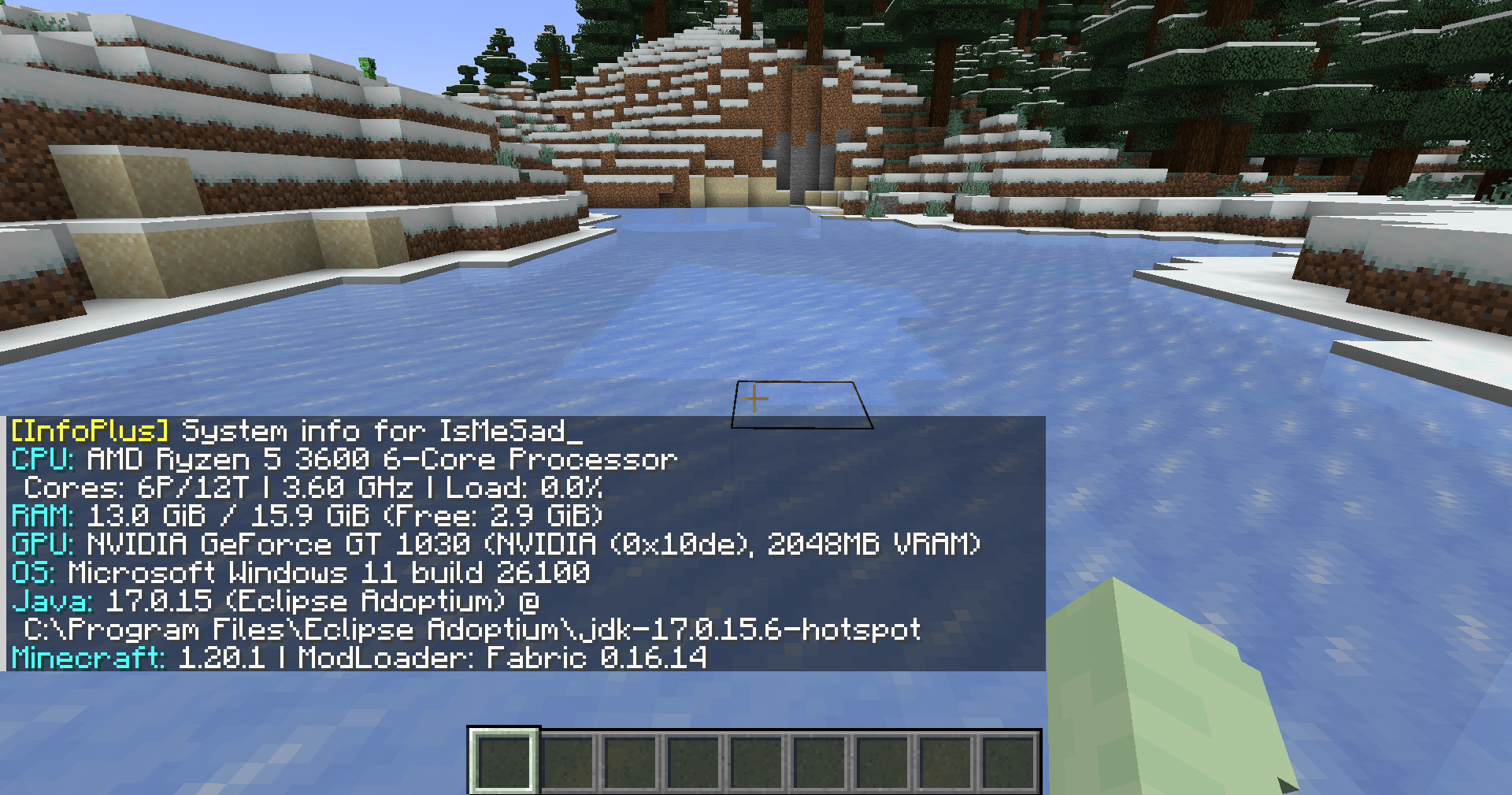
Show detailed system information directly in Minecraft chat. View CPU, RAM, GPU, OS, Java, Minecraft, and Loader details. Built for debugging, player support, server checks, and modpack troubleshooting.
截图
介绍

InfoPlus
Show detailed system information directly in Minecraft chat.
View CPU, RAM, GPU, OS, Java, Minecraft, and Loader details.
Built for debugging, player support, server checks, and modpack troubleshooting.
Features
- View CPU information, including model, vendor, cores, threads, frequency, and usage
- View RAM usage, including total, used, available, and swap/virtual memory
- View GPU details, including model, vendor, VRAM, device ID, and version info
- View operating system information, uptime, process count, and boot time
- View Java runtime information, Minecraft version, loader name, and loader version
- View disk, network, battery, firmware, motherboard, and file system information when using full mode
- Supports both local client checks and multiplayer player checks
- Outputs information in a clear chat-friendly format
Screenshot
Usage
Local system info
Run the command in Minecraft chat:
/infoBasic system information:
/info basicFull system information:
/info fullYou can also use the alias:
/infoplusMultiplayer player info
Request system information from another player:
/info <player>Request basic information from another player:
/info <player> basicRequest full information from another player:
/info <player> fullAlias:
/infoplus <player> fullServer-side player requests require permission level 2.
Command Summary
| Command | Description |
| ———————- | ———————————————– |
| /info | Shows your basic system information |
| /info basic | Shows your basic system information |
| /info full | Shows your full system information |
| /info <player> | Requests basic system information from a player |
| /info <player> basic | Requests basic system information from a player |
| /info <player> full | Requests full system information from a player |
| /infoplus | Alias for /info |
Privacy Notice
InfoPlus can display hardware and runtime information such as CPU, RAM, GPU, operating system, Java version, Minecraft version, loader version, and other system details.
Full mode may include more detailed information depending on the enabled options. Server-side player requests are limited to users with the required permission level.
Use this mod responsibly and avoid sharing sensitive system information publicly.
Requirements
- Minecraft 1.20.1
- Fabric Loader
- Fabric API
- Java 17
Download
Source Code
The source code is available on GitHub:
https://github.com/TamKungZ/infoplus
License
This project is licensed under the MIT License.
See the LICENSE file for more details.
|
常见问题
Info+ 📑 支持哪些 Minecraft 版本?
Info+ 📑 支持 Minecraft Java 版 1.20–1.21.5,共 8 个版本,可用的加载器:Fabric / Forge / Quilt。下载时注意选择和你游戏版本一致的文件。
Info+ 📑 怎么安装?
先用 PCL2 或 HMCL 启动器安装对应版本的 Fabric / Forge / Quilt,再把下载的 .jar 文件放进游戏目录的 mods 文件夹,重新启动游戏即可。开启了版本隔离的,mods 文件夹在 versions/版本名 下面。运行环境:客户端 / 服务端。
TamKungZ_ 的其他作品
查看全部 →
Let Your Friend Eating! (Can feed other player)
Players can feed others directly by right-clicking.

Let Your Friend Eating!
Players can feed others directly by right-clicking.

Stardew Valley Food
Cook and enjoy your favorite Stardew Valley meals in Minecraft.

Japan Props
The Japan Props mod for Minecraft introduces a range of Japanese street props to enhance the realism of your Minecraft world. With items such as traffic cones, bicycle barriers, traffic lights, and more.
评论
登录后评论和评分