
Infinite Upgrades
Hunt mobs and use their souls to upgrade your items to +1, +2, +3, etc. The classic MMORPG grindfest! 👌
截图


介绍



What is InfiniteUpgrades?
InfiniteUpgrades brings the classic MMO-style +1, +2, +3… enhancement loop to Minecraft.
Each success boosts your item level while the next attempt gets harder. Collect souls in a Soul Cage and infuse gear at an Angel or Demon statue—each path upgrades differently.
Angel vs Demon (How upgrades apply)
- Angel Infusion — _Balanced growth_ Applies the per-level step to all eligible stats on success. Great for steady, even progression (damage, speed, armor, etc.).
- Demon Infusion — _Min–max power_ Applies a (usually larger) step to one random eligible stat on success. Perfect for pushing a single attribute to the extreme.
Reputation System (affects success chances)
Your actions build a Reputation between Angel and Demon.
- Angel-leaning reputation slightly boosts Angel attempts and penalizes Demon.
- Demon-leaning reputation boosts Demon and penalizes Angel.
- The bonus/penalty is configurable and clamped, so it never gets out of hand. You can pivot sides—but expect a penalty until your reputation shifts.
Statues
| Angel statue |Demon statue |
| ———— |———— |
|  |
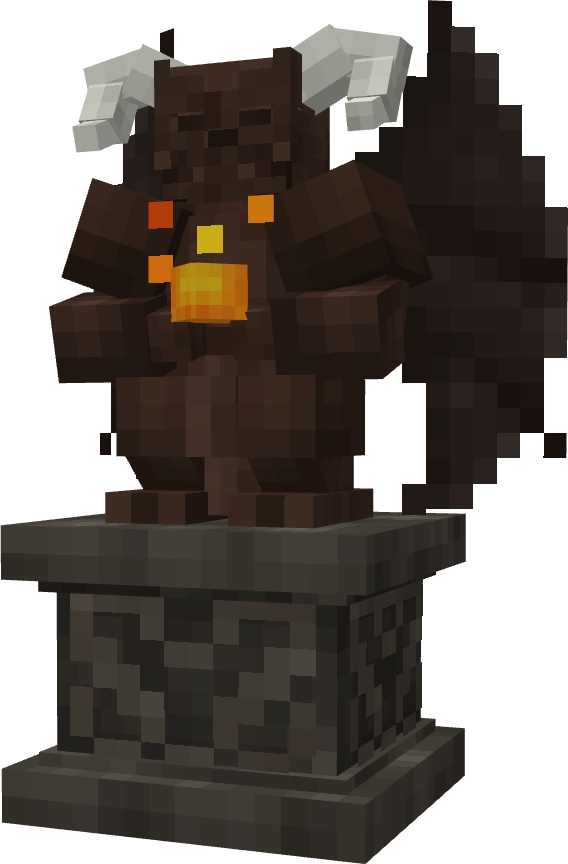 |
Core Gameplay Loop
- Craft a Soul Cage and carry it to gather _souls_ from defeated mobs.
- Place an Angel or Demon statue to access the infusion UI.
- Infuse your gear: item (left), Soul Cage (right), then review success chance, soul cost, and what will upgrade.
Success permanently improves stats and increments the item’s +level.
Failure adjusts your Reputation and sets up your next decision—double down or switch sides.
What Can Improve?
Vanilla combat attributes are supported out of the box (attack damage, attack speed, armor, armor toughness, knockback resistance).
Tools also benefit via a special Block Speed bonus so pickaxes/shovels/axes get meaningful progression too.
Modded attributes are supported but need to be added manually by server admin in the config.
Fully Configurable
Everything lives in world/serverconfig/infiniteupgrades-server.toml:
- Max level cap
- Chance curve (flat decrement or exponential; per-level overrides)
- Per-attribute rules (percent vs additive, direction, weights, rounding)
- Angel/Demon multipliers (per-step ritual scaling)
- Souls cost formula (base, exp base, scale, or exact overrides)
- Final multipliers per stat (e.g., halve/double specific stat effects)
- Reputation range, bonus-per-point, and clamp
How to Play (Quick Start)
- Make a Soul Cage → collect souls while fighting.
- Open a statue → insert item + Soul Cage.
- Check the right panel → success chance, cost, and affected stats.
- Choose → Angel for consistent all-stat growth, Demon for focused spikes.
Multiplayer & Modpacks
- Everything is fully server-authoritative: client-sided cheats won’t matter.
- Pack-friendly configuration to match any progression curve.
FAQ
What can I configure?
Everything. 👍
Is there a hard level cap?
Default cap is generous (20) and fully configurable.
What if my item has no combat attributes?
Tools still progress via Block Speed i.e. how quickly you break blocks. And, pack makers can add custom rules for anything.
Does failure destroy items?
No, failures shift Reputation (which influences future chances) and reverts back the latest upgrade.
Tips
- Angel = consistency, Demon = min–max burst.
- Lean your Reputation toward your chosen side to pad your odds.
- Pack authors: a reputation clamp around 10–20% often feels fair.
Balancing feedback is welcome—share configs and scenarios in the issues/discussions so we can tune further.
常见问题
Infinite Upgrades 支持哪些 Minecraft 版本?
Infinite Upgrades 支持 Minecraft Java 版 1.20.1–1.21.1,共 2 个版本,可用的加载器:Forge / NeoForge。下载时注意选择和你游戏版本一致的文件。
Infinite Upgrades 怎么安装?
先用 PCL2 或 HMCL 启动器安装对应版本的 Forge / NeoForge,再把下载的 .jar 文件放进游戏目录的 mods 文件夹,重新启动游戏即可。开启了版本隔离的,mods 文件夹在 versions/版本名 下面。运行环境:客户端和服务端都要装。
Z2SIX 的其他作品
查看全部 →
EZ Actions
适用于任意模组的轮盘菜单,支持空按键绑定、多命令执行、API 调用等更多功能。

Timeline
共享进度时间线,配有自定义日历和名人堂

Better Sparse Structures
Sparse Structures, but Better

Timeline
A shared advancement timeline with a custom calendar and Hall of Fame
评论
登录后评论和评分