
截图

介绍
ImmichMC
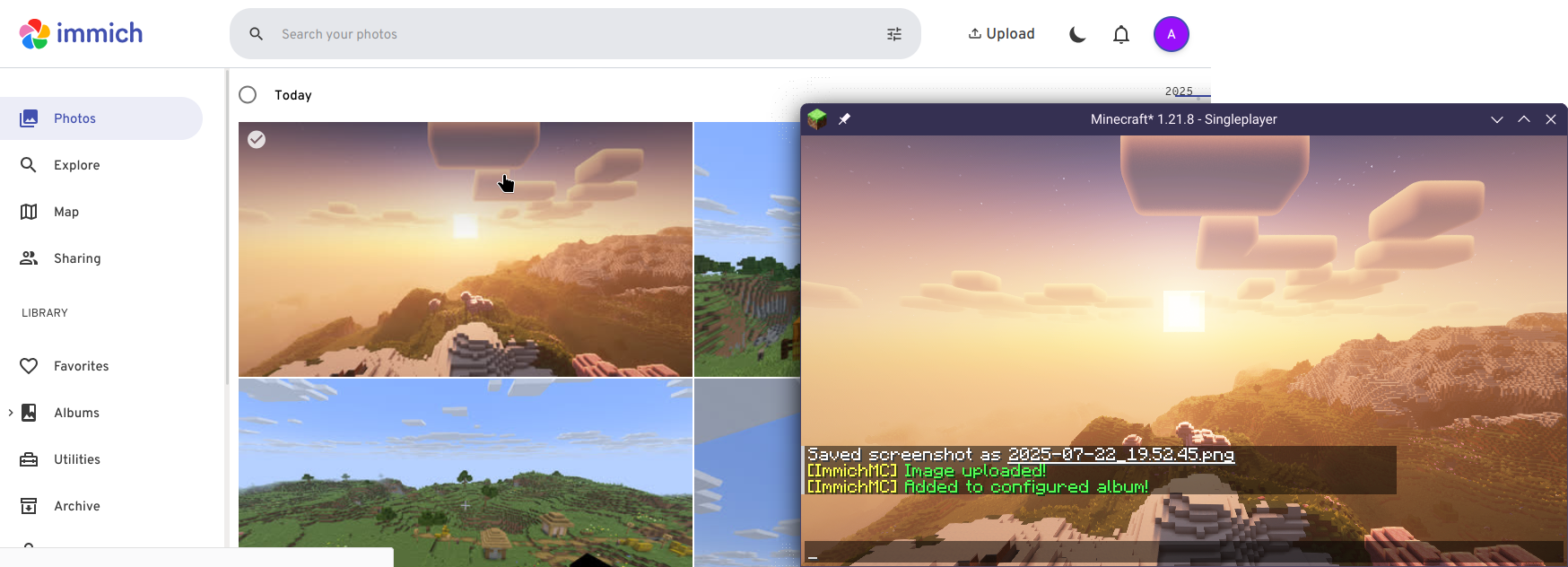
A client-side mod that automatically uploads your screenshot to an Immich instance of your choice, with option for auto-assigning to a specified album.
Works on Minecraft Fabric 1.21.1/1.21.8, tested on Immich v1.134.0
Prerequisite
- Immich is self-hosted software, you first need to have an Immich instance with an account that you can access.
- You need to generate an API Key under your account, please visit here for instruction.
Configuring
Mod Menu is required for configuration.
- Open the mod menu screen, find ImmichMC and click on the configure button.
- Fill the instance API URL (Remember the url should end with
/api!) - Fill in the API Key
- Done! Use F2 to capture a Minecraft Screenshot, and it will automatically be uploaded to the instance!
Bugs/Suggestions
If you have any suggestions or bug report, don’t hesitate to open an GitHub issue here!
License
This project is licensed under the MIT License.
常见问题
ImmichMC 支持哪些 Minecraft 版本?
ImmichMC 支持 Minecraft Java 版 1.21.1–1.21.10,共 3 个版本,可用的加载器:Fabric。下载时注意选择和你游戏版本一致的文件。
ImmichMC 怎么安装?
先用 PCL2 或 HMCL 启动器安装对应版本的 Fabric,再把下载的 .jar 文件放进游戏目录的 mods 文件夹,重新启动游戏即可。开启了版本隔离的,mods 文件夹在 versions/版本名 下面。运行环境:仅客户端。
AmberFrost 的其他作品
查看全部 →
Joban Client Mod
Minecraft Transit Railway(MTR)模组的铁路设施附加包与增强模组

RecipeCooldown
Prevents player from spamming excessive recipe book packets to lag out the server

List Entry Highlight Fix
Fixes 1-2 pixel of misalignment of the highlight border in Entry List like the Multiplayer screen
SplashFox
Displays an animated bouncy blobfox on Minecraft loading screen
评论
登录后评论和评分