介绍
中文介绍正在准备中,下面暂时显示原文。
Features
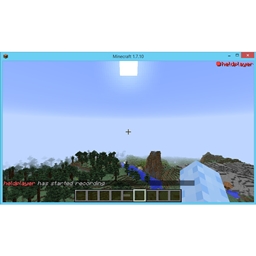
- Shows players names in red with a red ‘recording’ dot when they register themselves as recording.
- Shows players names in blue with a blue ‘paused’ sign to signify a user has halted recording and is going to resume soon.
- Shows players names in green with a green ‘paused’ sign to signify a user is requesting others to not record/pause recording.
- Allows players to hide the overlay, will still notify you of people changing their state unless disabled in config.
- Shows your state when in the main menu.
- Slowly fades out users when they are recording/halted recording if the overlay is disabled.
Config Options
general:lockOverlay (default: true) - makes you unable to toggle your own state when enabled and the overlay has been disabled. Use this if you don't record yourself.
general:screenLocation (default: top-right) - determines the location of the recording player list, can be set to "top-left", "top-right", "bottom-left" and "bottom-right".
general:chatMessages (default: true) - if set to true broadcasts your current recording state when it changes to every player via chat as well as the overlay. Requires the server to have this mod installed to work. Useful for when other players don't have this mod installed.
general:instantHide (default: false) - determines whether the overlay instantly hides when you toggle it.
Key Bindings
Recording Toggle (default: R) - Toggles your recording state, if you are not recording you will be marked as recording, otherwise you will be marked as non-recording.
Paused Toggle (default: P) - Toggles your recording state, if you are recording you will be marked as pausing the recording, otherwise you will be marked as recording. Hold for longer than half a second to request others to stop/pause recording.
Overlay Toggle (default: 0) - Hides the in-game overlay of recording players, will let the usernames fade out. Will show state changes to prevent you from missing somebody from starting his recording. Will also disable the other key bindings if "lock-overlay-when-hidden" in the config is set to true.
Disclaimer
This mod does not detect if any recording software is running, nor does it actually record anything. It is up to the user to let the other players of a server know they are recording.
常见问题
I’m Recording Mod 支持哪些 Minecraft 版本?
I’m Recording Mod 支持 Minecraft Java 版 1.4.7–1.8.9,共 5 个版本,可用的加载器:Forge。下载时注意选择和你游戏版本一致的文件。
I’m Recording Mod 怎么安装?
先用 PCL2 或 HMCL 启动器安装对应版本的 Forge,再把下载的 .jar 文件放进游戏目录的 mods 文件夹,重新启动游戏即可。开启了版本隔离的,mods 文件夹在 versions/版本名 下面。


评论
登录后评论和评分