
Ignore non-existent item tags
Prevents crash on unbound tags when loading recipes on Fabric. Skips broken tag ingredients and logs warnings instead.
截图
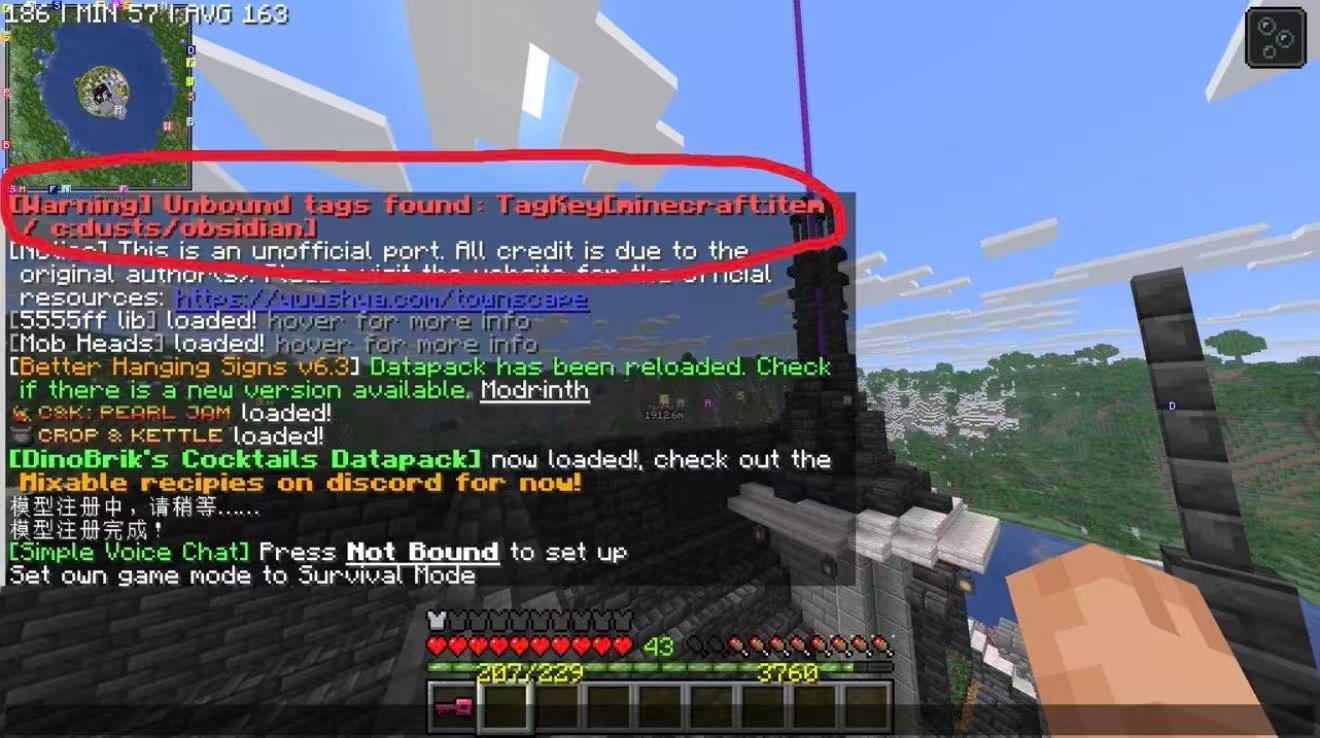
介绍
Ignore non-existent item tags
A tiny Fabric utility mod for fixing the crash:
java.lang.IllegalStateException: Trying to access unbound tag
What it does
This mod injects into HolderSet$Named.contents().
When a recipe ingredient references a tag that does not exist at all (unbound tag), instead of crashing the server/world loading, it:
- Skips that broken ingredient, continues loading recipes and world
- Prints a warning with the broken tag ID in the chat bar
⚠️ Important disclaimer
This is a workaround, NOT a real fix.
It only prevents the crash. The recipe that depends on the missing tag will not work.
You still need to find which mod / datapack defines that broken recipe.
Environment
- Loader: Fabric
- Dependencies: No other dependencies except fabric api
- Side: Server + Client (required on both for single-player)
- No config, no GUI, no extra items/blocks. Just install it.
Tips
- After entering your world, check the chat bar for warning messages starting with
[Warning]Unbound tags found:. It tells you exactly which tag is missing.(If there isn’t such warning, nothing happens then.) - You can install Spark mod, and use
/spark recipesto find out which recipe caused the broken tag. - If you want a proper fix: update the problematic mod, remove it, or add a datapack to define the missing empty tag.
Ignore non-existent item tags模组
一个极简 Fabric 补丁模组,专门解决这个经典崩溃:Trying to access unbound tag(访问未绑定标签)
原理
通过 Mixin 拦截 HolderSet$Named.contents()。
当配方成分引用一个完全不存在的标签时,游戏不再直接崩溃,而是:
- 直接加载配方和世界
- 在游戏聊天栏打印警告,输出损坏的标签ID
⚠️ 重要提醒(一定要看)
这只是绕过崩溃的补丁,不是根治修复!
它仅仅让你能进存档。依赖这个缺失标签的配方会失效、无法使用。
你后续仍然需要排查到底是哪个模组/数据包写了错误配方
使用方式
直接放入 mods 文件夹,客户端和服务端都要装,单人存档必须装在客户端。
无配置界面、无物品方块、无需任何设置。
使用建议
- 进存档后查看聊天栏,会出现
[Warning]Unbound tags found:开头的警告,告诉你缺失的标签名称(没有则说明无事发生) - 可以安装 Spark 模组,用
/spark recipes定位是哪个配方引用了坏标签 - 根治方案:更新问题模组、移除它,或者写一个小型数据包定义这个空标签
常见问题
Ignore non-existent item tags 支持哪些 Minecraft 版本?
Ignore non-existent item tags 支持 Minecraft Java 版 26.2,可用的加载器:Fabric。下载时注意选择和你游戏版本一致的文件。
Ignore non-existent item tags 怎么安装?
先用 PCL2 或 HMCL 启动器安装对应版本的 Fabric,再把下载的 .jar 文件放进游戏目录的 mods 文件夹,重新启动游戏即可。开启了版本隔离的,mods 文件夹在 versions/版本名 下面。
评论
登录后评论和评分