
iCraft
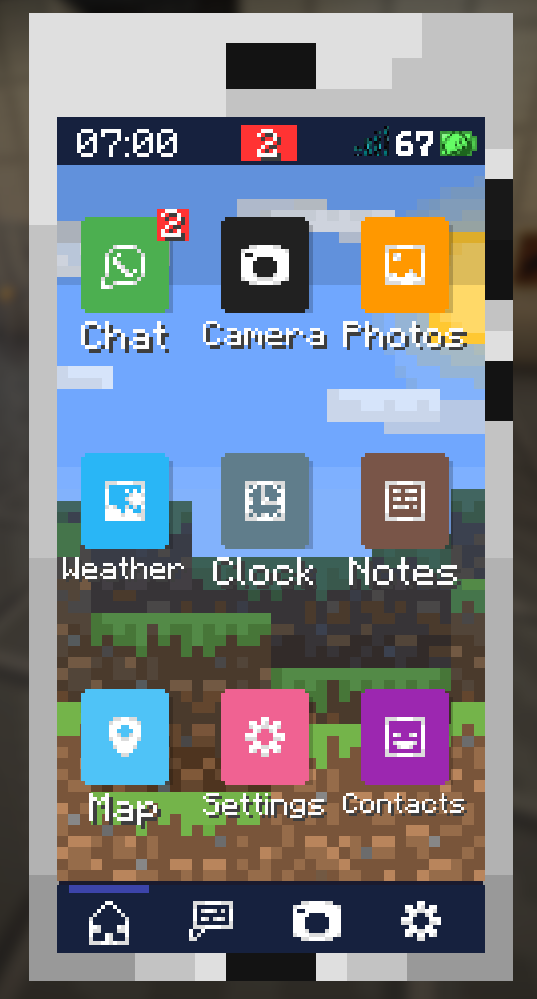
A functional smartphone inside Minecraft. Take photos, chat with players, check the weather, use a map, manage contacts, and more — all from your in-game phone.
截图



介绍
📱 iCraft — A Smartphone Inside Minecraft
iCraft adds a fully functional smartphone to your Minecraft world.
Chat with players, take photos, check the weather, make calls, and much more — all from your in-game phone.
✨ Features
- 💬 Chat — Send and receive messages with other players on the server in real time.
- 📞 Calls — Make voice calls to other players directly from Contacts (requires Simple Voice Chat).
- 📷 Camera — Take photos of your world with filters and save them to your gallery.
- 🖼️ Gallery — Browse your saved photos, share them in chat, send them to the printer, or delete them.
- 🖨️ Printer — Print your photos using the printer block. Requires printed paper as a material. The printed photo can then be hung on the wall as a painting.
- 🌤️ Weather — Check current and upcoming weather conditions.
- 🕐 Clock — See the Overworld time, day count, and your real local time.
- 🗺️ Map — View your world map with your current position (requires Xaero’s Minimap).
- 📝 Notes — Write and save personal notes that persist between sessions.
- 👥 Contacts — See which players are on the server and their connection status, and message or call them directly.
- 🔔 Sounds — Configure notification, call, and click sounds from a single Sounds tab, with instant preview. Includes Do Not Disturb.
- 🎨 Themes & Cases — Customize your phone’s color, browse wallpapers from a thumbnail gallery, and change your phone’s physical case from your inventory.
- 🔒 Lock Screen — A lock screen greets you every time you open the phone.
- ⚙️ Settings — Customize your phone: theme, wallpaper, sounds, icon editor, and more.
🛠️ Server Commands
| Command | Description |
|———|————-|
| /icraft chat <on\|off> | Enable or disable vanilla Minecraft chat alongside iCraft’s chat. |
| /icraft images <on\|off> | Enable or disable sharing photos to the global chat. |
| /icraft adminmessage <text> | Send a system message to the global chat (supports color codes with &). |
| /icraft sendphoto <file> | Send an admin photo to the global chat. |
| /icraft clearchats | Clear the chat on all connected clients. |
To use /icraft sendphoto, first drop your .png image into the iCraft/admin_photos/ folder inside your world save. Once it’s there, the command will auto-suggest the filename and broadcast it to the global chat. Max image size: 512 KB.
🚀 How to get the phone
Currently in Beta, the phone is obtained via command: /give @s icraft:smartphone
🔧 Dependencies
| Mod | Required | Notes |
|—–|———-|——-|
| Fabric API | ✅ Yes | Required |
| Architectury API | ✅ Yes | Core library after the Architectury migration |
| SkinRestorer | ✅ Yes | Client & server mod |
| Xaero’s World Map | ⚠️ Optional | Required for the Map app |
| Simple Voice Chat | ⚠️ Optional | Required for the Call feature |
iCraft is designed to be compatible with economy and payment mods — let players create their own in-game transactions.
常见问题
iCraft 支持哪些 Minecraft 版本?
iCraft 支持 Minecraft Java 版 1.21.1,可用的加载器:Fabric / NeoForge。下载时注意选择和你游戏版本一致的文件。
iCraft 怎么安装?
先用 PCL2 或 HMCL 启动器安装对应版本的 Fabric / NeoForge,再把下载的 .jar 文件放进游戏目录的 mods 文件夹,重新启动游戏即可。开启了版本隔离的,mods 文件夹在 versions/版本名 下面。运行环境:客户端和服务端都要装。

评论
登录后评论和评分