介绍
Iconographic
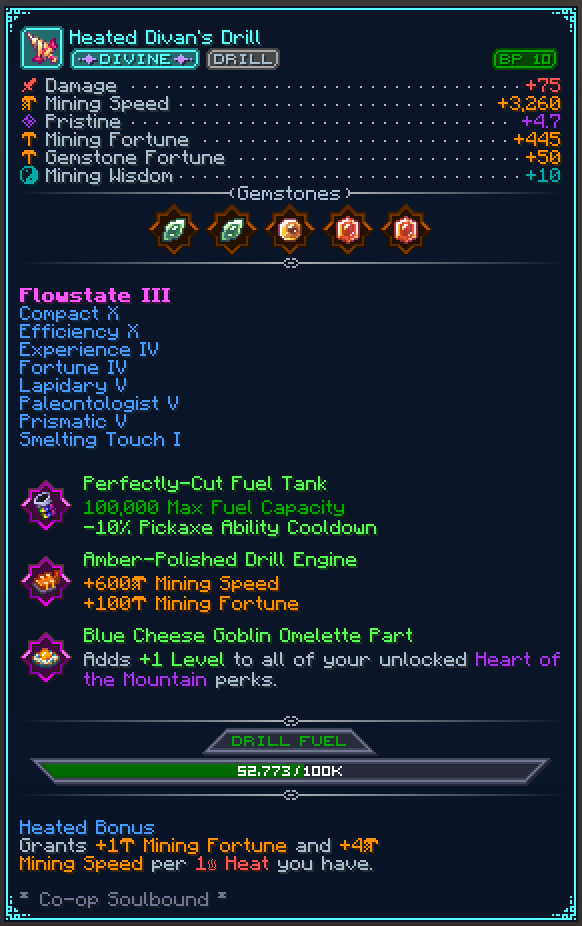
Remodel your Hypixel SkyBlock item tooltips completely to look much more fancy and organized.
Tired of walls of plain text? Instead, look at beautiful icons, progress bars, perfectly aligned stats, and custom categorized tags in your tooltips.
Features
- Aligned Stat Lines: Aligns item stats (Pristine, Strength, Wisdom, etc.) and adds icons to them.
- Progress Bars: Replaces boring text with progress bars for Pet Levels and Drill Fuel.
- Clean Tags: Converts standard text into clean tags for an item’s Category, Rarity, Dungeon Stars, and more!
- Pet Enhancements: Centers pet abilities, adds separators, and renders your favourite pet star.
- Spinny Items: Enable an optional 3D spinning item render in the top left corner of the tooltip.
- Fancy Gemstones: Gemstones now get displayed with their texture to be easily identifiable.
- …and more, checkout the config ingame.
Customizing
You can configure all features to how you like it using the config at /iconographic or /ttt for short.
Mod Compatability
As Minecraft’s system is limited, other mods need to add their own Compatability with Iconographic
to have their Tooltips be rendered with Iconographic applied.
Are you a mod dev trying to add compatability? Read here.
常见问题
Iconographic 支持哪些 Minecraft 版本?
Iconographic 支持 Minecraft Java 版 26.1–26.3,共 5 个版本,可用的加载器:Fabric。下载时注意选择和你游戏版本一致的文件。
Iconographic 怎么安装?
先用 PCL2 或 HMCL 启动器安装对应版本的 Fabric,再把下载的 .jar 文件放进游戏目录的 mods 文件夹,重新启动游戏即可。开启了版本隔离的,mods 文件夹在 versions/版本名 下面。运行环境:仅客户端。
Meowdding 的其他作品
查看全部 →
SkyBlock Profile Viewer
现代 Hypixel SkyBlock 档案查看器

SkyOcean
一款轻量级的 Hypixel SkyBlock 体验优化模组,旨在不过度修改游戏的前提下改善游玩体验。

Catharsis
适用于 Hypixel SkyBlock 的资源包模组
Hypixel Reward Claim
Hypixel 游戏内奖励领取。
评论
登录后评论和评分