
IconButtons API
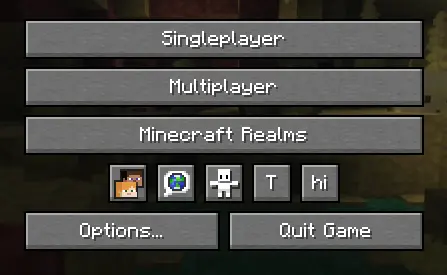
API for easily adding buttons to the Icon Buttons row in the title menu and pause menu
截图
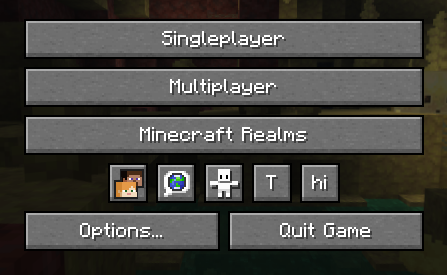
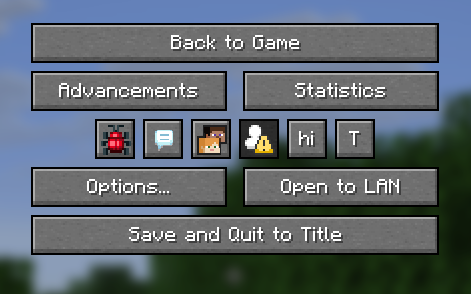
介绍
IconButtons API
API for easily adding buttons to the Icon Buttons row in the title menu and pause menu
Implementation
1. Configure build.gradle
repositories {
    maven {
        url "https://api.modrinth.com/maven"
    }
}
dependencies {
    implementation "maven.modrinth:iconbuttonsapi:${project.iconbuttonsapi_version}+mc-${project.minecraft_version}"
}
2. Configure gradle.properties
Add the following lines to your gradle.properties file and replace the values with your target versions:
iconbuttonsapi_version=1.0.03. Configure fabric.mod.json
Don’t forget to declare the dependency in your fabric.mod.json so Fabric Loader can verify it at runtime:
"depends": {
    ...
    "iconbuttonsapi": ">=1.0.0"
}
Usage
The main entry point of the API is the IconButtons class. It provides methods to easily add any AbstractWidget (like buttons, sliders, etc.) to the Minecraft Title Screen or Pause Menu rows.
You can register buttons to stay visible permanently or control their visibility dynamically using a BooleanSupplier.
Example
public class ExampleModClient implements ClientModInitializer {
    public static final String MOD_ID = "iconbuttonsapi";
    public static final Logger LOGGER = LoggerFactory.getLogger(MOD_ID);
    public static boolean willShow = true;

    @Override
    public void onInitializeClient() {
        Button buttonHi = Button.builder(
                Component.literal("hi"),
                b -> {
                    LOGGER.info("Hi!");
                }
        ).size(IconButtons.getButtonWidthAndHeight(), IconButtons.getButtonWidthAndHeight()).build();
        Button buttonToggleShow = Button.builder(
                Component.literal("T"),
                b -> {
                    willShow = !willShow;
                }
        ).size(IconButtons.getButtonWidthAndHeight(), IconButtons.getButtonWidthAndHeight()).build();

        IconButtons.addTitleScreenButton(buttonHi, () -> willShow);
        IconButtons.addPauseScreenButton(buttonHi, () -> willShow);

        IconButtons.addTitleScreenButton(buttonToggleShow);
        IconButtons.addPauseScreenButton(buttonToggleShow);
    }
}
Features
- Automatic Positioning: You don’t need to specify coordinates (
XandY) for your widgets. The API calculates and applies positioning automatically, arranging your buttons into a neat row. - Size: It is recommended to use
IconButtons.getButtonWidthAndHeight()(returns20) for the correct size to ensure your icons fit perfectly alongside vanilla icons.
常见问题
IconButtons API 支持哪些 Minecraft 版本?
IconButtons API 支持 Minecraft Java 版 26.2–26.3,共 2 个版本,可用的加载器:Fabric。下载时注意选择和你游戏版本一致的文件。
IconButtons API 怎么安装?
先用 PCL2 或 HMCL 启动器安装对应版本的 Fabric,再把下载的 .jar 文件放进游戏目录的 mods 文件夹,重新启动游戏即可。开启了版本隔离的,mods 文件夹在 versions/版本名 下面。运行环境:仅客户端。
Trivait 的其他作品
查看全部 →
Minesweeper In Game
This mod adds minesweeper in your game!

MinigamesMod
This mod adds some cool minigames.

Hammer Mod
This mod adds 6 new hammers that can dig 3x3 mines.

BrewingStandSmoke
This mod adds smoke functionality to the brewing stand.
评论
登录后评论和评分