HWYLF
HWYLF (Here's What You're Looking For) outlines the inventories around the player that contain the item they are looking for.
介绍
HWYLF is a utility mod that allows its users to search for specific items in the inventories around them.
Users can search for items in a few ways:
– Pressing the keybind (Default: v) while hovering over an item will search a 7×7 area around the player for inventories containing that item and outline them.
– Pressing the keybind while outside of an inventory will clear the search, unhiglighting everything.
– Using the search bar in the player inventory
– Users can use the scroll wheel while in the search bar to scroll through the typed word.
– Users can right click on the search bar to clear it
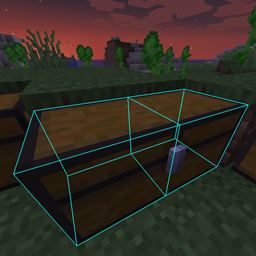
When searching for an item, the inventory containing it is outlined in a wireframe that matches its shape.
Opening the inventory will grey out any items that are not the one you’re looking for.
The color and line thickness of the wireframe outline can be changed in the client config.
Search Bar:

Chest Wireframe:

Opened Inventory:

Please either report any bugs / issues to https://github.com/kregerl/HWYLF/issues or comment them.
Currently Supported Versions:
Forge: 1.15.2, 1.16.4
常见问题
HWYLF 支持哪些 Minecraft 版本?
HWYLF 支持 Minecraft Java 版 1.15.2–1.16.4,共 2 个版本,可用的加载器:Forge。下载时注意选择和你游戏版本一致的文件。
HWYLF 怎么安装?
先用 PCL2 或 HMCL 启动器安装对应版本的 Forge,再把下载的 .jar 文件放进游戏目录的 mods 文件夹,重新启动游戏即可。开启了版本隔离的,mods 文件夹在 versions/版本名 下面。
Areuthreateningme 的其他作品
查看全部 →
Inventory Hotswap
Hotswap 是一个客户端模组,允许玩家将当前选中的物品与其上方物品栏列中的物品进行交换。

Armor Hotswap
手持盔甲右键即可与当前穿戴的盔甲快速交换。
Oxidized Forge
Oxidized 旨在为原版铜提供更多用途。
Shulker-sception
允许玩家把潜影盒放进其他潜影盒里。
评论
登录后评论和评分