
HUD Music Control
Control music playing on your computer directly from Minecraft with album art, media controls, track history, volume control, livestream support, and a modern Now Playing HUD.
截图

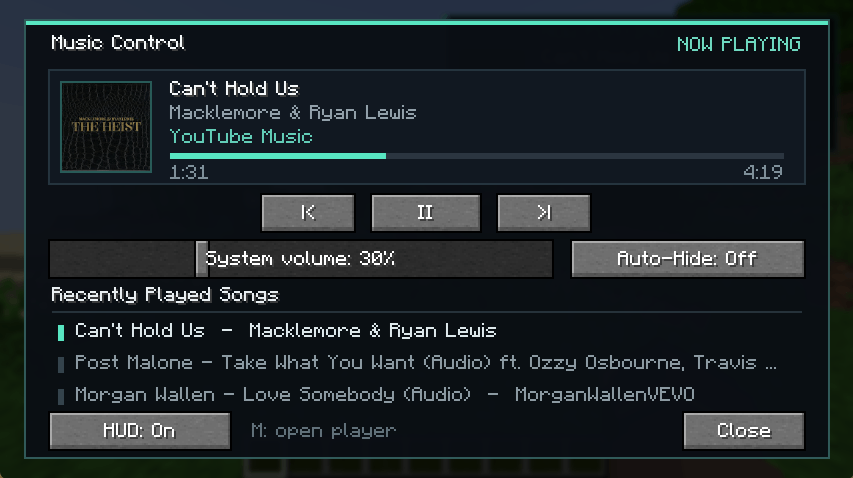
介绍
Music Control
Music Control adds a modern in-game music HUD and media control menu to Minecraft.
Control music that is already playing on your Windows computer without leaving the game. The mod reads the active Windows media session, so it does not download, redistribute, or stream music itself.

Features
- Modern, compact Now Playing HUD
- High-quality album and cover artwork
- Automatically synchronized artwork when tracks change
- Smooth elapsed-time and track-duration display
- Livestream detection with a proper LIVE indicator
- Scrolling titles and artist names for long text
- Dynamic audio visualizer
- Play, pause, previous-track, and next-track controls
- Recently Played list showing the last three tracks
- Minecraft-style system volume slider
- Optional Auto-Hide mode
- Automatically reconnects to active or paused media after joining a world
- Persistent settings and volume state
Music Control menu
Press M by default to open the full Music Control menu.
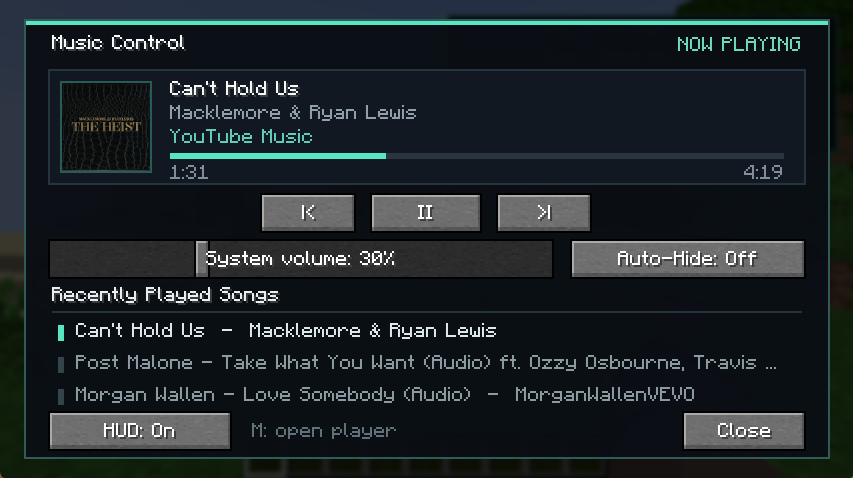
From this menu, you can:
- Control playback
- Change the system volume
- Enable or disable the HUD
- Enable or disable Auto-Hide
- View your three most recently played tracks
The keybind can be changed through Minecraft’s Controls menu.
Supported media
Music Control works with applications and web browsers that publish playback information through Windows media controls, including:
- YouTube
- YouTube Music
- Spotify
- SoundCloud
- Internet radio and livestreams
- Other compatible desktop applications and browser-based players
Available information and controls may depend on what the active media application provides to Windows.
Compatibility
- Minecraft 26.2
- Fabric
- Quilt
- Forge
- NeoForge
- Windows 10 and Windows 11
- Client-side only—servers do not need to install the mod
Important disclosures
- Music Control currently supports Windows 10 and Windows 11 only.
- The mod is entirely client-side and does not need to be installed on a server.
- It uses a bundled local PowerShell helper to communicate with Windows media controls.
- It can read the active track title, artist, album artwork, playback state, timeline, and system volume exposed by Windows.
- Recently played tracks and configuration settings are stored locally in the Minecraft configuration folder.
- The mod does not collect telemetry, upload personal data, download music, bypass advertisements, or redistribute copyrighted audio.
- Music Control is not affiliated with, endorsed by, or sponsored by Spotify, YouTube, YouTube Music, SoundCloud, Microsoft, or Mojang.
- Media availability and accuracy depend on what each browser or desktop application reports to Windows.
Dependencies
Fabric and Quilt
Fabric API is required.
The same Fabric JAR supports both Fabric and Quilt.
Forge and NeoForge
No additional API dependency is required.
License
All Rights Reserved.
常见问题
HUD Music Control 支持哪些 Minecraft 版本?
HUD Music Control 支持 Minecraft Java 版 26.2,可用的加载器:Fabric / Forge / NeoForge / Quilt。下载时注意选择和你游戏版本一致的文件。
HUD Music Control 怎么安装?
先用 PCL2 或 HMCL 启动器安装对应版本的 Fabric / Forge / NeoForge / Quilt,再把下载的 .jar 文件放进游戏目录的 mods 文件夹,重新启动游戏即可。开启了版本隔离的,mods 文件夹在 versions/版本名 下面。
Chiilax 的其他作品
查看全部 →
Copper Quarry
Build a coal-powered automated quarry with a moving mining arm, upgrade automation, smart item routing, fluid storage, and optional blast smelting.

Furnace Overlay
Furnace Overlay is a overlay that works with Furnace, Blast Furnace, Smoker, Campfires and with optional mod called: Iron Furnaces. It shows coockable and smeltable progress.

Portable Vintage Radio
Discover and share real internet radio stations with a portable vintage radio, positional multiplayer audio, favorites, and album art.

MysteryBox
MysteryBox adds a magical risk-and-reward block where valuable resources buy guaranteed payouts or randomized Mystery Gifts, featuring tiered loot, animated effects, advancements, a guide book, and a hidden Easter egg.
评论
登录后评论和评分