
HUD Customizer
Customize your Minecraft HUD with pixel-art styles, drag-and-drop layouts, and optional Sodium integration.
介绍

Your HUD. Your style.
Make Minecraft’s interface feel like your own.
HUD Customizer lets you move HUD elements, choose Minecraft-inspired pixel-art styles, and build a layout that suits the way you play. Use the live preview to arrange your interface, then save it for gameplay. Keep the classic look, mix different designs, or use a clean text-only style for coordinates and performance information.
- 13 customizable sections: Hotbar, Hearts, Head, Food, XP Bar, Armor, Air, Keystrokes, Armor HUD, Direction, Effects HUD, Coordinates, and FPS / Ping.
- Drag-and-drop editing: move elements in the preview, hide what you don’t need, and restore hidden elements.
- A large style library: pixel-art HUD designs, food-themed hunger icons, equipment layouts, compass artwork, and effect frames.
- Live information: coordinates, biome, FPS, connection latency, equipment durability, and potion-effect timers.
- Clear editing controls: Save, Cancel, and Reset HUD, with a confirmation before resetting.
- Flexible layouts: responsive controls across GUI scales, with saved positions mapped to the in-game HUD.

Move an element. Choose a style. Make it yours.
Press H to open the editor. Drag an element inside the preview and choose a design from its section. Click Save to keep your changes, or Cancel to restore the saved layout. The editor is also available from Video Settings.
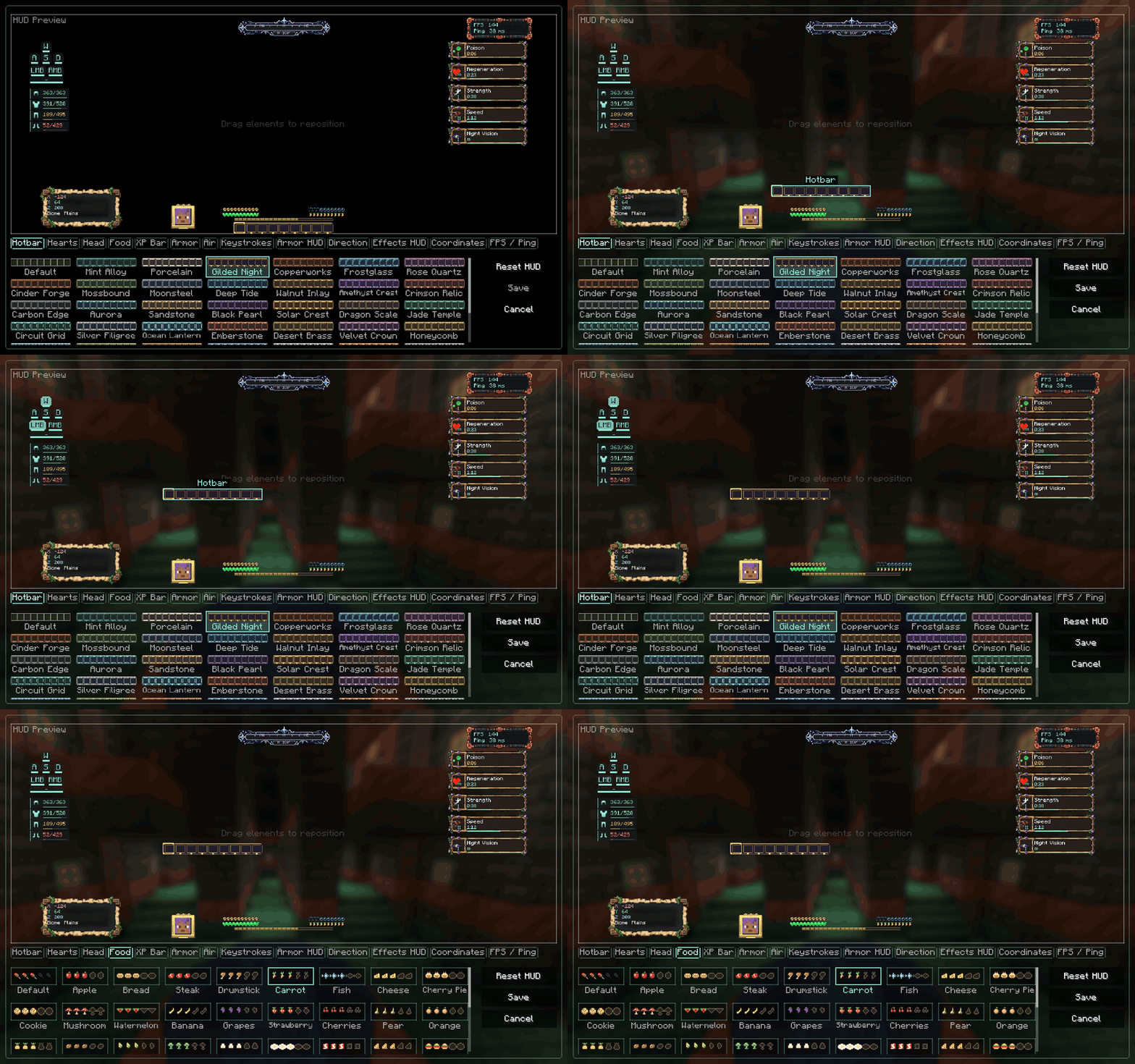
Recorded from the actual mod interface. Smooth, short looping demonstration.

One HUD. With or without Sodium.
Sodium is optional. HUD Customizer works on its own. On supported Sodium versions, its settings appear inside Sodium’s video-settings interface. Open HUD Customizer to reveal the editor beside Sodium’s sidebar, with a smooth sliding animation. Switching to another settings section cancels unsaved HUD edits.
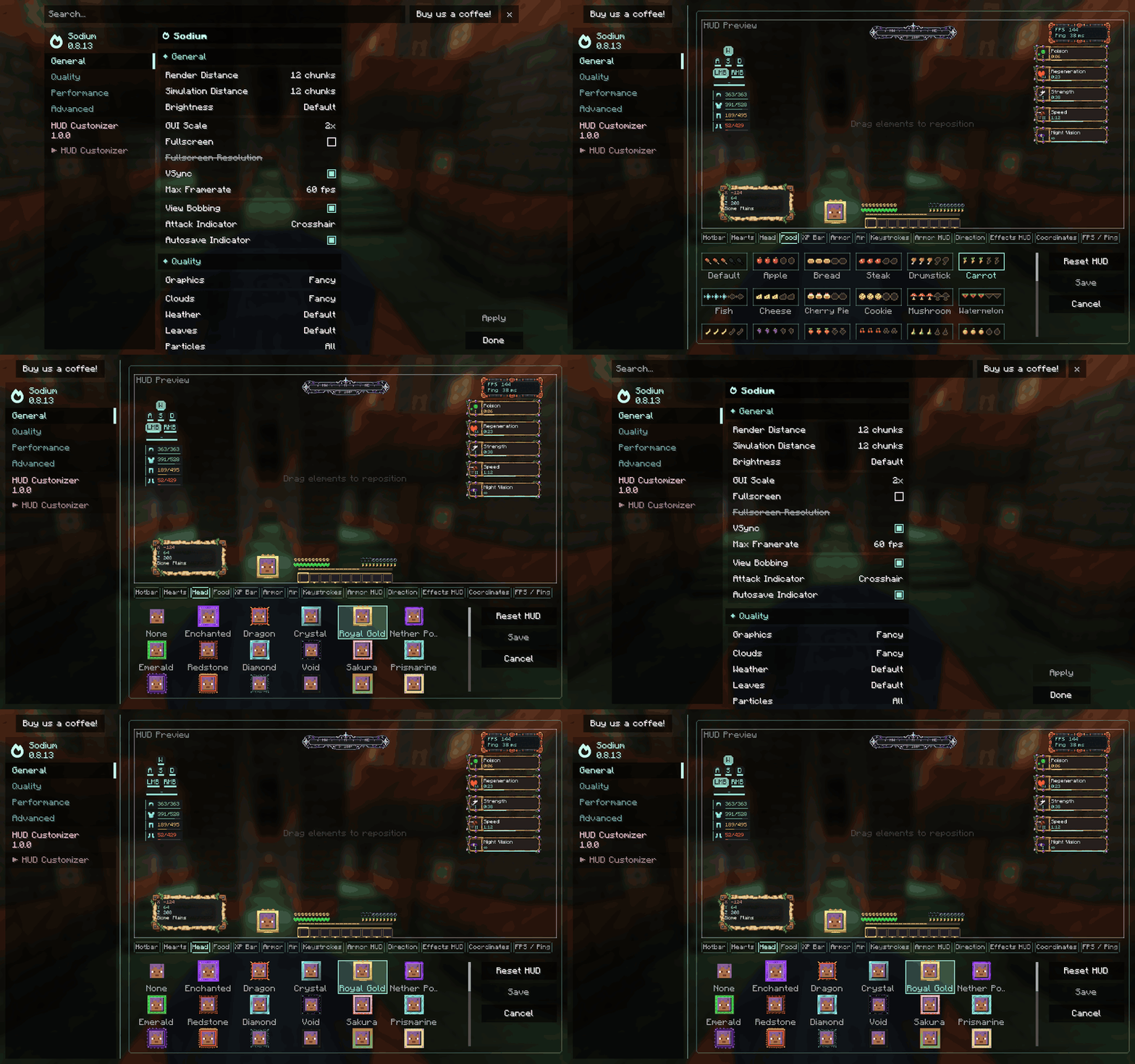
Sodium compatibility has been tested on Fabric builds for the supported Minecraft versions, and on NeoForge builds for 1.21.1, 1.21.11, and 26.3. Forge builds and the NeoForge 1.20.1 build work independently; no official Sodium build was available for those combinations during testing. Embeddium compatibility is not currently claimed.
Choose the right file
Download the file matching both your Minecraft version and mod loader. Each combination has its own JAR.
| Minecraft | Loaders | Java |
|---|---|---|
| 1.20.1 | Fabric, NeoForge, Forge | 17 |
| 1.21.1 | Fabric, NeoForge, Forge | 21 |
| 1.21.11 | Fabric, NeoForge, Forge | 21 |
| 26.3 | Fabric, NeoForge, Forge | 25 |
Installation: install the matching loader, place HUD Customizer in your mods folder, and launch the game. Fabric builds also require Fabric API. Install a compatible Sodium version only if you want its integration. This is a client-side mod; install it on your game client.
Created by Haider x
All Rights Reserved (ARR)
常见问题
HUD Customizer 支持哪些 Minecraft 版本?
HUD Customizer 支持 Minecraft Java 版 1.20.1–26.3,共 4 个版本,可用的加载器:Fabric / Forge / NeoForge。下载时注意选择和你游戏版本一致的文件。
HUD Customizer 怎么安装?
先用 PCL2 或 HMCL 启动器安装对应版本的 Fabric / Forge / NeoForge,再把下载的 .jar 文件放进游戏目录的 mods 文件夹,重新启动游戏即可。开启了版本隔离的,mods 文件夹在 versions/版本名 下面。
Haider_x 的其他作品
查看全部 →
Luna shader
Luna 光影:优化了水面反射,呈现深蓝色调,并为末地传送门加入独特的旋转黑洞效果。

Aetheria Shaders
Aetheria Shaders 是 Complementary Reimagined 的一款华丽奇幻改版光影。拥有自定义维度氛围、发光的青绿色水体、银河主题的下界传送门、流动的熔岩,以及体积化的末地龙卷风。性能表现有保障。

Quanta Shader
快速呈现精美的《Minecraft》画面。柔和的阴影、动态云朵、波光粼粼的水面和绚丽天空,同时优化性能,畅玩高帧率游戏。

Vanilla Rebuild
保留 Minecraft 的经典风格,同时增强光照效果,呈现逼真的天空、体积云、柔和阴影,以及各维度独具特色的浓郁氛围。
评论
登录后评论和评分