介绍
You are walking into a forest.
You don’t know it yet, but you are already being watched. Not from far away. From the edge of your vision. From the shadows between two trees that look the same.
If you look, it will move. It will move into the next shadow. It will stay there. It will not run. It will not attack. It will just stand there—waiting for you to look away.
If you stay too long, it will step closer. Not to kill you. Not yet. It will stand still, just beyond the light, and it will tilt its head—like it is trying to understand if you are worth remembering.
If you find it, it will leave. But it will not leave the forest. It will only leave your sight. It will still be there. It will just be behind you this time.
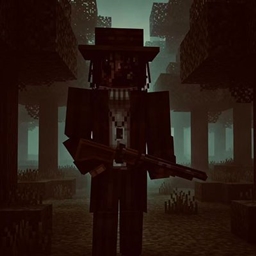
If you do not leave, it will come back. This time, it will not be a silhouette. It will be a figure with a broken face. It will carry a shotgun. And it will fire—not to scare you away, but to make you stop moving forever.
There is another one. It does not sneak. It does not wait. It will find you before you find the first one. It will run at you and laugh—because it knows you can’t run fast enough. It will talk to you. It will call you names. It will make sure you know that you are not the hunter. You are the herd.
You can fight. You can win—once. Twice. Ten times. But they will come back. They always come back. Because they are not just characters in a mod. They are the story. And the story is not written for you to survive.
You are not lost.
You are not unlucky.
You are in the wrong place at the right time—and they have been waiting for someone like you for a very long time.
So go ahead. Walk deeper.
But remember: when you hear the shotgun, it is not aiming at you. It is saying goodbye.
常见问题
(horror)The Shepherd 支持哪些 Minecraft 版本?
(horror)The Shepherd 支持 Minecraft Java 版 1.20.1,可用的加载器:Forge。下载时注意选择和你游戏版本一致的文件。
(horror)The Shepherd 怎么安装?
先用 PCL2 或 HMCL 启动器安装对应版本的 Forge,再把下载的 .jar 文件放进游戏目录的 mods 文件夹,重新启动游戏即可。开启了版本隔离的,mods 文件夹在 versions/版本名 下面。
评论
登录后评论和评分