
HolyWrench: Survival Debug Stick
The most holy way of editing your block states in survival!
介绍
HolyWrench
Fantasy Description
Down in the dark and forgotten corners of Minecraft Vanilla, dwells a holy stick going by the name of “Debug Stick”.
If you possess the strength and are deemed worthy of its grace (If you’re OP and in creative), you may access ultimate power over your world and that of others!
Changing the shape of stairs and slabs, turning and spinning around pillars and logs, and even make furnaces appear lit without fuel or fences flooded without water.
This mod brings this power to ye, mere mortals. But with great power comes great responsibility, and so we made adjustments so that ye don’t have to suffer the weight of these responsibilities.
Technical Description
This makes the debug stick available in survival through a (reasonably expensive) craft, and allows you to modify block states properties.
Simply left click on a block with the stick to select the property you wish to modify, and right click to cycle through the available states.
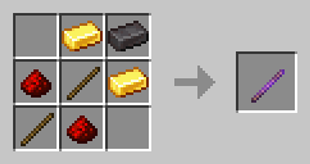
Said properties include blocks rotation, stairs and rails shape, fences and walls connections, and much more! But without breaking survival by preventing access to unrealistic/duplication prone states. For example, single slabs can be moved up and down, but not transformed into double slabs as would be possible if the stick were used in creative mode. In the same way, blocks cannot be made waterlogged, and the number of candles cannot be changed.
Acknowledgments
This mod has been made for the special edition of HolyCube Revolution, that started on April 4, 2025.
We thank Boitameu and the rest of the HolyCube team.
Credits
Gad – Developer
License
HolyWrench is provided under the zlib license.
常见问题
HolyWrench: Survival Debug Stick 支持哪些 Minecraft 版本?
HolyWrench: Survival Debug Stick 支持 Minecraft Java 版 1.21.1,可用的加载器:NeoForge。下载时注意选择和你游戏版本一致的文件。
HolyWrench: Survival Debug Stick 怎么安装?
先用 PCL2 或 HMCL 启动器安装对应版本的 NeoForge,再把下载的 .jar 文件放进游戏目录的 mods 文件夹,重新启动游戏即可。开启了版本隔离的,mods 文件夹在 versions/版本名 下面。
评论
登录后评论和评分