
截图
介绍
Overview
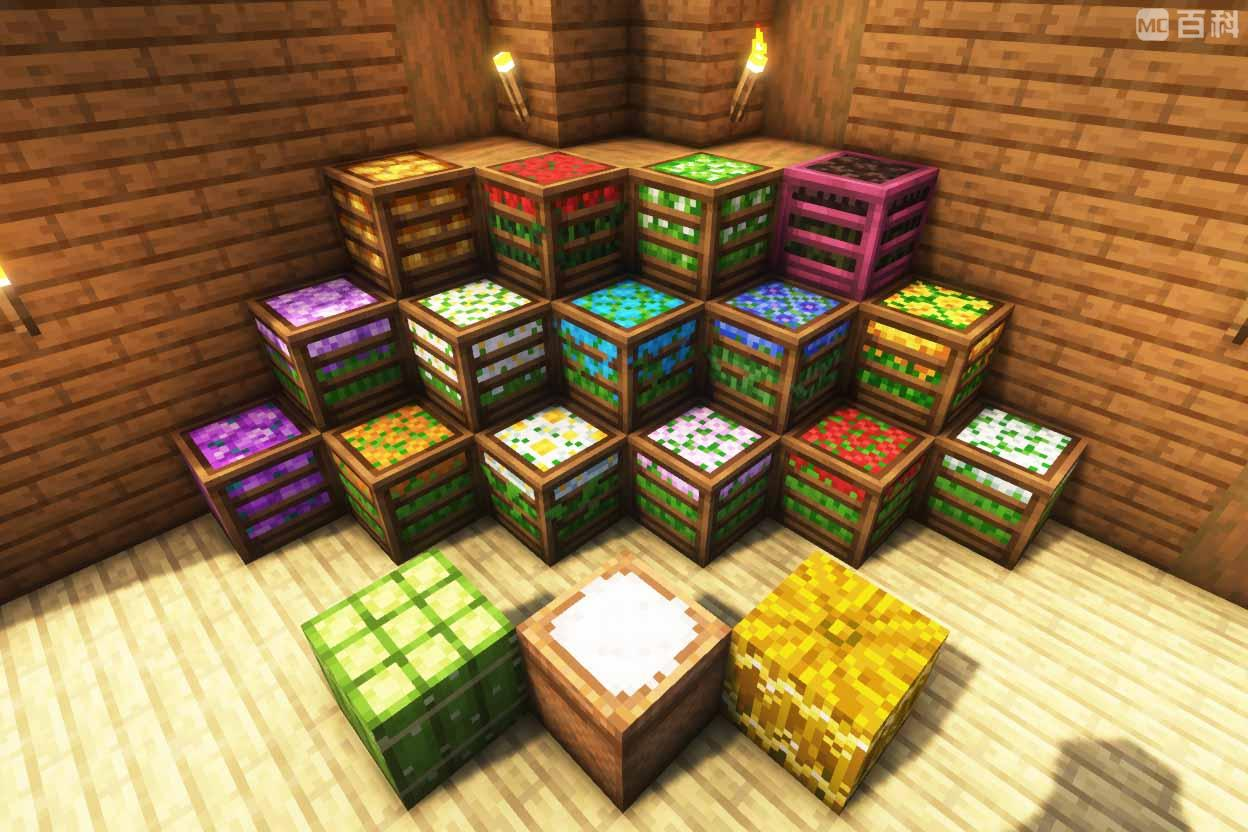
This mod introduces a new way to store crops and flowers in Minecraft, inspired by the storage blocks from Farmer’s Delight and Quark. It adds block forms for various crops and flowers, allowing players to efficiently store and manage their resources.
Features
- Crop and Flower Storage Blocks: Convert your crops and flowers into storage blocks, saving space and adding a decorative touch to your builds.
Supported Crops and Flowers:
Crops:
Red Mushrooms,
Brown Mushrooms,
Crimson Fungus,
Warped Fungus,
Cacti,
Glistering Melon,
Pumpkins (slice),
Cotton (from another mod),
Mana Bloom (from the Ars Nouveau mod),
Flowers:
Dandelion,
Poppy,
Blue Orchid,
Allium,
Azure Bluet,
Red Tulip,
Orange Tulip,
White Tulip,
Pink Tulip,
Oxeye Daisy,
Sunflower,
Lilac,
Rose Bush,
Peony,
Lily of the Valley,
Cornflower,
Wither Rose,
Additional Mods:
Future Plans:
We plan to add support for more crops from other mods in future updates.
Installation
- Download the Mod: Download the latest version of Plant Storage Blocks from Modrinth.
- Install Forge: Ensure you have Minecraft Forge 1.20.1 installed.
- Place the Mod File: Place the downloaded .jar file into the mods folder in your Minecraft directory.
- Launch Minecraft: Start Minecraft with the Forge 1.20.1 profile.
Usage
- Creating Storage Blocks: Use a crafting table to convert supported crops and flowers into their respective storage blocks.
- Using Storage Blocks: Place the storage blocks in your world. You can break them to retrieve the original items or use an interface to access the stored items directly.
- Decorative Use: These storage blocks can also be used for decoration, adding a unique aesthetic to your builds.
Feedback and Support
If you encounter any issues or have suggestions, please report them on our GitHub page or through the Modrinth page. Your feedback is valuable and helps us improve the mod.
常见问题
Hoarding 支持哪些 Minecraft 版本?
Hoarding 支持 Minecraft Java 版 1.20.1,可用的加载器:Forge。下载时注意选择和你游戏版本一致的文件。
Hoarding 怎么安装?
先用 PCL2 或 HMCL 启动器安装对应版本的 Forge,再把下载的 .jar 文件放进游戏目录的 mods 文件夹,重新启动游戏即可。开启了版本隔离的,mods 文件夹在 versions/版本名 下面。运行环境:客户端和服务端都要装。
XingLuo 的其他作品
查看全部 →
XingLuo AE2 1.21 GUIExpansion
XingLuo_AE2_1.21_GUIExpansion - Revamped 1.21.1 interface textures with holographic ME terminals and industrial-flux animations, faithfully recreating Applied Energistics 2's signature tech aesthetic while optimizing for modern versions.

Classic Bar Unofficial
Classic Bar Unofficial — A community-maintained fork of the original Classic Bar. Adds extended mod support including thirst overlay (Thirst Was Taken), Vampirism blood bar, Forbidden Curse hunger bar, and full Chinese localization.
Classic Bar Unofficial
Classic Bar Unofficial — A community-maintained fork of the original Classic Bar. Adds extended mod support including thirst overlay (Thirst Was Taken), Vampirism blood bar, Forbidden Curse hunger bar, and full Chinese localization.

kenergyengineering
Provides a large number of useful machines for Minecraft!
评论
登录后评论和评分