HM Scoreboard Toggle
作者:HenryMMey
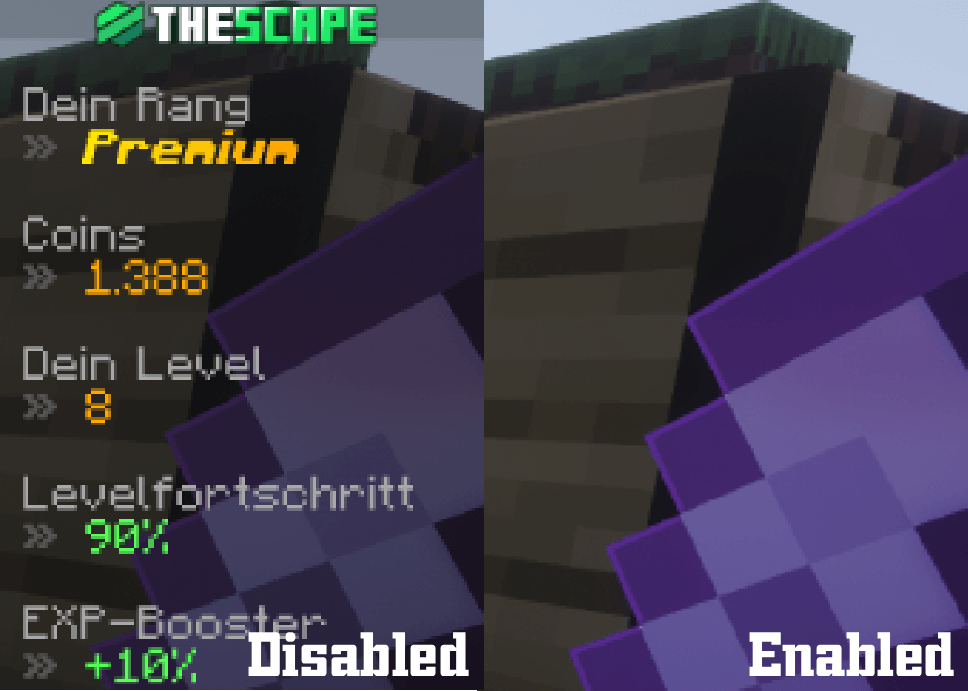
A minimal mod that lets you hide or show the vanilla scoreboard with a configurable keybind.
截图
介绍
中文介绍正在准备中,下面暂时显示原文。
HM Scoreboard Toggle



A tiny client-side Fabric mod for Minecraft Java Edition 26.2 that does exactly one thing: lets you hide or show the vanilla scoreboard sidebar with a single key press.
Features
- One-key toggle: Press
Kto hide or show the scoreboard. - Customizable keybind: Change the key in Options → Controls → Key Binds → HM Scoreboard Toggle.
- Client-side only: No server installation required.
- Vanilla rendering: The original scoreboard rendering is preserved whenever the sidebar is visible.
- No unnecessary features: No commands, configuration files, chat messages, sounds, or additional network packets.
- Simple behavior: The scoreboard is visible by default after starting Minecraft. Your toggle state lasts for the current client session.
Installation
- Install Fabric Loader and Fabric API.
- Download the mod JAR and place it in your Minecraft
modsfolder. - Launch your Fabric profile.
- Join a world or server and press
Kto toggle the scoreboard.
常见问题
HM Scoreboard Toggle 支持哪些 Minecraft 版本?
HM Scoreboard Toggle 支持 Minecraft Java 版 26.2,可用的加载器:Fabric。下载时注意选择和你游戏版本一致的文件。
HM Scoreboard Toggle 怎么安装?
先用 PCL2 或 HMCL 启动器安装对应版本的 Fabric,再把下载的 .jar 文件放进游戏目录的 mods 文件夹,重新启动游戏即可。开启了版本隔离的,mods 文件夹在 versions/版本名 下面。
HenryMMey 的其他作品
查看全部 →
JS Green Diamond Ore
by HMLabs Gaming
这个资源包将钻石矿石方块的材质替换为全绿色版本。
8,071
23 天前
Modrinth · CurseForge
JS Green Diamond Ore
by HMLabs Gaming
将钻石矿石方块的材质替换为全绿色版本。
7,005
23 天前
Modrinth

HM Basic Play
by HMLabs Gaming
一个轻量、小巧且优化的日常整合包。适合所有人日常使用。
1,792
23 天前
Modrinth · CurseForge

JS Green Ancient Debris Ore
by HMLabs Gaming
This resource pack replaces the texture of the Ancient Debris block with a fully green version.
1,222
22 天前
Modrinth
评论
登录后评论和评分