
HITWtimer
HITWtimer is a Minecraft mod designed specifically for MCC Island's "Hole in the Wall" minigame. It serves as a precise trap timing assistant, helping players improve their timing when passing through moving walls. The mod provides high-accuracy timing,
截图

介绍
HITWtimer
纯客户端 Fabric + Kotlin 模组 · Minecraft 26.1.2 · 作者 KCl · 许可证 CC0-1.0
面向 HITW(Hole in the Wall) 等小游戏:根据屏幕字幕 / 标题或聊天自动识别陷阱(trap),并在 HUD 上显示多阶段倒计时(含可选 Preparation 准备阶段、颜色与音效提示)。
本模组不修改服务端玩法,只在客户端读字幕/聊天并画 HUD,可在 Hypixel 等服务器正常使用。
English documentation: jump to English Documentation at the end of this file.
目录
- 功能一览
- 安装与依赖
- 快速开始
- 快捷键
- 命令
- HUD 说明
- 使用案例:Falling Sand
- 配置系统总览
- overallconfig.txt(全局配置)
- traplist 文件(陷阱列表)
- 怎么写一个 Trap
- 检测匹配详解
- Preparation 准备阶段
- 事件(events)格式
- 调试技巧
- 构建
- 文件结构
- 常见问题
功能一览
| 模块 | 说明 |
|——|——|
| 字幕 / 聊天检测 | 通过 Title/Subtitle Mixin + 聊天事件匹配 trap;可按 trap 指定 SUBTITLE / CHAT / BOTH |
| 多阶段计时 | 每个 trap 配置多个阶段;HUD 显示当前阶段倒计时 + 后续阶段预览 |
| Preparation | 字幕触发时可自动在阶段列表第一行插入英文 Preparation 倒计时(chat 触发永不插入) |
| HUD | 深色半透明背景、多 trap 同时显示、颜色可配 |
| HUD 编辑 | 按 K 打开编辑层:拖动位置、滚轮缩放、Esc/K 保存 |
| 三级配置 | overall(全局)→ traplist 头部默认 → 单个 trap 覆盖 |
| 多列表 | 多个 traplist*.txt,命令运行时 enable/disable |
| 热重载 | 按 L 或 /hitwtimer reload 即时生效 |
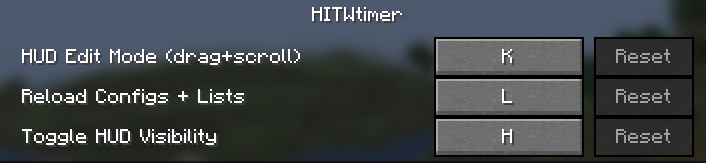
| 按键绑定 | 出现在原版「控制 → 按键绑定」的 HITWtimer / HITW 计时器 分类下 |
| 双语 | en_us / zh_cn 语言文件;配置模板中英注释 |
安装与依赖
| 依赖 | 版本要求 |
|——|———-|
| Minecraft | ~26.1.2 |
| Fabric Loader | ≥ 0.19.2 |
| Fabric API | 与 26.1.2 匹配 |
| Fabric Language Kotlin | 与环境匹配 |
| Java | ≥ 25 |
将构建产物 hitwtimer-*.jar 放入 .minecraft/mods/,与 Fabric 一起启动客户端即可。
首次启动会自动在:
.minecraft/config/hitwtimer/生成示例配置(overallconfig.txt、traplist1.txt 等)。
快速开始
- 安装模组并进入游戏。
- 确认
config/hitwtimer/overallconfig.txt里:
   enabled=true
   enabled_lists=traplist1
detect_subtitle=true- 编辑
config/hitwtimer/traplist1.txt,写好 trap 的pattern=(必须与游戏实际字幕/聊天文字匹配)。 - 游戏内按 L 热重载(或
/hitwtimer reload)。 - 进入 HITW;当字幕出现匹配文字时,HUD 自动开始计时。
- 按 K 调整 HUD 位置与大小,再按 Esc/K 保存。
建议调试时临时打开:
debug=true匹配时会在控制台打日志,触发时聊天也会有提示。
快捷键
均可在 选项 → 控制 → 按键绑定 → HITW 计时器 / HITWtimer 中修改。
| 默认键 | 名称 | 功能 |
|——–|——|——|
| H | 切换 HUD 显示 | 显示 / 隐藏计时 HUD(不清除正在跑的计时器逻辑,只控制是否绘制) |
| K | HUD 编辑模式 | 打开半透明编辑层:左键拖动移动、滚轮缩放;Esc 或再按 K 保存并退出 |
| L | 重载配置 | 重新加载 overallconfig + 所有启用的 traplist,并清空检测去重缓存 |
HUD 编辑模式细节
- 必须打开编辑 Screen 才能拖动(游戏内鼠标锁定时无法自由拖拽,因此用 Screen 释放光标)。
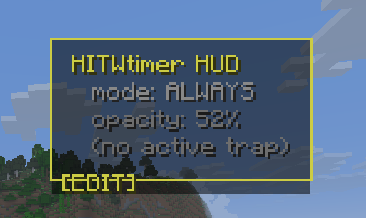
- 编辑时即使没有激活 trap,也会显示占位面板,方便定位。
- 退出时写入
overallconfig.txt的hud_x/hud_y/hud_scale。
命令
客户端命令(聊天中输入):
/hitwtimer
/hitwtimer list
/hitwtimer reload
/hitwtimer enable <name>
/hitwtimer disable <name>
/hitwtimer settings
| 命令 | 作用 |
|——|——|
| /hitwtimer | 显示可用子命令 |
| list | 列出当前启用的 traplist(绿字名称 + 灰字 description) |
| reload | 等同按 L:重载配置与列表 |
| enable <name> | 启用名为 name 的列表(文件名不含 .txt,如 traplist1),并自动 reload |
| disable <name> | 禁用该列表并 reload |
| settings | 打开简易设置界面(预览全局配置等) |
列表文件必须先存在于 config/hitwtimer/。enable/disable 会改运行时启用集合;若要长期固定,请同步改 overallconfig.txt 的 enabled_lists=。
HUD 说明
显示结构
每个激活的 trap 大致如下:
falling sand  18.0s          ← trap 名 + 总剩余时间
  Preparation  3.0s          ← 自动插入的第一阶段(仅字幕+允许时)
  stop falling               ← 后续阶段(未到则灰色预览)
  sands gone
准备结束后:
falling sand  15.0s
  Preparation                ← 已过:灰色、无倒计时
  stop falling  10.0s        ← 当前阶段:彩色 + 倒计时
sands gone ← 未到:灰色预览- Preparation 标签固定为英文
Preparation,作为 trap 阶段列表的第一行(与其它事件同一列)。 - 不要在
events=里手动写 Preparation 行。 - 多个 trap 同时触发时会纵向排列,中间空行分隔。
外观相关配置(overallconfig)
| 键 | 默认 | 说明 |
|—-|——|——|
| hud_x / hud_y | 10 / 10 | 左上角位置(GUI 坐标,可用 K 编辑) |
| hud_scale | 1.0 | 缩放 0.4~4.0 |
| render_background | true | 是否画深色半透明底 |
| hud_horizontal_padding | 8 | 背景水平内边距 |
| hud_vertical_padding | 6 | 背景垂直内边距 |
使用案例:Falling Sand
以 HITW 常见陷阱 Falling Sand(落沙) 为例,完整走通「配置 → 检测 → 显示」。
1. 场景
游戏字幕/标题出现类似:
Falling Sand或聊天/其它文案含 sand。你希望:
- 先有 3 秒 Preparation(站位准备)
- 再倒计时 10 秒 到「stop falling」
- 再 5 秒 到「sands gone」
2. 在 traplist1.txt 中写入
# 列表头部默认(第一个 name= 之前)
enabled=true
description=Classic HITW traps

subtitle_preparation=true
preparation_time=3.0
preparation_color=#55FF55
main_color=#FFFFFF
source=SUBTITLE
match_mode=CONTAINS
case_sensitive=false

# ---------- 单个 trap ----------
name=falling sand
enabled=true
source=SUBTITLE
subtitle_preparation=true
main_color=#FFAA00
preparation_time=3.0
preparation_color=#55FF55
start_sound=block.note_block.pling
end_sound=block.note_block.bell
pattern=falling sand|sand
match_mode=CONTAINS
case_sensitive=false
events=
  stop falling|10|#FF5500|entity.blaze.shoot
  sands gone|15|
关于 events 时间:实现里各阶段的时间为相对「主阶段开始」(Preparation 结束后)的绝对偏移秒数,按数值排序。
上例中
stop falling在 prep 结束后 10s 处,sands gone在 15s 处(即 stop falling 后再约 5s)。
若写成
sands gone|5,会排在 10 之前,顺序会与预期相反。
3. 确保列表已启用
overallconfig.txt:
enabled=true
enabled_lists=traplist1
detect_subtitle=true
subtitle_preparation=true
preparation_time=3.0
游戏内执行:
/hitwtimer reload或按 L。
4. 时间线(字幕触发)
| 时刻 | HUD 表现 |
|——|———-|
| t=0 字幕匹配 | 出现 falling sand,第一行 Preparation 3.0s…,下面灰色预览两个事件 |
| t=3 | Preparation 结束,播放 start_sound,进入 stop falling 倒计时 |
| t=13 | 到达 stop falling 节点(可播事件音),进入下一阶段 |
| t=18 | 到达 sands gone,计时结束,播放 end_sound |
5. 若字幕对不上
- 设
debug=true,重载后看控制台匹配日志。 - 把
pattern改成字幕实际原文(可先用CONTAINS缩短关键词)。 - 确认语言/大小写:
case_sensitive=false时不区分大小写。 - 确认
source与检测源一致(字幕用SUBTITLE或BOTH)。
6. 若不想要 Preparation
name=falling sand
subtitle_preparation=false
pattern=falling sand
events=
  stop falling|10
  sands gone|15
subtitle_preparation=false 在 trap 级为严格优先:即使列表/全局为 true,该 trap 也绝无准备阶段。
7. 若只想从聊天触发、不要准备
name=falling sand
source=CHAT
pattern=falling sand
events=
  stop falling|10
  sands gone|15
Chat 来源永远不会插入 Preparation。
配置系统总览
config/hitwtimer/
├── overallconfig.txt     # 全局 / 模组级
├── traplist1.txt         # 列表 1(头部 = 列表默认 + 多个 name= trap)
├── traplist2.txt         # 你可自建更多
└── ...
三级优先级(高 → 低)
- trapconfig:某个
name=块内的字段 - traplistconfig:该 txt 里第一个
name=之前的头部默认 - overallconfig:全局回退
特例:trap 级 subtitle_preparation=false 严格无准备,不回退列表/全局的 true。
解析时键名大小写不敏感,下划线可省略(如 preparation_time / preparationtime)。
overallconfig.txt(全局配置)
完整示例
# HITWtimer Overall Config

# --- Master ---
enabled=true

# --- Lists(要加载的列表文件名,逗号分隔,不要写 .txt)---
enabled_lists=traplist1
# enabled_lists=traplist1,pvp,custom

# --- Detection ---
detect_subtitle=true
detect_chat=true

# --- Preparation defaults(可被 list/trap 覆盖)---
subtitle_preparation=true
preparation_time=3.0
preparation_color=#55FF55
main_color=#FFFFFF

# --- HUD(可用游戏内 K 编辑后自动写回)---
hud_x=10
hud_y=10
hud_scale=1.0
render_background=true
hud_horizontal_padding=8
hud_vertical_padding=6

# --- Behavior ---
auto_reload_keywords=hitw,hole in the wall,游戏开始

# --- Misc ---
debug=false
键说明
| 键 | 默认 | 说明 |
|—-|——|——|
| enabled | true | 模组总开关 |
| enabled_lists | traplist1 | 启动时加载的列表 |
| detect_subtitle | true | 是否检测字幕/标题 |
| detect_chat | true | 是否检测聊天 |
| subtitle_preparation | true | 全局:字幕是否默认带 Preparation |
| preparation_time | 3.0 | 默认准备秒数 |
| preparation_color | #55FF55 | 准备阶段颜色 |
| main_color | #FFFFFF | 默认事件颜色 |
| hud_* | 见上 | HUD 位置/缩放/背景 |
| auto_reload_keywords | … | 预留关键词(部分逻辑) |
| debug | false | 详细匹配日志 + 触发聊天提示 |
颜色支持 #RRGGBB 或 RRGGBB。
traplist 文件(陷阱列表)
文件命名
- 任意名,如
traplist1.txt、pvp.txt、mytraps.txt - 在
enabled_lists或/hitwtimer enable <name>中用不带扩展名的名字
文件结构
# 注释任意

# ===== traplistconfig:头部默认(必须在第一个 name= 之前)=====
enabled=true
description=经典 HITW 列表
subtitle_preparation=true
preparation_time=3.0
...

# ===== 一个或多个 trap =====
name=trap_a
pattern=...
events=
  ...

name=trap_b
pattern=...
events=
  ...
头部常用键
| 键 | 说明 |
|—-|——|
| enabled | 列表是否启用(列表本身) |
| description | /hitwtimer list 里显示的说明 |
| subtitle_preparation | 本列表 trap 的默认是否准备 |
| preparation_time / preparation_color | 本列表准备默认 |
| main_color | 本列表默认主色 |
| start_sound / end_sound | 默认开始/结束音效 ID |
| source | 默认检测源 |
| match_mode / case_sensitive | 默认匹配方式 |
怎么写一个 Trap
必填
| 字段 | 说明 |
|——|——|
| name= | 唯一 ID,也作 HUD 标题回退 |
| pattern= | 匹配字幕/聊天的关键词(支持 a\|b\|c OR) |
| events= + 至少一行阶段 | 阶段列表 |
可选(不写则 list → overall)
| 字段 | 说明 |
|——|——|
| enabled | true/false |
| source | SUBTITLE / CHAT / BOTH |
| subtitle_preparation | true/false(false = 严格无准备) |
| preparation_time | 秒 |
| preparation_color | #RRGGBB |
| main_color | 事件默认色 |
| start_sound / end_sound | 原版音效 ID,如 block.note_block.pling |
| match_mode | CONTAINS / EQUALS / STARTS_WITH / REGEX |
| case_sensitive | 默认 false |
最小可用示例
name=my_trap
pattern=关键词
events=
  phase1|5
  phase2|10
完整示例模板(可复制)
name=your_trap_id
enabled=true
source=SUBTITLE
subtitle_preparation=true
preparation_time=3.0
preparation_color=#55FF55
main_color=#FFFFFF
start_sound=block.note_block.pling
end_sound=block.note_block.bell
pattern=english text|中文关键词
match_mode=CONTAINS
case_sensitive=false
events=
  stage one|5.0|#FFAA00|entity.experience_orb.pickup
  stage two|12.0|
  stage three|20.0|#55FFFF|
检测匹配详解
匹配在 SubtitleDetector 中进行:对每个启用 trap,用其 pattern + match_mode + case_sensitive 测 component.string。
pattern
- 必填
- 非 REGEX 时:
a|b|c表示 OR(任一命中即可) - REGEX 时:整段作正则,
|为正则语法
match_mode
| 模式 | 行为 |
|——|——|
| CONTAINS(默认) | 文本包含 pattern |
| EQUALS | 整段相等 |
| STARTS_WITH | 以 pattern 开头 |
| REGEX | 正则 containsMatchIn |
示例
| pattern | mode | 能匹配的例子 |
|———|——|—————-|
| falling sand\|sand | CONTAINS | Falling Sand!、sand is coming |
| Falling Sand | EQUALS | 仅整段等于(受 case_sensitive 影响) |
| anvil.*fall | REGEX | Anvil is falling |
来源过滤
source=SUBTITLE:只响应字幕/标题source=CHAT:只响应聊天source=BOTH:两者皆可
全局还需 detect_subtitle / detect_chat 为 true。
去重
短时间内相同消息 / 同名 trap 不会重复狂触发,避免字幕刷新刷屏。
Preparation 准备阶段
| 规则 | 行为 |
|——|——|
| 字幕触发 + subtitle_preparation 解析为 true | 自动插入 Preparation |
| 字幕触发 + trap 级 subtitle_preparation=false | 严格无准备 |
| 聊天触发 | 永远无准备 |
| HUD 文案 | 固定英文 Preparation,作为阶段列表第一行 |
| 时长 / 颜色 | trap → list → overall 的 preparation_time / preparation_color |
| start_sound | 在 Preparation 结束、进入主阶段时播放 |
不要在 events= 里写 Preparation 行。
事件(events)格式
events=
  显示名|偏移秒数|颜色(可选)|声音(可选)
| 段 | 必填 | 说明 |
|—-|——|——|
| 显示名 | 是 | HUD 上显示的阶段名 |
| 偏移秒数 | 是 | 相对 Preparation 结束后(无 prep 则相对触发时刻)的绝对时间点(秒) |
| 颜色 | 否 | #RRGGBB;缺省用 trap main_color → list → overall → 白 |
| 声音 | 否 | 原版 namespace:path 风格音效 ID |
多行缩进写在 events= 下方。实现会按偏移秒数排序。
颜色回退顺序
事件指定 → trap main_color → list 默认 → overall main_color → 白色。
编写建议
- 用递增的时间点表示阶段边界,例如
5、12、20,而不是把「每段时长」写成乱序小数。 - 事件名用你容易看懂的英文/中文均可(Preparation 本身除外,那是自动的)。
调试技巧
- 打开 debug
debug=true然后按 L。控制台会打印每次字幕/聊天匹配尝试;触发时聊天有 trap started 类信息。
- 先放宽 pattern 用短关键词 +
CONTAINS,确认能触发后再收紧。
- 确认字幕原文 不同服务器/语言的 Title 文本不同,以你屏幕上实际为准。
- 确认列表启用
/hitwtimer list- 改完必重载 改 txt 后按 L 或
/hitwtimer reload。
- HUD 看不见 按 H 确认未隐藏;按 K 看是否移出屏幕外;检查
enabled=true。
构建
# Windows
.\gradlew.bat build -x test

# Linux / macOS
./gradlew build -x test产物:build/libs/hitwtimer-*.jar(另有 sources jar 可忽略)。
开发调试:
.\gradlew.bat runClient配置会写在运行目录 run/config/hitwtimer/。
文件结构
hitwtimer/
├── src/
│   ├── main/                 # 模组入口、fabric.mod.json、语言文件
│   └── client/
│       ├── kotlin/...        # 配置、检测、计时、HUD、命令、编辑屏
│       └── java/.../mixin/   # Options / Gui / Title 等 Mixin
├── config/hitwtimer/         # 运行时配置(首次启动生成,不在源码树)
├── README.md
├── build.gradle.kts
└── gradle.properties
核心逻辑入口:
| 路径 | 职责 |
|——|——|
| HITWtimerClient.kt | 客户端初始化、按键、tick |
| SubtitleDetector.kt | 字幕/聊天匹配与启动计时 |
| ActiveTimer.kt / TimerManager.kt | 阶段推进与音效 |
| HudRenderer.kt + GuiHudRenderMixin | HUD 数据与绘制 |
| HudEditScreen.kt | 编辑模式 |
| ConfigLoader.kt | 配置解析与模板生成 |
| HitwCommands.kt | /hitwtimer 命令 |
常见问题
Q: Controls 里找不到按键?
A: 打开「控制 → 按键绑定」,找分类 HITW 计时器(中文)或 HITWtimer(英文)。
Q: 按 K 没反应 / 拖不动?
A: 编辑必须进入 HudEditScreen(按 K 后应有顶部黄字提示)。在菜单界面时不会打开;请在世界内、无其它界面时按 K。
Q: 字幕出了但不计时?
A: 查 pattern、source、enabled、列表是否在 enabled_lists、是否 detect_subtitle=true,并开 debug=true。
Q: Preparation 不出现?
A: 是否 chat 触发?是否 subtitle_preparation=false?全局/列表是否关闭?
Q: 改了配置没变化?
A: 必须 L 或 /hitwtimer reload。
Q: 音效没声音?
A: 确认音效 ID 合法(原版注册表内),且游戏音量/UI 音量未关。
Q: 能多个列表同时用吗?
A: 可以。enabled_lists=traplist1,pvp 或多次 enable。
License
CC0-1.0 — 可自由使用、修改与再分发。
提示:首次运行生成的 config/hitwtimer/ 与 generated-config-examples/(若有)含带注释的模板。最稳妥的路径是:复制 falling sand 示例 → 改 pattern 为你服字幕原文 → debug=true 验证 → 关掉 debug 日常使用。
如需扩展(多 HUD 并列布局、更多命令、配置 GUI 完整编辑 trap 等),可在此模组结构上继续迭代。
English Documentation
Client-only Fabric + Kotlin mod · Minecraft 26.1.2 · Author KCl · License CC0-1.0
HITWtimer is for HITW (Hole in the Wall) and similar minigames. It watches subtitles / titles and chat, matches configurable traps, and shows a multi-stage countdown HUD (optional auto Preparation stage, colors, and sounds).
This mod does not change server gameplay. It only reads client subtitle/chat text and draws a HUD. Safe for servers such as Hypixel.
Table of contents
- Features
- Install and dependencies
- Quick start
- Keybinds
- Commands
- HUD
- Worked example: Falling Sand
- Config system
- overallconfig.txt
- Trap list files
- Writing a trap
- Matching
- Preparation
- Events format
- Debugging
- Build
- FAQ
- License
Features {#features-en}
| Area | Description |
|——|————-|
| Subtitle / chat detection | Title/subtitle mixin + chat events; per-trap SUBTITLE / CHAT / BOTH |
| Multi-stage timers | Each trap defines stages; HUD shows current countdown and upcoming stages |
| Preparation | On subtitle triggers, can auto-insert English Preparation as the first stage row (never for chat) |
| HUD | Semi-transparent background, multi-trap layout, colors |
| HUD modes | ALWAYS / ON_TRAP / DISABLED (H cycles; DISABLED = no HUD, no detect, no sound) |
| Background opacity | Configurable; default 50%; editable in HUD edit mode |
| HUD edit | K opens free-cursor editor: drag, scroll scale, Shift+scroll opacity |
| 3-level config | overall → traplist header defaults → per-trap override |
| Multiple lists | Several traplist*.txt; enable/disable at runtime |
| Hot reload | L or /hitwtimer reload |
| Keybinds | Shown under Controls → HITWtimer |
| i18n | en_us / zh_cn lang files |
Install and dependencies {#install-and-dependencies-en}
| Dependency | Requirement |
|————|————-|
| Minecraft | ~26.1.2 |
| Fabric Loader | ≥ 0.19.2 |
| Fabric API | Matching 26.1.2 |
| Fabric Language Kotlin | Matching your stack |
| Java | ≥ 25 |
Put hitwtimer-*.jar in .minecraft/mods/ and launch with Fabric.
First run creates:
.minecraft/config/hitwtimer/with sample overallconfig.txt and traplist1.txt.
Quick start {#quick-start-en}
- Install the mod and enter a world.
- Check
config/hitwtimer/overallconfig.txt:
   enabled=true
   enabled_lists=traplist1
   detect_subtitle=true
   hud_mode=ON_TRAP
hud_bg_opacity=0.5- Edit
traplist1.txtso each trappattern=matches real subtitle/chat text. - Press L (or
/hitwtimer reload). - Play HITW; matching text starts the HUD timer.
- Press K to move/scale/opacity the HUD; Esc/K to save.
For debugging:
debug=trueKeybinds {#keybinds-en}
Change under Options → Controls → Key Binds → HITWtimer.
| Default | Name | Action |
|———|——|——–|
| H | Cycle HUD mode | ALWAYS → ON_TRAP → DISABLED → … (saves to config) |
| K | HUD edit mode | Drag move, scroll scale, Shift+scroll opacity, M mode, B background, Esc/K save |
| L | Reload configs | Reload overall + enabled lists; clear match dedup |
HUD modes
| Mode | Behavior |
|——|———-|
| ALWAYS | HUD always drawn (placeholder when no trap) |
| ON_TRAP | HUD only while a trap timer is active (default) |
| DISABLED | No HUD, no detection, no sounds/timers |
HUD edit mode
- Requires an open edit screen so the mouse is free (in-game grab cannot drag UI).
- Placeholder panel appears while editing even with no trap.
- Saves
hud_x,hud_y,hud_scale, opacity, mode, etc. tooverallconfig.txton exit.
Commands {#commands-en}
Client commands:
/hitwtimer
/hitwtimer list
/hitwtimer reload
/hitwtimer enable <name>
/hitwtimer disable <name>
/hitwtimer settings
| Command | Effect |
|———|——–|
| /hitwtimer | List subcommands |
| list | Enabled trap lists (name + description) |
| reload | Same as L |
| enable <name> | Enable list file name.txt and reload |
| disable <name> | Disable list and reload |
| settings | Simple settings preview screen |
Lists must exist under config/hitwtimer/. For permanent enable sets, also edit enabled_lists= in overallconfig.txt.
HUD {#hud-en}
Layout
falling sand  18.0s
  Preparation  3.0s
  stop falling
  sands gone
After prep:
falling sand  15.0s
  Preparation
  stop falling  10.0s
sands gone- Label is always English Preparation as the first stage row.
- Do not put Preparation in
events=. - Multiple traps stack vertically with a blank separator.
Appearance keys (overallconfig)
| Key | Default | Meaning |
|—–|———|———|
| hud_x / hud_y | 10 / 10 | Top-left (GUI coords) |
| hud_scale | 1.0 | Scale 0.4–4.0 |
| hud_mode | ON_TRAP | ALWAYS / ON_TRAP / DISABLED |
| render_background | true | Draw panel background |
| hud_bg_opacity | 0.5 | 0.0–1.0 (50% default) |
| hud_horizontal_padding | 8 | Horizontal padding |
| hud_vertical_padding | 6 | Vertical padding |
Worked example: Falling Sand {#worked-example-falling-sand-en}
Scenario
Subtitle like Falling Sand. You want:
- 3s Preparation
- Stage at 10s:
stop falling - Stage at 15s:
sands gone(~5s after stop falling)
traplist1.txt
enabled=true
description=Classic HITW traps
subtitle_preparation=true
preparation_time=3.0
preparation_color=#55FF55
main_color=#FFFFFF
source=SUBTITLE
match_mode=CONTAINS
case_sensitive=false

name=falling sand
enabled=true
source=SUBTITLE
subtitle_preparation=true
main_color=#FFAA00
preparation_time=3.0
preparation_color=#55FF55
start_sound=block.note_block.pling
end_sound=block.note_block.bell
pattern=falling sand|sand
match_mode=CONTAINS
case_sensitive=false
events=
  stop falling|10|#FF5500|entity.blaze.shoot
  sands gone|15|
Event times are absolute offsets in seconds after Preparation ends (or after trigger if no prep), sorted by value.
stop falling|10thensands gone|15is correct.sands gone|5would sort before 10.
overallconfig snippet
enabled=true
enabled_lists=traplist1
detect_subtitle=true
subtitle_preparation=true
preparation_time=3.0
hud_mode=ON_TRAP
hud_bg_opacity=0.5
Then /hitwtimer reload or L.
Timeline (subtitle)
| Time | HUD |
|——|—–|
| t=0 match | falling sand + Preparation countdown |
| t=3 | Prep ends, start_sound, enter stop falling |
| t=13 | stop falling node |
| t=18 | sands gone, end, end_sound |
No preparation
name=falling sand
subtitle_preparation=false
pattern=falling sand
events=
  stop falling|10
  sands gone|15
Trap-level subtitle_preparation=false is strict (ignores list/global true).
Chat only (never prep)
name=falling sand
source=CHAT
pattern=falling sand
events=
  stop falling|10
  sands gone|15
Config system {#config-system-en}
config/hitwtimer/
├── overallconfig.txt
├── traplist1.txt
└── ...
Priority (high → low)
- trapconfig — fields under a
name=block - traplistconfig — header before the first
name= - overallconfig — global fallback
Exception: trap subtitle_preparation=false is strict no-prep.
Keys are case-insensitive; underscores may be omitted.
overallconfig.txt {#overallconfigtxt-en}
enabled=true
enabled_lists=traplist1

detect_subtitle=true
detect_chat=true

subtitle_preparation=true
preparation_time=3.0
preparation_color=#55FF55
main_color=#FFFFFF

hud_x=10
hud_y=10
hud_scale=1.0
hud_mode=ON_TRAP
render_background=true
hud_bg_opacity=0.5
hud_horizontal_padding=8
hud_vertical_padding=6

auto_reload_keywords=hitw,hole in the wall,游戏开始
debug=false
| Key | Default | Meaning |
|—–|———|———|
| enabled | true | Master switch |
| enabled_lists | traplist1 | Lists to load (no .txt) |
| detect_subtitle / detect_chat | true | Detection sources |
| subtitle_preparation | true | Default prep for subtitle |
| preparation_time / preparation_color | 3.0 / #55FF55 | Prep defaults |
| main_color | #FFFFFF | Default event color |
| hud_mode | ON_TRAP | ALWAYS / ON_TRAP / DISABLED |
| hud_bg_opacity | 0.5 | Background alpha 0–1 (also accepts % or 0–255) |
| debug | false | Verbose match logs + chat |
Colors: #RRGGBB or RRGGBB.
Trap list files {#trap-list-files-en}
- Any name:
traplist1.txt,pvp.txt, … - Reference without extension in
enabled_listsor/hitwtimer enable <name>.
# traplistconfig header (before first name=)
enabled=true
description=Classic HITW list
...

name=trap_a
pattern=...
events=
  ...
Header keys: enabled, description, prep/color/sound/source/match defaults.
Writing a trap {#writing-a-trap-en}
Required
| Field | Meaning |
|——-|———|
| name= | Unique id / HUD title fallback |
| pattern= | Match text (a\|b OR for non-REGEX) |
| events= + ≥1 stage | Stage list |
Optional (else list → overall)
enabled, source, subtitle_preparation, preparation_time, preparation_color, main_color, start_sound, end_sound, match_mode, case_sensitive
Minimal
name=my_trap
pattern=keyword
events=
  phase1|5
  phase2|10
Full template
name=your_trap_id
enabled=true
source=SUBTITLE
subtitle_preparation=true
preparation_time=3.0
preparation_color=#55FF55
main_color=#FFFFFF
start_sound=block.note_block.pling
end_sound=block.note_block.bell
pattern=english text|other keyword
match_mode=CONTAINS
case_sensitive=false
events=
  stage one|5.0|#FFAA00|entity.experience_orb.pickup
  stage two|12.0|
  stage three|20.0|#55FFFF|
Matching {#matching-en}
| Mode | Behavior |
|——|———-|
| CONTAINS (default) | Substring |
| EQUALS | Full string |
| STARTS_WITH | Prefix |
| REGEX | Regex |
Non-REGEX pattern=a|b|c is OR. REGEX treats | as regex.
source=SUBTITLE / CHAT / BOTH. Global detect_* must allow the source.
Dedup avoids rapid re-triggers from the same text/trap.
Preparation {#preparation-en}
| Rule | Result |
|——|——–|
| Subtitle + prep allowed | Auto insert Preparation |
| Trap subtitle_preparation=false | Strict no prep |
| Chat trigger | Never prep |
| HUD label | Always English Preparation as first row |
| start_sound | Plays when prep ends |
Do not add Preparation to events=.
Events format {#events-format-en}
events=
  label|offsetSeconds|color(optional)|sound(optional)
Offsets are absolute seconds after prep ends (or after trigger), sorted ascending.
Color fallback: event → trap main_color → list → overall → white.
Debugging {#debugging-en}
debug=truethen L — console match logs.- Loosen
pattern+CONTAINSfirst. - Copy real on-screen subtitle text.
/hitwtimer listfor enabled lists.- Always reload after editing files.
- HUD missing: check H mode, K position,
enabled/hud_mode.
Build {#build-en}
# Windows
.\gradlew.bat build -x test

# Linux / macOS
./gradlew build -x test
Output: build/libs/hitwtimer-*.jar
Dev: .\gradlew.bat runClient → configs under run/config/hitwtimer/.
FAQ {#faq-en}
Keys missing in Controls?
Look under category HITWtimer.
K does nothing / cannot drag?
Must be in-world with no other screen; yellow edit banner should appear.
Subtitle shows but no timer?
Check pattern, source, list enable, detect_subtitle, hud_mode not DISABLED, debug=true.
No Preparation?
Chat source? Trap subtitle_preparation=false? Global/list off?
Config changes ignored?
Press L or /hitwtimer reload.
No sound?
Valid vanilla sound ids; master/UI volume on.
Multiple lists?
Yes: enabled_lists=traplist1,pvp or repeated enable.
Not for Minecraft 26.2?
Built for ~26.1.2. 26.2 needs dependency and GUI API updates (not a drop-in).
License {#license-en}
CC0-1.0 — free to use, modify, and redistribute.
Tip: Copy the falling sand sample → set pattern to your server’s real subtitle text → debug=true until it triggers → turn debug off for normal play.
常见问题
HITWtimer 支持哪些 Minecraft 版本?
HITWtimer 支持 Minecraft Java 版 26.1.2,可用的加载器:Fabric。下载时注意选择和你游戏版本一致的文件。
HITWtimer 怎么安装?
先用 PCL2 或 HMCL 启动器安装对应版本的 Fabric,再把下载的 .jar 文件放进游戏目录的 mods 文件夹,重新启动游戏即可。开启了版本隔离的,mods 文件夹在 versions/版本名 下面。运行环境:仅客户端。

评论
登录后评论和评分