
Hinterix’s Builders Dimension
Builders Dimension is a flat dimension for builders. Pixel-art-like and an part of "Over the Mountain 2.0."
截图


介绍
Builders Dimension
Current Version
Version: 1.9
What’s New in 1.9
- Added separate Creative and Survival inventories.
- Survival inventory is automatically saved when entering a Creative Builders Dimension.
- Creative inventory is automatically cleared when returning to a Survival world.
- Previously saved Survival inventory is automatically restored.
- Prevents Creative items from being transferred into Survival gameplay.
Builders Dimension is a flat dimension designed for builders, pixel artists, and creative projects. Originally created as part of Over the Mountain 2.0, it provides a dedicated space for large-scale construction without cluttering your main world.
With this mod, you don’t need to link portals above the Nether roof anymore.
Simply connect your Overworld portals directly to the Builders Dimension.
Have you ever searched for a dimension dedicated entirely to building, pixel art, or large Chisel & Bits creations? Or perhaps you’re the kind of player who keeps creating new worlds and eventually loses track of where everything is located.
Builders Dimension offers a simple solution.
The dimension generates as a completely flat white building surface, making it ideal for:
- Pixel Art
- Chisel & Bits creations
- Server builds
- Adventure maps
- Creative testing environments
- Organized construction projects
You can access the dimension by constructing the portal or by using a compatible portal mod. The portal can be created manually, but for larger projects I highly recommend using the StarGate mod.
Features
- Extremely rare naturally spawning portals in the Overworld.
- Easy to disable by preventing the crafting of the Portal Igniter.
- Separate Creative and Survival inventories (since v1.9).
- Compatible with Star Gate for linking dimensions, maps, and servers through a single gate network.
How to Install
Install the mod like any standard Minecraft Forge mod.
Portal Construction
Step 1: Craft Dimension Blocks
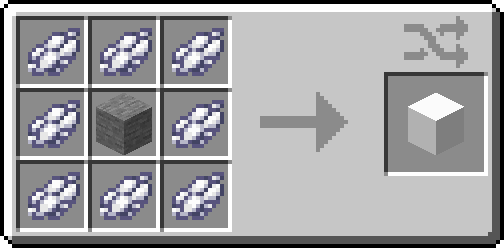
Step 2: Craft Gate Blocks
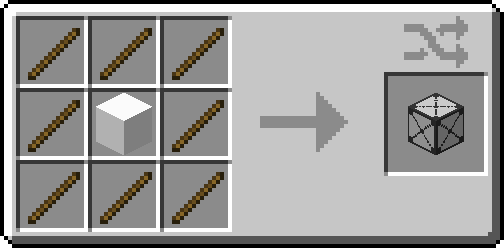
Step 3: Craft the Portal Igniter
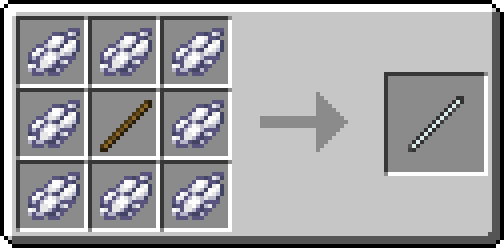
Step 4: Build the Portal
Build the portal frame using Gate Blocks exactly like a Nether Portal frame, then activate it with the Portal Igniter.
Good luck and have fun building!
常见问题
Hinterix’s Builders Dimension 支持哪些 Minecraft 版本?
Hinterix’s Builders Dimension 支持 Minecraft Java 版 1.20.1–1.21.1,共 2 个版本,可用的加载器:Forge / NeoForge。下载时注意选择和你游戏版本一致的文件。
Hinterix’s Builders Dimension 怎么安装?
先用 PCL2 或 HMCL 启动器安装对应版本的 Forge / NeoForge,再把下载的 .jar 文件放进游戏目录的 mods 文件夹,重新启动游戏即可。开启了版本隔离的,mods 文件夹在 versions/版本名 下面。
Hinterix 的其他作品
查看全部 →
Flywheel Version Fix
所需飞轮模组 1.0+ 的 Bug 修复
Continuity Version Fix
在保持原有内容连续性的基础上,稍作调整以兼容 Sinytra Connector 模组和 Fabric 0.92.6+1.20.1。

AllTheLeaks Fix for Moonlight 2.13.4
This mod version is an custom version build of AllTheLeaks

Groundpack of Over The Mountain [GOTM]
Multiloader modpack for modpack creators. Forge - Neo Forge - Quilt - Fabric
评论
登录后评论和评分