Highlighted Friends
作者:NebulaJinxed
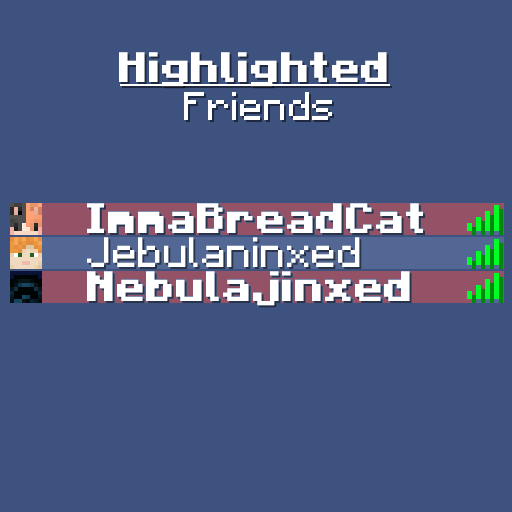
Ever wanted to quickly see if your friends are online? This mod lets you highlight their names in the Tab list with colors and bold text!
介绍
中文介绍正在准备中,下面暂时显示原文。
How to Install:
- Download the mod.
- Place it in your
modsfolder. - Launch the game.
- Add your friends names via
/highlighted-friends. - Enjoy!
What does the mod do?
- The mod allows you to change the style of player names in the Tab list (Bold, Italic, Underlined)
- Allows you to customise the background color behind your friends’ names.
- Saves player’s via UUID.
- Adjusts the name if changed.
- Allows multiple groups so you can make “teams” in your Tab list!
If you’d like to support me you can do so at Ko-Fi

常见问题
Highlighted Friends 支持哪些 Minecraft 版本?
Highlighted Friends 支持 Minecraft Java 版 1.20.5–26.2,共 18 个版本,可用的加载器:Fabric。下载时注意选择和你游戏版本一致的文件。
Highlighted Friends 怎么安装?
先用 PCL2 或 HMCL 启动器安装对应版本的 Fabric,再把下载的 .jar 文件放进游戏目录的 mods 文件夹,重新启动游戏即可。开启了版本隔离的,mods 文件夹在 versions/版本名 下面。运行环境:仅客户端。
NebulaJinxed 的其他作品
查看全部 →
NebsConfigLib
by NebulaJinxed
A config library used by some of my mods
8.5万
29 天前
Modrinth

Visible Suspicious Stew
by NebulaJinxed
Ever wanted to know what you're eating? This mod tells you exactly which effect suspicious stews grant and for how long!
2万
9 天前
Modrinth

Simple CPS
by NebulaJinxed
A very simple mod to display how much cps you're getting!
1.8万
1 年前
Modrinth

Nbt Editor Port
by NebulaJinxed
Edit items, blocks, and entities in-game.
1.2万
3 天前
Modrinth
评论
登录后评论和评分