截图
介绍
CONTROLLER SUPPORT COMING SOON
NUMPAD AND ARROW KEYS WILL ALSO BE BACK NEXT UPDATE
We’ve all seen it happen. You download a modpack (or a huge collection of mods) and want to change your controls. But when you open the menu, you’re greeted by a massive list of keybinds and are left in the dark about which keys are still available and which are already assigned.
Here comes Hermes to the rescue!
We decided to scrap the old system and replace it with a more user-friendly interface to help both new and veteran players.
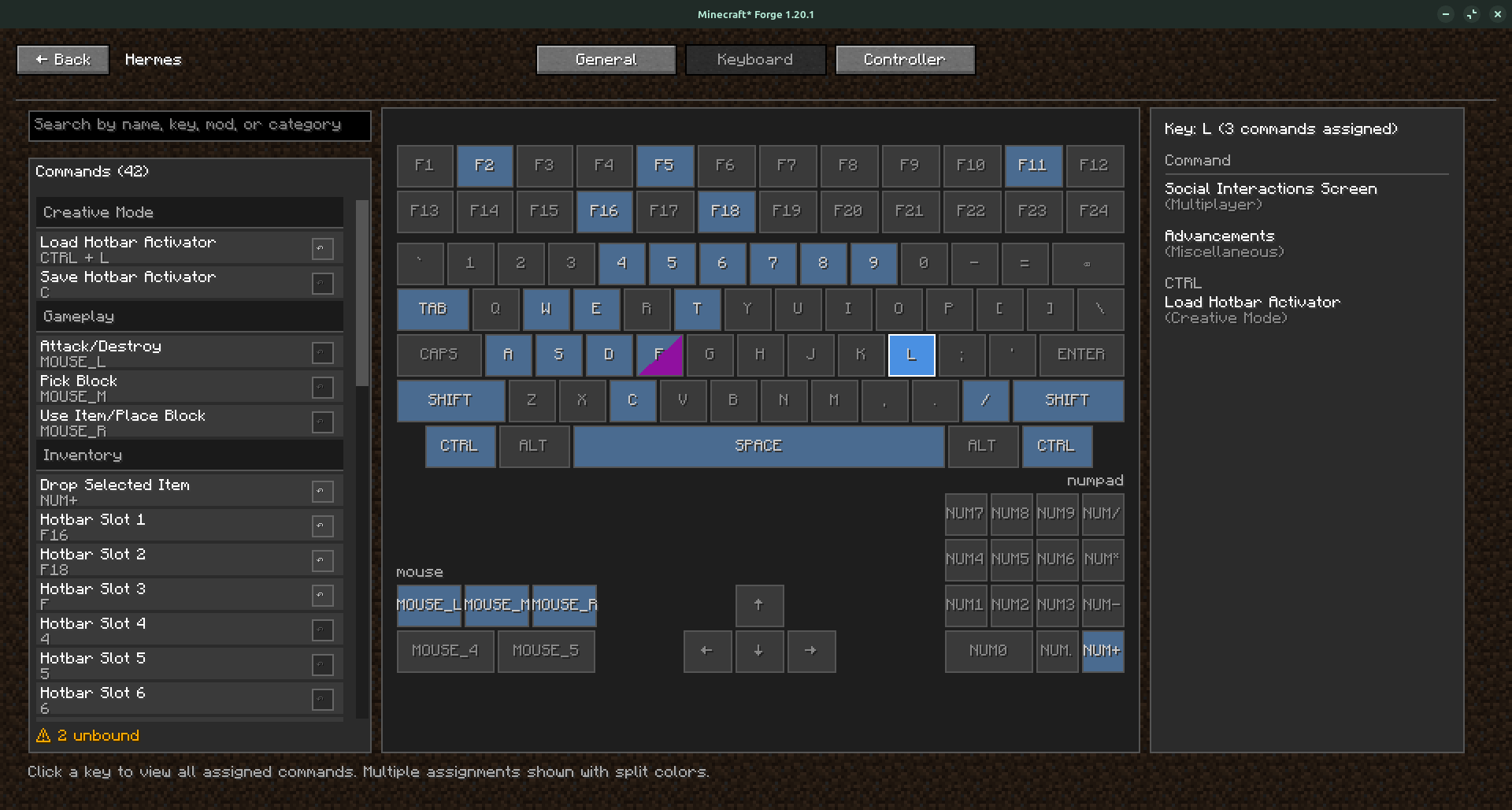
This new interface allows you to press any key and immediately see what is assigned to it. The list is still available on the left side, and double-clicking an item allows you to edit the keybind.
A new feature we’ve added allows users to stack modifiers on keys. This means we now support crazy combos like SHIFT + CTRL + ALT + T!
Keep in mind that this project is still in beta, and we’re actively fixing bugs as we come across them.
If you encounter any issues, feel free to let us know in the comments or on GitHub!
常见问题
Hermes 支持哪些 Minecraft 版本?
Hermes 支持 Minecraft Java 版 1.20.1–1.21.1,共 2 个版本,可用的加载器:Forge / NeoForge。下载时注意选择和你游戏版本一致的文件。
Hermes 怎么安装?
先用 PCL2 或 HMCL 启动器安装对应版本的 Forge / NeoForge,再把下载的 .jar 文件放进游戏目录的 mods 文件夹,重新启动游戏即可。开启了版本隔离的,mods 文件夹在 versions/版本名 下面。
Ginger1y 的其他作品
查看全部 →
Lootr Liaison
修复地形模组和拟态怪生成导致的 Lootr 警告。稳定 Lootr 对结构战利品容器的处理:等待世界生成完成后,每个箱子只结算一次。如果安装了 Artifacts,还会限制拟态怪判定次数,避免重复触发或异常运行。
Dead Air
Extra Special Studio 带来 Dead Air:无线电塔会变成信号站点,你可以用内置的 T1/T2 无线电进行调频,还能通过 Link 跨维度连接。收集笔记,制作升级组件和面板。需要 Apocalypse Structures、GeckoLib 和 ESC。

Death Detangler
A Forge 1.20.1 compatibility mod that prevents “downed player” clone leaks and keeps Hardcore Revival, corpse/grave mods, and Curios working together safely.

Creatopia Unbound
A pack about tech and magic with 700+ mods & 2400+ quests *Product may contain REACTORS AND GLUTEN.... 10GB RAM recommended.
评论
登录后评论和评分