
Helpful Commands
Feature-rich Minecraft mod that adds many useful commands. Interactive, supports permissions, easy to configure.
截图


介绍

A feature-rich Minecraft mod that adds many useful commands. Improve server management and give your players more fun and possibilities, or optimize your singleplayer experience – Helpful Commands works in both environments. The output is interactive and informative. It supports LuckPerms, and the mod is easy to configure. Commands support selectors, so you can use them on other players or entities.


«✨» Features
- Lots of new commands: everything from social and fun commands to powerful management tools – all toggleable, with flexible permission control
- Warps and homes: create server warps and let players set custom homes – with configurable limits
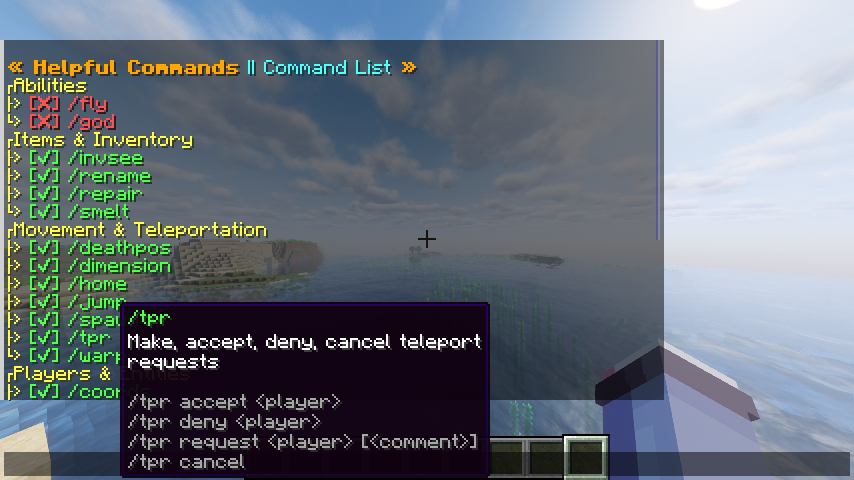
- Interactive menus and output: hover highlighted text for more details, or click to perform certain actions
- Selectors: use commands on other players or entities, not just yourself
- Flexible permissions: compatible with LuckPerms. Control permissions for command arguments as well as whole commands
- Easy configuration: configure the mod in-game with tooltips and intuitive interactive buttons
- Server-side: no client installation required – players get all features just by joining a modded server
«📜» Command List
| Command | Description |
|———|————-|
| /hc | Helpful Commands menu and configuration |
| /fly | Toggle flying |
| /god | Toggle invulnerability |
| /disenchant | Remove enchantments from the item in main hand |
| /echest | View or edit a player’s Ender chest |
| /invsee | View or edit a player’s inventory |
| /rename | Set or remove a custom name on the item in main hand |
| /repair | Repair the item in main hand |
| /smelt | Smelt the item in main hand |
| /deathpos | Teleport to or query a player’s last death position |
| /dimension | Teleport entities to another dimension |
| /home | Teleport to or manage your homes |
| /jump | Teleport forward in the direction you are looking |
| /spawn | Teleport to or query the world spawn or a player’s spawn point |
| /tpr | Send, accept, deny, or cancel teleport requests |
| /warp | Teleport to or manage warps |
| /coords | Query, share, or broadcast a player’s coordinates |
| /dmg | An improved version of /damage that can deal damage to multiple targets at once |
| /extinguish | Extinguish entities on fire |
| /feed | Restore hunger |
| /gm | Set the game mode |
| /hat | Put an item on a player’s head |
| /heal | Restore health |
| /ignite | Set entities on fire for a specified duration |
| /coinflip | Flip a coin |
| /day | Set the time to day |
| /night | Set the time to night |
| /explosion | Create an explosion |
| /fireball | Launch a fireball |
| /killitems | Delete items on the ground |
| /lightning | Summon lightning |
See the Documentation or use /hc commands in-game for details, usage, and permissions.
常见问题
Helpful Commands 支持哪些 Minecraft 版本?
Helpful Commands 支持 Minecraft Java 版 1.19.2–26.3,共 27 个版本,可用的加载器:Fabric / NeoForge。下载时注意选择和你游戏版本一致的文件。
Helpful Commands 怎么安装?
先用 PCL2 或 HMCL 启动器安装对应版本的 Fabric / NeoForge,再把下载的 .jar 文件放进游戏目录的 mods 文件夹,重新启动游戏即可。开启了版本隔离的,mods 文件夹在 versions/版本名 下面。运行环境:仅服务端。

评论
登录后评论和评分