Healthify – Health Bars & Damage Numbers
Clean RPG-style health bars and damage numbers, with support for Dynamic Difficulty, Dungeon Difficulty, L2 Hostility and Champions.
介绍

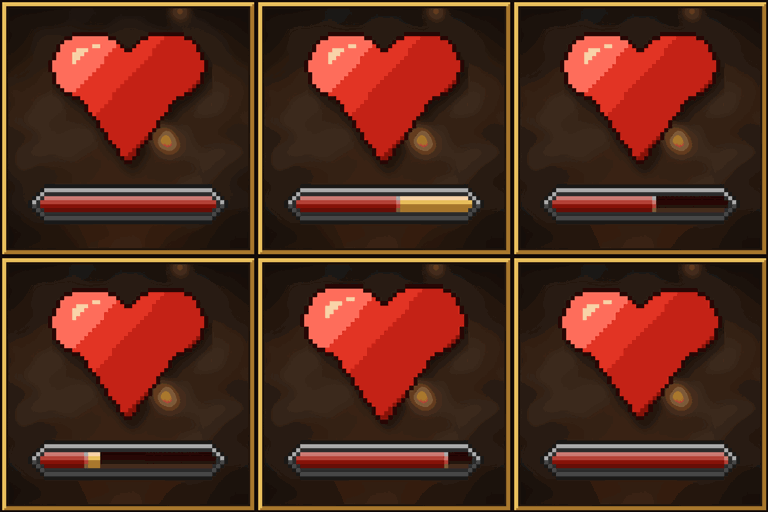
Healthify adds clean, RPG-style health bars and floating damage numbers to Minecraft. Bars show when mobs are near, damaged or looked at, hide behind walls, and everything is configurable in game.

Bar styles
Pixel-art bars with the mob’s name and exact health. Choose a classic flat look or RPG shading, and watch the damage trail drain away when a mob gets hit.

Damage numbers
Floating numbers pop out of mobs when they take damage: cream for hits, amber for big hits, deep red for killing blows and soft green for heals. Big hits and kills also get an exclamation mark and a word like “Crit!” or “Slain!” above them.

Themes
Six themes are included. Pick one in game under Mods → Healthify → Config.

Custom themes
Make your own look in a few minutes:
- In the theme picker, click Open Themes Folder (
config/healthify/themes). - Copy one of the theme files and give it a new name, like
my_theme.json. - Change the colours. The bar updates in game as you save, no restart needed.
{
  "name": "My Theme",
  "author": "You",
  "bar": {
    "ends": "round",
    "fill": "#3B8FD9",
    "empty": "#0D2238",
    "frame": "#A9C6DA",
    "damageTrail": "#EAF8FF",
    "lowHealthFill": "#D83A2E"
  },
  "text": { "name": "#D8F1FF" },
  "damageNumbers": { "damage": "#FFE14D" }
}
Anything you leave out uses the default theme. Themes can also set the bar’s height, its end caps (pointed, round, square or your own pixel shape) and shading; every option is explained in the README.txt in the themes folder. To share a theme, just send the .json file.
Easy to configure
Every setting has its place in a clean in-game config screen, on both NeoForge and Fabric. Hover any setting to see what it does.

Compatibility
| Minecraft | 1.21.1 / 26.1.2 / 26.2 / 26.3 |
| Mod loader | NeoForge, Fabric |
| Side | Client only: servers don’t need it |
| Works with | Iris, Sodium and shader packs |
Healthify also shows extra info from these mods when they’re installed. Neither is required.
Dynamic Difficulty & Dungeon Difficulty
With Dynamic Difficulty installed, each mob’s level shows right in its health bar, in difficulty colours.

Add Dungeon Difficulty as well, and mobs it scales also show their area and level under the bar, like “Dungeon 5”, with Dungeon Difficulty’s own skull icons. The colour goes from green to crimson as it gets harder.

Champions
With Champions installed, health bars show each champion’s tier as stars above the name, in the tier’s colour, with the name tinted to match and its affixes listed above it. You can switch the stars to the rank’s name (like “Elite Zombie”), show both, or turn any part off under Mod Support.

L2 Hostility
With L2 Hostility installed, health bars show each mob’s level, coloured by how it compares to your own difficulty, with its traits as icons above the name.

常见问题
Healthify – Health Bars & Damage Numbers 支持哪些 Minecraft 版本?
Healthify – Health Bars & Damage Numbers 支持 Minecraft Java 版 1.21.1–26.3,共 3 个版本,可用的加载器:Fabric / NeoForge。下载时注意选择和你游戏版本一致的文件。
Healthify – Health Bars & Damage Numbers 怎么安装?
先用 PCL2 或 HMCL 启动器安装对应版本的 Fabric / NeoForge,再把下载的 .jar 文件放进游戏目录的 mods 文件夹,重新启动游戏即可。开启了版本隔离的,mods 文件夹在 versions/版本名 下面。
HiAmAK 的其他作品
查看全部 →
TooManyRecipeViewers (TMRV)
由 Nolij 编写的兼容层,可让 EMI 运行 JEI 插件。
Trofers (Fabric)
添加可通过数据包自定义物品或实体的奖杯。

Asset Validator
让功能完整的快照版/预发布版整合包也能通过 Twitch 游玩。

The Hallow
一款协作开发的模组,加入了一个全新维度……
评论
登录后评论和评分