
Hardcore Control Utility
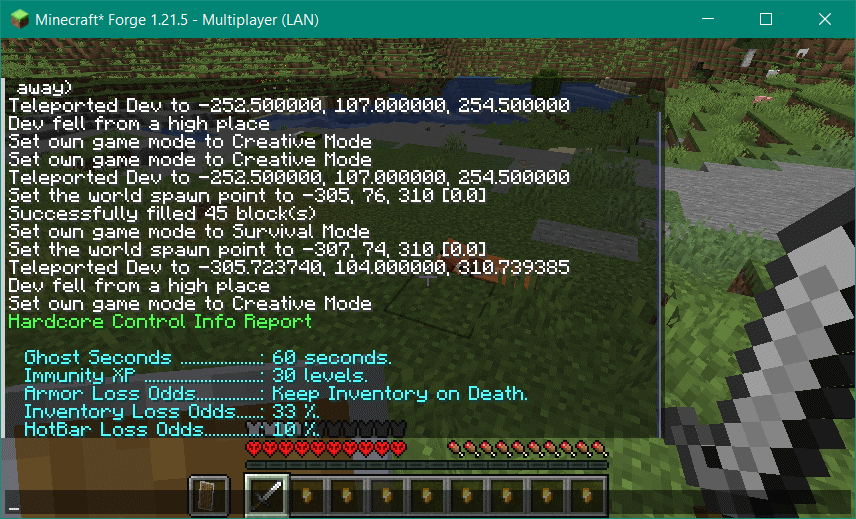
Allows multiplayer Hardcore with control over what inventory is lost and a "time out" from 1 second to many weeks. You could have a 100% of losing inventory, a 10% chance to lose armor, and a 20% chance to lose hotbar items.
截图
介绍
Hardcore Control Utility (HCU) (Slows Rushing)
Hardcore Control Utility lets you configure Hardcore variants (both on multiplayer servers and in personal games).
As of Minecraft 1.19.2-1.19.4, it supports easy, normal, hard, and adventure modes as well as HardCore.
It can be put on a multiplayer server without installing it on the clients.
You can use this to play Hardcore in multi-player without losing the world or having the person who died banned from play. A death causes some downtime as a ghost and the loss of some equipment. If the person has enough levels of experience, they will lose the experience but not suffer the full effects of the death.
Ghost Seconds
When a player dies, after they respawn they are a ghost in spectator mode, unable to move more than a meter from it, for 1 second to 61 years. The default is 1 minute;
After the time has passed, there is a audible sound and the player is returned to survival (or adventure) play.
Example: A player dies to slippery biters while at sea. The server operator has set the Ghost Time to 60 seconds. The player respawns floats unseen over their spawn point. A message informing them how many seconds til they respawn is in the center of the screen. After 60 seconds, there is an alert sound and the player is returned to survival mode.
Example: Players are beating tough mobs by setting up a bed with a chest of stone axes and repeatedly rushing the mobs. The server operator installs Hardcore Control Utility with a 60 second timer. Now the player will be dead at least 60 seconds each time.
This feature is particularly useful if you want to slow down corpse-rushing from a bed, cheesing tough mobs by repeatedly attacking and dying with stone weapons, etc.
Note: Version 3.3 adds the ability for an operator to instantly resurrect a player and set them to survival (or adventure) mode by setting the player to creative mode while they are in ghost time.
Xp Death Prevention
* If a player has more than a (configurable) experience level, then the hardcore death is a normal death instead.
Example: A player dies with 21 levels of experience. The server operator has the Xp Death Prevention set to 15 levels. The player dies a normal death.
Inventory Loss (General & Offslot, Hotbar, Armor)
* The mod will randomly remove inventory from the character when they die with configurable odds for Armor, Hotbar, and General Inventory plus Offhand slot.
Example: A player dies and loses a piece of armor (Odds 33%), four hotbar items (odds 25%) and 15 inventory slots (odds 66%).
You can mix and match these option as you like!
Support the Mod
You can support the mod and make Harder Farther available on alternative loaders by becoming a basic level patron! Becoming a basic supporter now locks in that level of support in as long as you are a patron. We’ll add credit to you here (unless you want to remain anonymous).

You can join us on our Discord Server at the link below.
常见问题
Hardcore Control Utility 支持哪些 Minecraft 版本?
Hardcore Control Utility 支持 Minecraft Java 版 1.18.1–1.21.11,共 17 个版本,可用的加载器:Forge。下载时注意选择和你游戏版本一致的文件。
Hardcore Control Utility 怎么安装?
先用 PCL2 或 HMCL 启动器安装对应版本的 Forge,再把下载的 .jar 文件放进游戏目录的 mods 文件夹,重新启动游戏即可。开启了版本隔离的,mods 文件夹在 versions/版本名 下面。
MacTso 的其他作品
查看全部 →
Bee Fix
修复蜜蜂相关漏洞

Fix Experience Bug (now with FABRIC and FORGE versions)
修复切换维度时经验值消失的问题。

Spawner Bug Fix
修复了末影人刷怪笼因 MC-189565 漏洞导致的卡顿问题。

Spawn Balance Utility
允许你按生物群系和结构控制生物的生成权重与群组大小。此模组控制的是生成生物的种类构成,不会像我们的另一个模组“Spawncap Control Utility”那样修改生成上限。
评论
登录后评论和评分