
Happy Ghast+
Happy Ghast+ improves tamed Happy Ghasts on the server with a more compact size, fire resistance, and more reliable riding/menu behavior. Java players can join without installing any client-side mods, since all features run server-side.
截图

介绍
Happy Ghast+
Happy Ghast+ makes Happy Ghasts easier and more fun to use in survival.
You can tame them, control them with a simple menu, and use helpful actions like follow, stop, leash, and teleport.
The goal is to keep things easy and smooth while still feeling vanilla-friendly.
What this mod adds
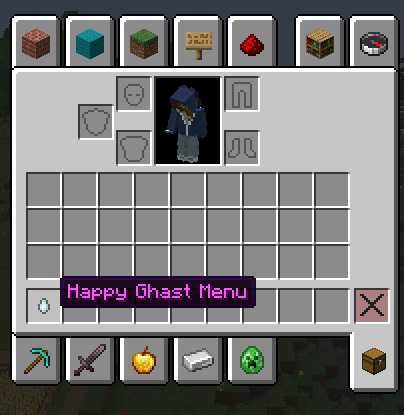
- A simple Happy Ghast Menu (ghast tear item)
- Easy Snow Block taming
- Quick control actions for your ghast
- Cleaner riding and companion gameplay
- Optional server commands to change ghast size and speed (for OPs)
How taming works
- Find a Happy Ghast
- Throw or drop a Snow Block near it
- It gets tamed
That is all you need.
Happy Ghast Menu
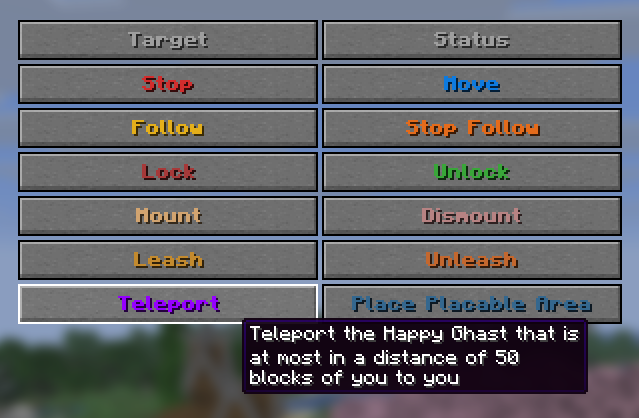
Use the Happy Ghast Menu item to control your ghast.
Important: each player normally gets only one Happy Ghast Menu tear.
Try not to lose it.
If you lose it, you can get it back with:
/function better_happy_ghast:give_happy_ghast_menuTo use the tear, put it in your offhand:
- press F while holding it in your main hand, or
- move it manually into your offhand slot in inventory.
You can:
- Select your ghast
- Make it follow you
- Stop it in place
- Mount / dismount
- Leash / unleash
- Teleport it back to you
Commands (functions)
These use the datapack namespace better_happy_ghast:
/function better_happy_ghast:configs
/function better_happy_ghast:give_happy_ghast_menu
/function better_happy_ghast:trigger_happy_ghast
/function better_happy_ghast:uninstall
Server: /happyghastplus (only with the mod on the server)
If the mod runs on the server, these chat commands exist. You must be an operator (OP) — same as for other admin commands (e.g. /gamemode).
/happyghastplus setscale <number>— ghast size, 0.05 to 2 (example:0.4)/happyghastplus setspeed <number>— speed, 0.001 to 1 (example:0.05)/happyghastplus resetscale— size back to default/happyghastplus resetspeed— speed back to default/happyghastplus reset— both back to default
Optional tip
If you want to hide Triggered ... messages in chat:
/gamerule sendCommandFeedback false常见问题
Happy Ghast+ 支持哪些 Minecraft 版本?
Happy Ghast+ 支持 Minecraft Java 版 26.1–26.3,共 5 个版本,可用的加载器:Fabric。下载时注意选择和你游戏版本一致的文件。
Happy Ghast+ 怎么安装?
先用 PCL2 或 HMCL 启动器安装对应版本的 Fabric,再把下载的 .jar 文件放进游戏目录的 mods 文件夹,重新启动游戏即可。开启了版本隔离的,mods 文件夹在 versions/版本名 下面。运行环境:仅服务端。
Melworks 的其他作品
查看全部 →
Serverside CarryOn
这是 Carry On 模组的主要功能,但仅限服务端:你可以搬运生物并将它们放下。

Morphica
Disguise any entity as mobs, players, or blocks visuals only, behavior stays.

Real Working Villagers
A lightweight villager brain overhaul that makes villagers feel more alive and responsive.

Unsettling
Fabric mod for slow, subtle creepy ambience in Minecraft. Highly configurable.
评论
登录后评论和评分