GUI Compass – Locator Bar integrated
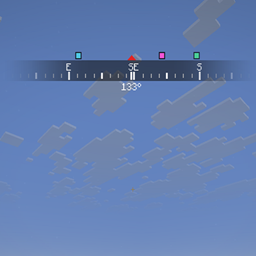
A clean horizontal compass bar for your HUD with a live heading readout, adjustable FOV, size and position, and an optional locator bar with player dots above the compass.
介绍
GUI Compass
A clean, minimal compass bar at the top of your screen. It scrolls smoothly as you turn, fades out toward the sides, and shows your exact heading in degrees. Everything is adjustable in game.
the Mod allows for:
- Scrolling compass bar: letter markings (N, NE, E, SE, S, SW, W, NW) with tick marks between them, a red triangle at the center, and your exact heading below it.
- Adjustable FOV: choose how much of the compass is visible, from a tight 45° to a wide 270° (default 90°).
- Resizable: scale the compass up or down with a slider.
- drag the compass to any spot on your screen from a live preview.
- Locator bar (optional): replaces the vanilla locator bar with a permanent XP bar and instead shows the player dots on the compass, level with the red triangle above in sync with the compass.
the default options key bind is N
You can change the key under Options → Controls → Key Binds → GUI Compass.
常见问题
GUI Compass – Locator Bar integrated 支持哪些 Minecraft 版本?
GUI Compass – Locator Bar integrated 支持 Minecraft Java 版 26.3,可用的加载器:Fabric。下载时注意选择和你游戏版本一致的文件。
GUI Compass – Locator Bar integrated 怎么安装?
先用 PCL2 或 HMCL 启动器安装对应版本的 Fabric,再把下载的 .jar 文件放进游戏目录的 mods 文件夹,重新启动游戏即可。开启了版本隔离的,mods 文件夹在 versions/版本名 下面。
7amada 的其他作品
查看全部 →
7amada Panini Projection Lite
Allows panini projection rather than default rectilinear projection of minecraft with very little performance cost
Panini Projection Lite
a shadepack that allows for Panini projection into minecraft with little to no effect on performance
评论
登录后评论和评分