
Gridless
Removes the grid from storage inventories, allowing you to freely place your items anywhere, pixel by pixel. Features smart auto-merge, scaling interactions, and universal UI support!
介绍
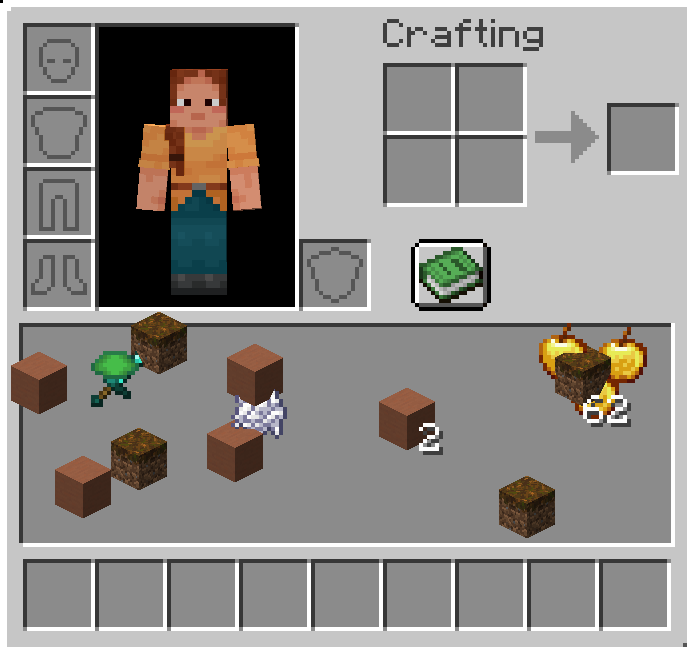
Gridless Inventory
_Say goodbye to boring slots! Place your items freely, pixel by pixel._
Gridless completely removes the restrictive 9×3 grid from the player inventory, chests, and other storage screens. You can now place your items anywhere you want in a seamless, grid-free space.
✨ Features
- Free Placement: Drop your items anywhere on the screen.
- Auto-Sort & Merge (Press R): Press
Rto instantly merge partial stacks and organize your items into neat, perfect rows. Identical items stack perfectly on top of each other! - Drag & Paint: Hold Left-Click or Right-Click and drag your mouse to “paint” and place items perfectly across the screen!
- Quick Drop & Hotbar: Hover over any item and press
Qto drop it into the world, or press1-9to instantly swap it with your hotbar slots. - Smart Magnet (Double Click): Double click on an item to gather all identical items nearby into your hand.
- Shift-Click to Chest: Shift-Click items in your gridless area to instantly send them to an open chest or your hotbar.
- Universal Support: Works beautifully with player inventories, chests, shulker boxes, ender chests, barrels, and creative mode!
- ModMenu & Config Support: Easily enable or disable gridless mode for chests, ender chests, barrels, shulker boxes, and player inventories individually.
- No Data Loss: Item coordinates are saved as NBT data, so your inventory layout is always preserved.
常见问题
Gridless 支持哪些 Minecraft 版本?
Gridless 支持 Minecraft Java 版 1.20.1,可用的加载器:Fabric。下载时注意选择和你游戏版本一致的文件。
Gridless 怎么安装?
先用 PCL2 或 HMCL 启动器安装对应版本的 Fabric,再把下载的 .jar 文件放进游戏目录的 mods 文件夹,重新启动游戏即可。开启了版本隔离的,mods 文件夹在 versions/版本名 下面。运行环境:客户端和服务端都要装。
Cukkoo 的其他作品
查看全部 →
Sound Culling
动态限制并减弱重叠音效,减少声音杂乱,并提升音效密集区域的性能。

Sound Culling
Dynamically limits and dampens overlapping sounds to reduce audio clutter and improve performance in sound-heavy areas.

Free Camera
A powerful client-side cinematic camera mod with Free, Orbit, Tripod, Follow, recording, paths, roll, zoom, and collision.

Free Camera
A powerful client-side cinematic camera mod with Free, Orbit, Tripod, Follow, recording, paths, roll, zoom, and collision.
评论
登录后评论和评分