
Grid updated
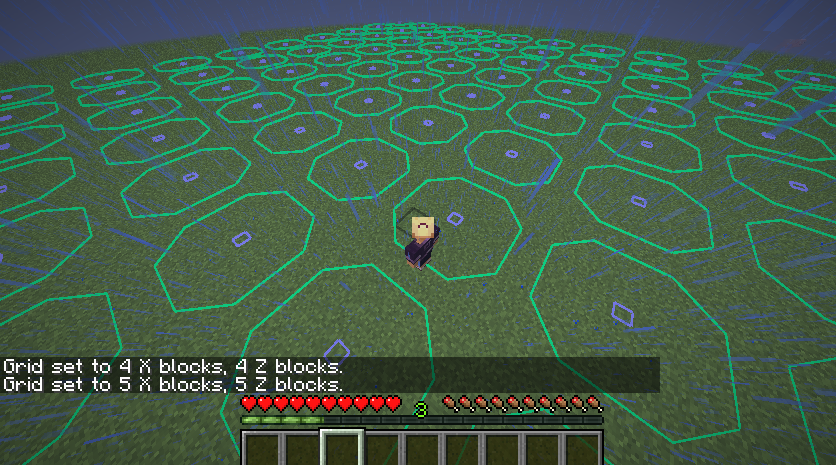
Updated mod from gbl to 1.21+, which displays a configurable grid-like overlay over the world
截图
介绍
Updated Grid by gbl. The original mod is end of life and I got request to update this mod…
if u find a bug/ crash, report to my discord/ github.
original discription
Sometimes you want to place blocks in a regular pattern, so you need to count blocks, and if you mess up once, the error propagates to all subsequent blocks.
This mod displays a grid-like overlay over the world, with configurable spacing, so the blocks you’re interested in get highlighted automatically.
For example, you’re building a railroad and want to place a powered rail ever 20th block. Type /grid 20, walk to the first powered rail, type /grid here (or press the c button, can be configured), and the mod will highlight every 20th block from where you’re standing.
Or, if you want to place torches in an area to prevent spawns, type /grid 5 – this highlights every 5th block; placing torches on each of them will light everything up enough.
You can switch between block mode (to highlight blocks to place stuff on) or line mode (to display borders; for example /grid chunks followed by grid lines will turn Grid into a chunk border highlighter), have the y-coordinate of the display floating with the player or fixed, and choose different X and Z spacings if you want that.
commands
/grid show and /grid hide: show/hide the grid, bound to the B key.
/grid here: set the origin of the grid to where the player is standing. Bound to C (for center)
/grid blocks: set Block mode: show blue squares above marked blocks
/grid lines: set Line mode: show yellow lines to the N/W of marked blocks
/grid chunks: set X and Y spacing to 16 and the origin to chunk borders. Use together with /grid lines to get a chunk border display that’s less intrusive than F3-G
/grid : and are numbers; set the grid spacing to n in X direction and m in Y direction
/grid : set the grid spacing to n in both horizontal directions
/grid fixy: toggle between floating the y coordinate of the grid with the player, or fixing it to where the player stands when you use the command. Bound to the Y key.
/grid spawns: show possible mob spawn locations
/grid circles: shows circle overlays. In line mode, this shows regular circles; in block mode, it tries to find and mark the blocks you should build on to get a circle. Obviously, this can’t work well with very small diameters, for example, trying to mark a 3×3 circle will give you a square.
/grid distance : sets the range in blocks, that the grid is rendered around you. If you use very large spacings/circle diameters, you need to adjust this too. Be careful though, high values for distance absolutely kill your framerate when you turn spawn locations on.
/grid biome : draw a marker on all blocks in a certain biome. For example, /grid biome river helps when you want to build a drowned or squid farm. (Only with Grid version 1.5+).
/grid hex: Draw a hex grid. In block mode, you get the corners of each hex; in line mode, you get lines around the hexes. (Only with Grid version 1.6+)
All keys can be reconfigured using the standard Controls UI.
Spoiler
if u want to request an update, leave an issue or message me in discord…
常见问题
Grid updated 支持哪些 Minecraft 版本?
Grid updated 支持 Minecraft Java 版 1.21.6–26.3,共 11 个版本,可用的加载器:Fabric。下载时注意选择和你游戏版本一致的文件。
Grid updated 怎么安装?
先用 PCL2 或 HMCL 启动器安装对应版本的 Fabric,再把下载的 .jar 文件放进游戏目录的 mods 文件夹,重新启动游戏即可。开启了版本隔离的,mods 文件夹在 versions/版本名 下面。运行环境:仅客户端。
CC_PCT 的其他作品
查看全部 →
Better Stack Count
configure stack count text, such as size/ colour/ background

Totem Utils
Totem hotkey, pop overlay and much more >:)

EasierCrafting updated
Easy one click craft on a custom recipe grid

Bedrock Bridging
port REAL bedrock bridging behaviour completely to java, as well as other placement utilities
评论
登录后评论和评分